Unlock a world of possibilities! Login now and discover the exclusive benefits awaiting you.

- Qlik Community
- :
- Forums
- :
- Analytics & AI
- :
- Products & Topics
- :
- Visualization and Usability
- :
- Re: Retrieving years minus 1
- Subscribe to RSS Feed
- Mark Topic as New
- Mark Topic as Read
- Float this Topic for Current User
- Bookmark
- Subscribe
- Mute
- Printer Friendly Page

 jelindbe
- Mark as New
- Bookmark
- Subscribe
- Mute
- Subscribe to RSS Feed
- Permalink
- Report Inappropriate Content
Retrieving years minus 1
I try to make an expression to retrieve values based on selected years, but where the year value are subtracted with one year. For example when selecting the year 2019, I want values for 2018. When I select 2017, 2018, 2019 I want values for 2016,2017,2018.
I have made this expression:
Sum({<Year={$(=GetFieldSelections(Year)-1)}>}Sales)
It works fine when selecting one year. For example, if I select 2019 it gives me 2018.
But when I select several years (2019, 2018, 2017) it ends in nothing.
Accepted Solutions

 sunny_talwar
- Mark as New
- Bookmark
- Subscribe
- Mute
- Subscribe to RSS Feed
- Permalink
- Report Inappropriate Content
Another option is to use this
Sum({<Year = {">=$(=Min(Year)-1)<=$(=Max(Year)-1)"}>} Sales)
 vunguyenq89
- Mark as New
- Bookmark
- Subscribe
- Mute
- Subscribe to RSS Feed
- Permalink
- Report Inappropriate Content
@jelindbe I figured out the correct expression now. It's much simpler than I initially thought 😀.
Concat(Aggr(...)) can be used in the set modifier to form the search string:
=Sum({<Year={$(=Concat(Aggr(Max(Year)-1,Year),','))}>}Sales)
This one works with both range and discrete selections:
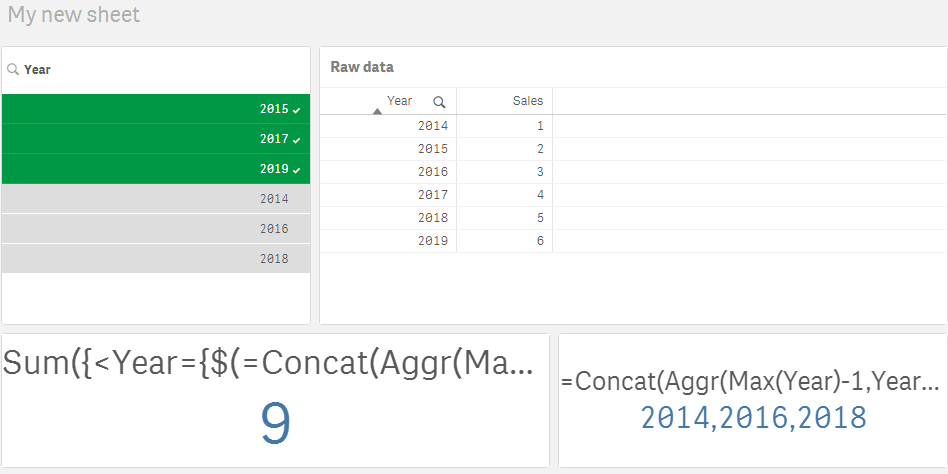
BR,
Vu Nguyen
vunguyenq89
- Mark as New
- Bookmark
- Subscribe
- Mute
- Subscribe to RSS Feed
- Permalink
- Report Inappropriate Content
Hi,
The following expression works, but only when you select a connected range of year (for example 2017,2018,2019)
=Sum({<Year={">=$(=Left(GetFieldSelections(Year),4)-1) <=$(=Right(GetFieldSelections(Year),4)-1)"}>}Sales)The expression inside Set Analysis generates a search string like ">=2016 <=2018", which can be applied as a set modifier.
This doesn't work if you also need to select discrete years (for example 2016, 2017, 2019) because the generated search string would be ">=2015 <=2018", which means 4 years 2015,2016,2017,2018.
Hope this helps,
BR,
Vu Nguyen
sunny_talwar
- Mark as New
- Bookmark
- Subscribe
- Mute
- Subscribe to RSS Feed
- Permalink
- Report Inappropriate Content
Another option is to use this
Sum({<Year = {">=$(=Min(Year)-1)<=$(=Max(Year)-1)"}>} Sales)- Mark as New
- Bookmark
- Subscribe
- Mute
- Subscribe to RSS Feed
- Permalink
- Report Inappropriate Content
Yes of course, I over-complicated the solution. This is a better one 🙂
jelindbe
- Mark as New
- Bookmark
- Subscribe
- Mute
- Subscribe to RSS Feed
- Permalink
- Report Inappropriate Content
Thank you!
vunguyenq89
- Mark as New
- Bookmark
- Subscribe
- Mute
- Subscribe to RSS Feed
- Permalink
- Report Inappropriate Content
@jelindbe I figured out the correct expression now. It's much simpler than I initially thought 😀.
Concat(Aggr(...)) can be used in the set modifier to form the search string:
=Sum({<Year={$(=Concat(Aggr(Max(Year)-1,Year),','))}>}Sales)
This one works with both range and discrete selections:
BR,
Vu Nguyen
jelindbe
- Mark as New
- Bookmark
- Subscribe
- Mute
- Subscribe to RSS Feed
- Permalink
- Report Inappropriate Content
You are right! That one worked.
Perhaps you could come up with a nice solution for my label.
So far I have this solution: 'my variable description ' &(Min(Year)-1) &'-' &(Max(Year)-1). This was OK for range selections, but is not good for discrete selections.
All the best and good weekend!
