Unlock a world of possibilities! Login now and discover the exclusive benefits awaiting you.

- Qlik Community
- :
- Forums
- :
- Analytics & AI
- :
- Products & Topics
- :
- Visualization and Usability
- :
- Re: SQL :scripting scalar variable problem (dymani...
- Subscribe to RSS Feed
- Mark Topic as New
- Mark Topic as Read
- Float this Topic for Current User
- Bookmark
- Subscribe
- Mute
- Printer Friendly Page

- Mark as New
- Bookmark
- Subscribe
- Mute
- Subscribe to RSS Feed
- Permalink
- Report Inappropriate Content
SQL :scripting scalar variable problem (dymanic sql pivot)
I get the following error when I try to create a qlik table from a SQL dynamic pivot: I can't seem to find a source or example for below. I think I need to create a intermediary table before loading scalar variable but I am not sure where?
Thanks,
ErrorSource: Microsoft OLE DB Provider for SQL Server, ErrorMsg: Must declare the scalar variable "@query".
Below is example of code that I am using:
PivotTable:
load *;
SQL
( SELECT
columns1, columns2, column3...
-- into #temptable
from
sqltable source
DECLARE @cols AS NVARCHAR(MAX),
@query AS NVARCHAR(MAX);
select @cols = STUFF((SELECT ',' + QUOTENAME(column2)
from #temptable
group by column2
order by column2
FOR XML PATH(''), TYPE
).value('.', 'NVARCHAR(MAX)')
,1,1,'')
set @query = 'SELECT columns1,' + @cols + ' from
(
select
max(T.columns1) as columns1
,isnull(T. [column2],0)as [column2]
,COALESCE(T. [column3],0)as [column3]
from #temptable T
group by T.column2, T.column3
) x
pivot
(
sum(column3)
for column2 in (' + @cols + ')
) p '
execute(@query);
drop table #temptable;

 sinanozdemir
- Mark as New
- Bookmark
- Subscribe
- Mute
- Subscribe to RSS Feed
- Permalink
- Report Inappropriate Content
When you use OLE DB connection, you should use "?" instead of "@" or change your connection to ODBC.
If you ask why, because OLE DB uses positional parameters.
Thanks
- Mark as New
- Bookmark
- Subscribe
- Mute
- Subscribe to RSS Feed
- Permalink
- Report Inappropriate Content
Thanks I will give it a try.
Sent from Outlook<http://taps.io/outlookmobile>
- Mark as New
- Bookmark
- Subscribe
- Mute
- Subscribe to RSS Feed
- Permalink
- Report Inappropriate Content
Hi, Unfortunately that didn't work,
I changed to the @ to ? and still got same error?
PivotTable:
load *;
SQL
( SELECT
columns1, columns2, column3...
-- into #temptable
from
sqltable source
DECLARE ?cols AS NVARCHAR(MAX),
?query AS NVARCHAR(MAX);
select ?cols = STUFF((SELECT ',' + QUOTENAME(column2)
from #temptable
group by column2
order by column2
FOR XML PATH(''), TYPE
).value('.', 'NVARCHAR(MAX)')
,1,1,'')
set ?query = 'SELECT columns1,' + ?cols + ' from
(
select
max(T.columns1) as columns1
,isnull(T. [column2],0)as [column2]
,COALESCE(T. [column3],0)as [column3]
from #temptable T
group by T.column2, T.column3
) x
pivot
(
sum(column3)
for column2 in (' + ?cols + ')
) p '
execute(?query);
drop table #temptable;
sinanozdemir
- Mark as New
- Bookmark
- Subscribe
- Mute
- Subscribe to RSS Feed
- Permalink
- Report Inappropriate Content
Ok. Let's try another way.
Now, keep '@', but use ODBC not OLE DB.
BTW, is this query running fine in SQL Server?
- Mark as New
- Bookmark
- Subscribe
- Mute
- Subscribe to RSS Feed
- Permalink
- Report Inappropriate Content
Works fine in sql;
Never used ODBC connection so I am newbie there; I am connecting via server credentials and not sure how to do that, is there good source?
sinanozdemir
- Mark as New
- Bookmark
- Subscribe
- Mute
- Subscribe to RSS Feed
- Permalink
- Report Inappropriate Content
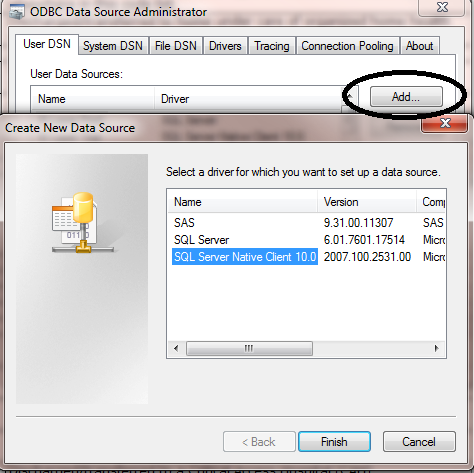
You can set up an ODBC connection. Do a search in Windows for ODBC and I use 64 bit. Here are screenshots:
I would suggest picking "SQL Server Native Client 10.0" from the driver list.
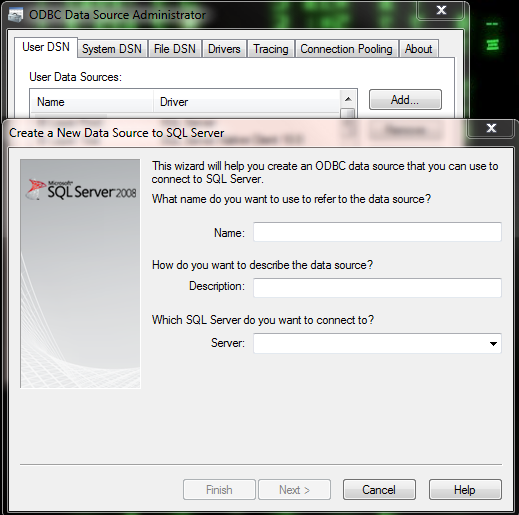
Give it a name and find your server from the server list.
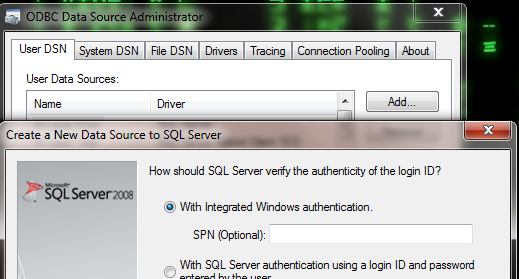
In terms of authentication, use "Windows authentication":
And then choose your default database:
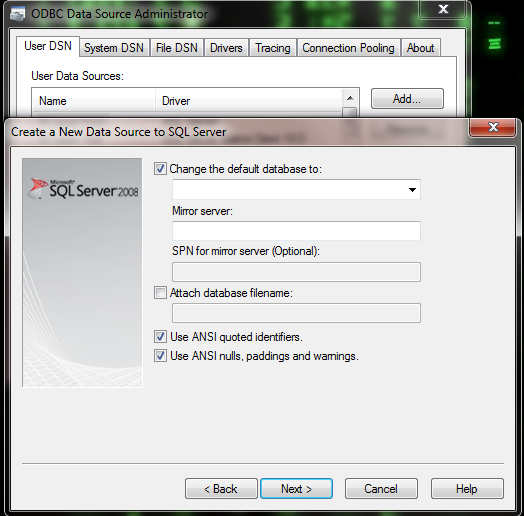
After all this, test your connection to see if you can connect to it successfully.
You can also do a Google search for setting up ODBC connections and I am sure there are videos on YouTube.
Hope this helps.
- Mark as New
- Bookmark
- Subscribe
- Mute
- Subscribe to RSS Feed
- Permalink
- Report Inappropriate Content
Your very helpful; I will try this tomorrow as I used pivot without dynamic to meet a deadline; making this works will be very useful.
I am connecting via Sense not qlikview so you screenshots not that useful; I will research when I have more time later this week and respond appropriately with my results.
thanks

 nategreen
- Mark as New
- Bookmark
- Subscribe
- Mute
- Subscribe to RSS Feed
- Permalink
- Report Inappropriate Content
Though this is an old thread, I'm wondering if you ever found a resolution to this. I am getting an error when I run the PIVOT operator in SQL.