Unlock a world of possibilities! Login now and discover the exclusive benefits awaiting you.

- Qlik Community
- :
- Forums
- :
- Analytics & AI
- :
- Products & Topics
- :
- Visualization and Usability
- :
- Re: Script Help
- Subscribe to RSS Feed
- Mark Topic as New
- Mark Topic as Read
- Float this Topic for Current User
- Bookmark
- Subscribe
- Mute
- Printer Friendly Page

 rittermd
- Mark as New
- Bookmark
- Subscribe
- Mute
- Subscribe to RSS Feed
- Permalink
- Report Inappropriate Content
Script Help
I don't know if this is possible or even makes sense to do.
But here goes.
I want to create one table that contains all terminated employees and a second table that contains all active employees. I have done that so far.
Now the part I am not sure of.
I want to create a third table that contains all of the terminated employees and only the active employees where there is no matching employee id in the terminated table.
So far I have something like this:
LoadTerms:
Load Distinct Employee_ID
From QVD where currentactive='0'
LoadActive:
NoConcatenate
Load Distinct Employee_ID
From QVD where currentactive='1'
Next I want to combine them into a third table as I detailed above.
Not sure how to do that.

- Mark as New
- Bookmark
- Subscribe
- Mute
- Subscribe to RSS Feed
- Permalink
- Report Inappropriate Content
Technically, you can do this:
ThirdTable:
LOAD DISTINCT
Employee_ID,
Employee_ID as Term_ID
RESIDENT LoadTerms;
CONCATENATE (ThirdTable) LOAD DISTINCT
Employee_ID
RESIDENT LoadActive
WHERE not exists(Term_ID, Employee_ID);
DROP FIELD Term_ID;
Logically - is it possible that the same Employee ID is both active and terminated???
rittermd
- Mark as New
- Bookmark
- Subscribe
- Mute
- Subscribe to RSS Feed
- Permalink
- Report Inappropriate Content
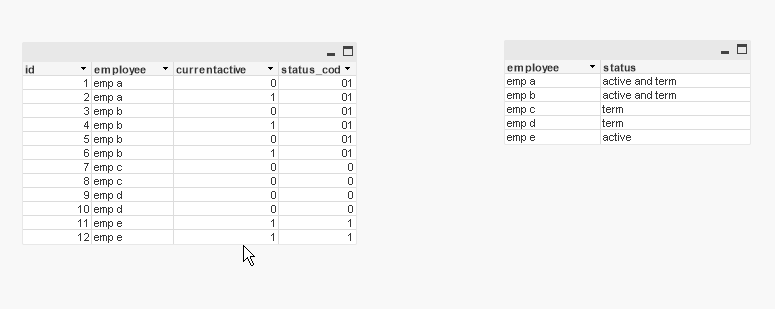
That is the problem. The way the data is being delivered I have multiple rows for the same employee and in my final table I need to make sure that I don't have an active record with a termed record.

 maxgro
- Mark as New
- Bookmark
- Subscribe
- Mute
- Subscribe to RSS Feed
- Permalink
- Report Inappropriate Content
something like this?
see the attachment