Unlock a world of possibilities! Login now and discover the exclusive benefits awaiting you.

- Qlik Community
- :
- Forums
- :
- Analytics & AI
- :
- Products & Topics
- :
- Visualization and Usability
- :
- Section Access: Admin Access work fine, not User A...
Options
- Subscribe to RSS Feed
- Mark Topic as New
- Mark Topic as Read
- Float this Topic for Current User
- Bookmark
- Subscribe
- Mute
- Printer Friendly Page
Turn on suggestions
Auto-suggest helps you quickly narrow down your search results by suggesting possible matches as you type.
Showing results for

 adnene__
Contributor
2019-03-25
04:41 AM
- Mark as New
- Bookmark
- Subscribe
- Mute
- Subscribe to RSS Feed
- Permalink
- Report Inappropriate Content
Section Access: Admin Access work fine, not User Acess
Hello,
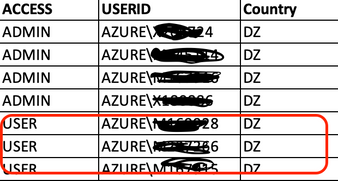
I am using Section access and what I noted is that:
- When in ACCESS column I use 'ADMIN', everything works fine i terms of limiting data I user "country code".
- When in ACCESS column I use 'USER', I got 'access denied'.
Do you have an idea what might be the problem?
Script:
SA:
LOAD
    upper("ACCESS") 			as ACCESS,
    upper("USERID") 			as USERID,
    Upper(COUNTRY_CODE) 		as COUNTRY_CODE

FROM [PATH_TO_FILE\Section Access.xlsx]
(ooxml, embedded labels, table is Access);

// Section Access implementation
Section Access;
LOAD
    "ACCESS",
    "USERID",
    COUNTRY_CODE
Resident SA;

Section Application;

Drop Table SA;
1,677 Views
5 Replies

 agigliotti
MVP
2019-03-25
05:12 AM
- Mark as New
- Bookmark
- Subscribe
- Mute
- Subscribe to RSS Feed
- Permalink
- Report Inappropriate Content
could you attach your section access script to look at ?
The Power of shining a light on the dark side of your data.
Follow me on my LinkedIn | Know Gamma Informatica at gammainformatica.it
Follow me on my LinkedIn | Know Gamma Informatica at gammainformatica.it
1,669 Views
adnene__
Contributor
2019-03-25
05:15 AM
Author
- Mark as New
- Bookmark
- Subscribe
- Mute
- Subscribe to RSS Feed
- Permalink
- Report Inappropriate Content
I edited the post to include it
1,663 Views
agigliotti
MVP
2019-03-25
05:33 AM
- Mark as New
- Bookmark
- Subscribe
- Mute
- Subscribe to RSS Feed
- Permalink
- Report Inappropriate Content
i can't see the data reduction in secion application, did you use it in some way?
The Power of shining a light on the dark side of your data.
Follow me on my LinkedIn | Know Gamma Informatica at gammainformatica.it
Follow me on my LinkedIn | Know Gamma Informatica at gammainformatica.it
1,657 Views
adnene__
Contributor
2019-03-25
05:37 AM
Author
- Mark as New
- Bookmark
- Subscribe
- Mute
- Subscribe to RSS Feed
- Permalink
- Report Inappropriate Content
The data reduction is supposed to be the column "REGION_CODE" in the data, right?
Is did use it, but I use a lot of scripts to do it. And since it works fine whith the ACCESS 'ADMIN', I thought it's useless to think the problem was in the data.
1,654 Views
agigliotti
MVP
2019-03-25
06:24 AM
- Mark as New
- Bookmark
- Subscribe
- Mute
- Subscribe to RSS Feed
- Permalink
- Report Inappropriate Content
you need to make a link between section access table and section application table.
let's try with the below code:
Section Access;
SA:
LOAD
upper("ACCESS") as ACCESS,
upper("USERID") as USERID,
Upper(COUNTRY_CODE) as SA_COUNTRY_CODE
FROM [PATH_TO_FILE\Section Access.xlsx]
(ooxml, embedded labels, table is Access);
Section Application;
tab_1:
load
COUNTRY_CODE,
COUNTRY_CODE as SA_COUNTRY_CODE,
...
from your_data_table;
I hope it helps.
let's try with the below code:
Section Access;
SA:
LOAD
upper("ACCESS") as ACCESS,
upper("USERID") as USERID,
Upper(COUNTRY_CODE) as SA_COUNTRY_CODE
FROM [PATH_TO_FILE\Section Access.xlsx]
(ooxml, embedded labels, table is Access);
Section Application;
tab_1:
load
COUNTRY_CODE,
COUNTRY_CODE as SA_COUNTRY_CODE,
...
from your_data_table;
I hope it helps.
The Power of shining a light on the dark side of your data.
Follow me on my LinkedIn | Know Gamma Informatica at gammainformatica.it
Follow me on my LinkedIn | Know Gamma Informatica at gammainformatica.it
1,638 Views
