Unlock a world of possibilities! Login now and discover the exclusive benefits awaiting you.

- Qlik Community
- :
- Forums
- :
- Analytics & AI
- :
- Products & Topics
- :
- Visualization and Usability
- :
- Re: Select a dimension, time
- Subscribe to RSS Feed
- Mark Topic as New
- Mark Topic as Read
- Float this Topic for Current User
- Bookmark
- Subscribe
- Mute
- Printer Friendly Page

- Mark as New
- Bookmark
- Subscribe
- Mute
- Subscribe to RSS Feed
- Permalink
- Report Inappropriate Content
Select a dimension, time
Hello,
I´m already have a few graphs created that use the dimension time like the years of the data.
This is my model:
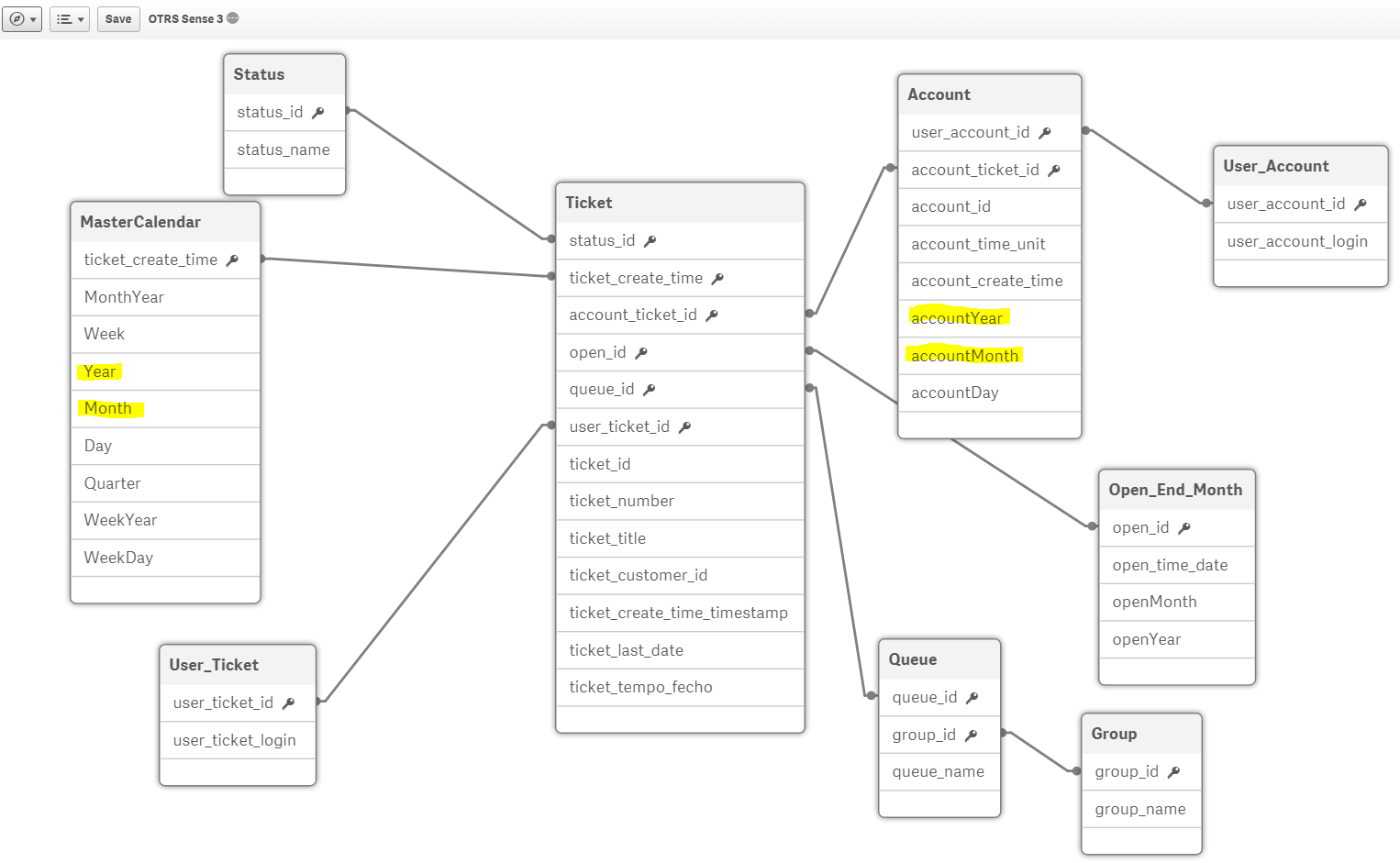
I would like that when I select "Year" only affect the graph that i want and doesn´t alter the others. And the same for the dimension "accountYear".
Better yet, if possible, then i select the "Year" 2016 also select "accountYear" 2016, and then only affect the graph with the corresponded dimensions.
PS: some graph have the dimension "Year" and others the dimension "accountYear".
What should I do?
- « Previous Replies
-
- 1
- 2
- Next Replies »

 vinieme12
- Mark as New
- Bookmark
- Subscribe
- Mute
- Subscribe to RSS Feed
- Permalink
- Report Inappropriate Content
Apply the same set to Avg ()
If a post helps to resolve your issue, please accept it as a Solution.
- Mark as New
- Bookmark
- Subscribe
- Mute
- Subscribe to RSS Feed
- Permalink
- Report Inappropriate Content
Sorry i didn´t understand...
I tried to add
RangeSum(
Above(
Count(
{$<status_name = {$(vPendente)},
account_ticket_id,
accountYear,
accountMonth,
Month,
Year,
MonthYear = {"$(='<=' & Date(Max(MonthYear), 'MMM-YYYY'))"}>} ticket_id), 0, RowNo())) * Avg(1)
but it is not the proper way to do it
vinieme12
- Mark as New
- Bookmark
- Subscribe
- Mute
- Subscribe to RSS Feed
- Permalink
- Report Inappropriate Content
Above(
Count(
{$<status_name = {$(vPendente)},
account_ticket_id,
accountYear,
accountMonth,
Month,
Year,
MonthYear = {"$(='<=' & Date(Max(MonthYear), 'MMM-YYYY'))"}>} ticket_id), 0, RowNo())) * Avg({<account year, account month, account_ticket_id>}1)
If a post helps to resolve your issue, please accept it as a Solution.
- Mark as New
- Bookmark
- Subscribe
- Mute
- Subscribe to RSS Feed
- Permalink
- Report Inappropriate Content
It doesn´t work. Doesn´t even appear the bar
vinieme12
- Mark as New
- Bookmark
- Subscribe
- Mute
- Subscribe to RSS Feed
- Permalink
- Report Inappropriate Content
please recheck the field names; I've not used exact field names, as I was typing on phone
Above(
Count(
{$<status_name = {$(vPendente)},
account_ticket_id,
accountYear,
accountMonth,
Month,
Year,
MonthYear = {"$(='<=' & Date(Max(MonthYear), 'MMM-YYYY'))"}>} ticket_id), 0, RowNo()) * Avg({<account_ticket_id, accountYear,accountMonth>}1)
If a post helps to resolve your issue, please accept it as a Solution.
- Mark as New
- Bookmark
- Subscribe
- Mute
- Subscribe to RSS Feed
- Permalink
- Report Inappropriate Content
I did this: (inserted the RangeSum), double check the names but still when i select "accountYear" or "accountMonth" the graph changed...
RangeSum(
Above(
Count(
{$<status_name = {$(vPendente)},
Month,
Year,
account_ticket_id,
accountYear,
accountMonth,
MonthYear = {"$(='<=' & Date(Max(MonthYear), 'MMM-YYYY'))"}>} ticket_id), 0, RowNo())) * Avg({<account_ticket_id,accountYear,accountMonth>}1)
- « Previous Replies
-
- 1
- 2
- Next Replies »