Unlock a world of possibilities! Login now and discover the exclusive benefits awaiting you.

- Qlik Community
- :
- Forums
- :
- Analytics & AI
- :
- Products & Topics
- :
- Visualization and Usability
- :
- Re: Set Analysis - How to pass a field value in se...
- Subscribe to RSS Feed
- Mark Topic as New
- Mark Topic as Read
- Float this Topic for Current User
- Bookmark
- Subscribe
- Mute
- Printer Friendly Page

 rajuamet
- Mark as New
- Bookmark
- Subscribe
- Mute
- Subscribe to RSS Feed
- Permalink
- Report Inappropriate Content
Set Analysis - How to pass a field value in set analysys
Hi Techies,
Here I have two tables:
Table1:
| Snapshot_Month | Products_Aggregate |
| Dec | A,B,C,D,E |
| Nov | B,C,D |
| Oct | A,F |
Table2:
| Snapshot_Month | Products | Ratingsum |
| Dec | A | 100 |
| Dec | B | 200 |
| Dec | C | 300 |
| Dec | D | 400 |
| Dec | E | 100 |
| Nov | A | 100 |
| Nov | B | 200 |
| Nov | C | 300 |
| Nov | D | 400 |
| Nov | E | 100 |
| Oct | A | 100 |
| Oct | B | 200 |
| Oct | C | 300 |
| Oct | D | 400 |
| Oct | E | 100 |
In a straight table, Snapshot_month is the dimension, Count(Products) is the expression.
Here, I need to pass Products_Aggregate via set expression to filter the products.
For example:
This is how we need the set expression.
| Snapshot_Month | Expression |
| Dec | Count({$<Product={'A,B,C,D,E'}>}Product) |
| Nov | Count({$<Product={'B,C,D'}>}Product) |
| Oct | Count({$<Product={'A,F'}>}Product) |
Required Output:
| Snapshot_Month | Output |
| Dec | 5 |
| Nov | 3 |
| Oct | 2 |
Please let me know how to achieve this.
- « Previous Replies
-
- 1
- 2
- Next Replies »
Accepted Solutions

 kaanerisen
- Mark as New
- Bookmark
- Subscribe
- Mute
- Subscribe to RSS Feed
- Permalink
- Report Inappropriate Content
OK then how about this 🙂
COUNT(IF(WildMatch(prodAgg,product&',*','*,'&product,'*,'&product&',*',product),product))
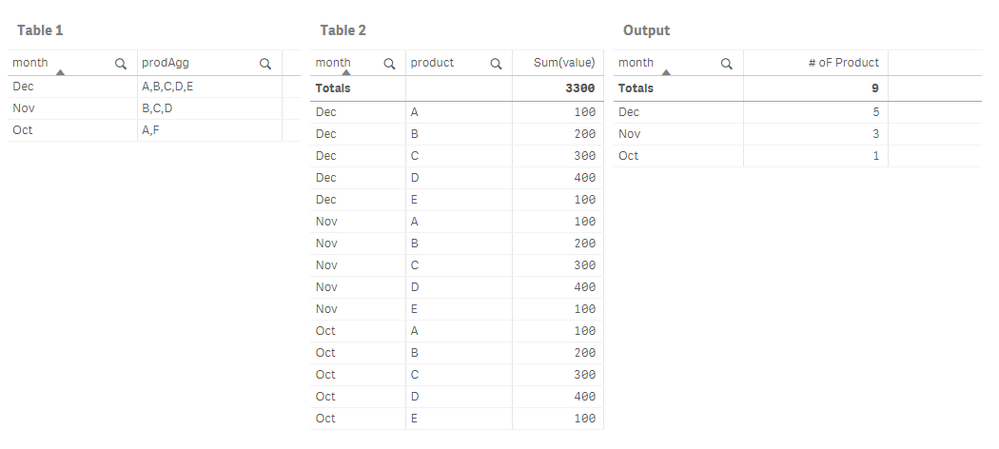
Your required output is mentioned in your post is
| Snapshot_Month | Output |
| Dec | 5 |
| Nov | 3 |
| Oct | 2 |
But Oct should be 1 because there is only Product A data that match in table 1 in October.
If you want to use set analysis, You should create a uniqueID for month&product.
load AutoNumber(month&'|'&product) as key,* Inline [
month,product,value
Dec,A,100
Dec,B,200
Dec,C,300
Dec,D,400
Dec,E,100
Nov,A,100
Nov,B,200
Nov,C,300
Nov,D,400
Nov,E,100
Oct,A,100
Oct,B,200
Oct,C,300
Oct,D,400
Oct,E,100
]
Count({<key={"=WildMatch(prodAgg,product&',*','*,'&product,'*,'&product&',*',product)"}>}key)
Hope it helps.

 Channa
- Mark as New
- Bookmark
- Subscribe
- Mute
- Subscribe to RSS Feed
- Permalink
- Report Inappropriate Content
dont need set expression just do count of product
rajuamet
- Mark as New
- Bookmark
- Subscribe
- Mute
- Subscribe to RSS Feed
- Permalink
- Report Inappropriate Content
Hi Channa,
Count of product will give me 5 for all the snapshot months. But the required output is :
Dec - 5
Nov - 3
Oct - 2
Channa
- Mark as New
- Bookmark
- Subscribe
- Mute
- Subscribe to RSS Feed
- Permalink
- Report Inappropriate Content
=Snapshot_Month&'_'&Count(product)
try
or
try to have resident table for Count(product) as CountProducts
then
Snapshot_Month&'_'&CountProducts
rajuamet
- Mark as New
- Bookmark
- Subscribe
- Mute
- Subscribe to RSS Feed
- Permalink
- Report Inappropriate Content
Hi Channa,
I mean to say that the
Required Output:
| Snapshot_Month | Output |
| Dec | 5 |
| Nov | 3 |
| Oct | 2 |

 pradosh_thakur
- Mark as New
- Bookmark
- Subscribe
- Mute
- Subscribe to RSS Feed
- Permalink
- Report Inappropriate Content
May be try this
Dimension = Snapshot_Month
expression = substringcount(Products_Aggregate,',')+1
kaanerisen
- Mark as New
- Bookmark
- Subscribe
- Mute
- Subscribe to RSS Feed
- Permalink
- Report Inappropriate Content
Hi Raju,
How about this.
SubStringCount(VALUE,',')+1
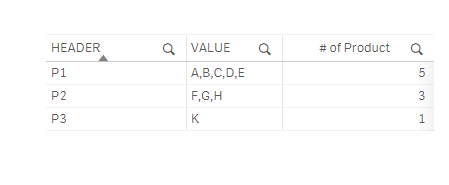
Hope it helps..
Channa
- Mark as New
- Bookmark
- Subscribe
- Mute
- Subscribe to RSS Feed
- Permalink
- Report Inappropriate Content
try this expression
IF ( Snapshot_Month='Dec',Count({$<Product={'A,B,C,D,E'}>}Product),if(Snapshot_Month= 'Nov',Count({$<Product={'B,C,D'}>}Product),IF(Snapshot_Month='Oct',Count({$<Product={'A,F'}>}Product))))
rajuamet
- Mark as New
- Bookmark
- Subscribe
- Mute
- Subscribe to RSS Feed
- Permalink
- Report Inappropriate Content
Hi Channa,
Thanks. But your solution is hard coded. I want it to happen dynamically.
Channa
- Mark as New
- Bookmark
- Subscribe
- Mute
- Subscribe to RSS Feed
- Permalink
- Report Inappropriate Content
Bro
for Nov you have A,B,C,D,E in your date and you want to cont A,B,C we have to go like this only

- « Previous Replies
-
- 1
- 2
- Next Replies »