Unlock a world of possibilities! Login now and discover the exclusive benefits awaiting you.

- Qlik Community
- :
- Forums
- :
- Analytics & AI
- :
- Products & Topics
- :
- Visualization and Usability
- :
- Re: Set Analysis: most recent, earlier than a date
- Subscribe to RSS Feed
- Mark Topic as New
- Mark Topic as Read
- Float this Topic for Current User
- Bookmark
- Subscribe
- Mute
- Printer Friendly Page

 ramzi-manoubi
- Mark as New
- Bookmark
- Subscribe
- Mute
- Subscribe to RSS Feed
- Permalink
- Report Inappropriate Content
Set Analysis: most recent, earlier than a date
Hello, I really hope someone can help me with this one. Any help is welcome.
Context:
Sales representatives do registrations when they visit the points of sales (stores).
The goal:
When you pick a date, the max date is calculated. I want to use this date as a date picker.
Per customer I want to have the most recent registered value prior to this date.
QVF with clarification as attachment.
If something is not clear, please ask.
- Tags:
- 'set analysis'
Accepted Solutions

 sunny_talwar
- Mark as New
- Bookmark
- Subscribe
- Mute
- Subscribe to RSS Feed
- Permalink
- Report Inappropriate Content
May be you need this?
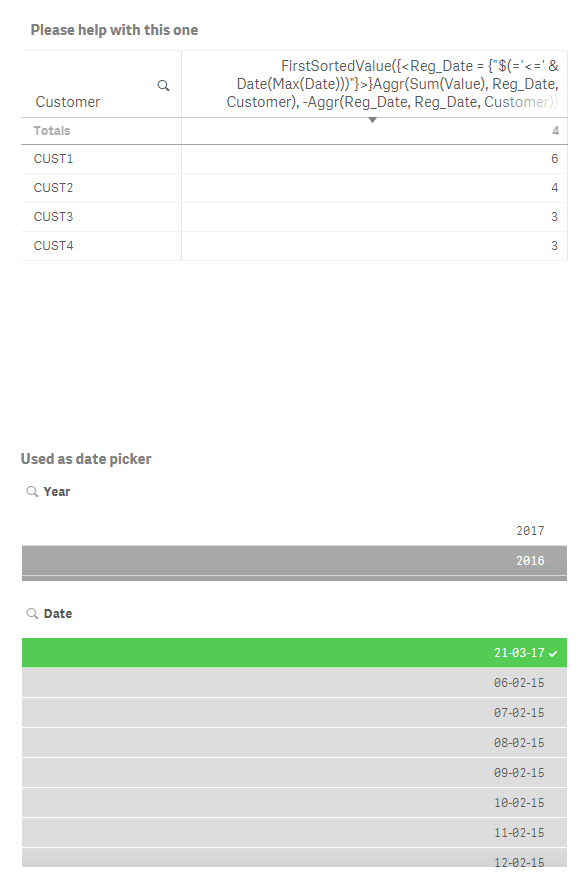
FirstSortedValue({<Reg_Date = {"$(='<=' & Date(Date))"}>}Aggr(Sum(Value), Reg_Date, Customer), -Aggr(Reg_Date, Reg_Date, Customer))
or
FirstSortedValue({<Reg_Date = {"$(='<=' & Date(Max(Date)))"}>}Aggr(Sum(Value), Reg_Date, Customer), -Aggr(Reg_Date, Reg_Date, Customer))
sunny_talwar
- Mark as New
- Bookmark
- Subscribe
- Mute
- Subscribe to RSS Feed
- Permalink
- Report Inappropriate Content
May be you need this?
FirstSortedValue({<Reg_Date = {"$(='<=' & Date(Date))"}>}Aggr(Sum(Value), Reg_Date, Customer), -Aggr(Reg_Date, Reg_Date, Customer))
or
FirstSortedValue({<Reg_Date = {"$(='<=' & Date(Max(Date)))"}>}Aggr(Sum(Value), Reg_Date, Customer), -Aggr(Reg_Date, Reg_Date, Customer))
 OmarBenSalem
- Mark as New
- Bookmark
- Subscribe
- Mute
- Subscribe to RSS Feed
- Permalink
- Report Inappropriate Content
Can you please explain that stalwar1 ?
I've tried to answer this question yesterday but didn't find a correct way..
And honestly, I don't really understand your expression
sunny_talwar
- Mark as New
- Bookmark
- Subscribe
- Mute
- Subscribe to RSS Feed
- Permalink
- Report Inappropriate Content
Couple of questions before I explain
1) Do you think that the output is correct?
2) Which part of the expression you don't understand? FirstSortedValue or the set analysis or something else?
OmarBenSalem
- Mark as New
- Bookmark
- Subscribe
- Mute
- Subscribe to RSS Feed
- Permalink
- Report Inappropriate Content
I think It's correct;
I didn't work with the firstsortedvlue expression before but I kind of know how it works.
For example,
firstsortedvalue (Value, Reg_Order) will return the date with the min Reg_Order?
In our case, the expression is:
FirstSortedValue({<Reg_Date = {"$(='<=' & Date(Max(Date)))"}>}
Aggr(Sum(Value), Reg_Date, Customer),
-Aggr(Reg_Date, Reg_Date, Customer))
How should I break that apart?
With what I know,
I would think of sthing like this:
FirstSortedValue({<Reg_Date = {"$(='<=' & Date(Max(Date)))"}>}
aggr(Sum(Value),Reg_Date,Customer)
,
aggr(Reg_Order,Reg_Date,Customer)
To return the Value (for the reg data < selected date) which has the Min reg Order by customer)
But this does not return a thing? Why?
What I am doing wrong?
Another question:
Why none of these expressions is returning correct values (when I select a date):
1)aggr(sum({ <Date=, Reg_Date=,Reg_Date={"<=$(=max(Date))"},Reg_Order={"$(=Aggr( min(Reg_Order),Customer))"} >} Value),Customer)
2)sum({<Date=,Reg_Date=,Reg_Date={"<=$(=max(Reg_Date))"},
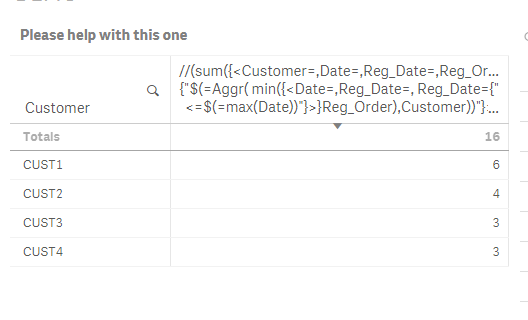
Customer=,Reg_Order={"$(=min(Reg_Order))"}>} Value)
Second expression when I do not select a date :
Thank you for your time Sunny
sunny_talwar
- Mark as New
- Bookmark
- Subscribe
- Mute
- Subscribe to RSS Feed
- Permalink
- Report Inappropriate Content
FirstSortedValue({<Reg_Date = {"$(='<=' & Date(Max(Date)))"}>}
aggr(Sum(Value),Reg_Date,Customer)
,
aggr(Reg_Order,Reg_Date,Customer)
You missed a parenthesis at the end...
FirstSortedValue({<Reg_Date = {"$(='<=' & Date(Max(Date)))"}>}Aggr(Sum(Value), Reg_Date, Customer), Aggr(Reg_Date, Reg_Date, Customer))
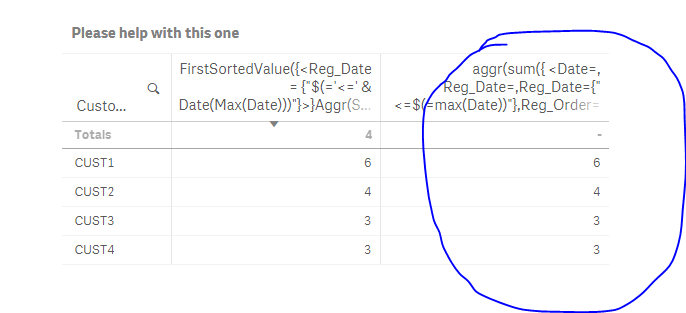
1)aggr(sum({ <Date=, Reg_Date=,Reg_Date={"<=$(=max(Date))"},Reg_Order={"$(=Aggr( min(Reg_Order),Customer))"} >} Value),Customer)
This seems to be working for me
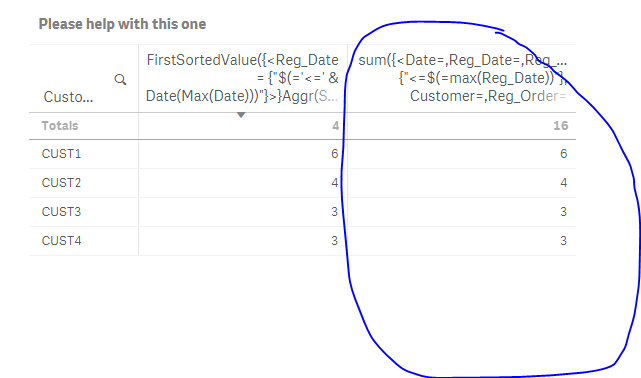
2)sum({<Date=,Reg_Date=,Reg_Date={"<=$(=max(Reg_Date))"},
Customer=,Reg_Order={"$(=min(Reg_Order))"}>} Value)
This worked also
OmarBenSalem
- Mark as New
- Bookmark
- Subscribe
- Mute
- Subscribe to RSS Feed
- Permalink
- Report Inappropriate Content
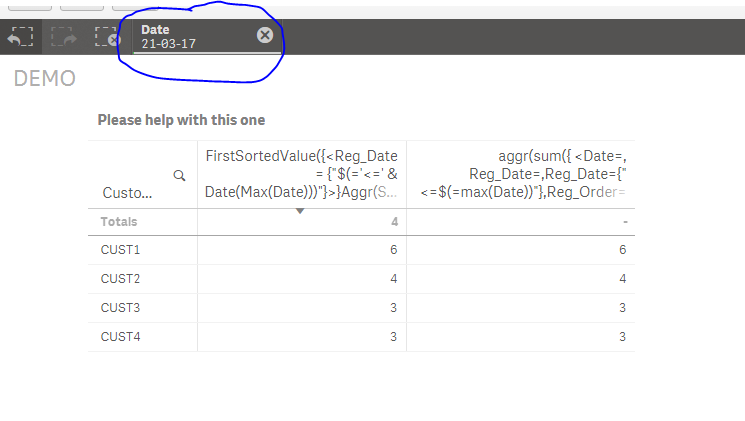
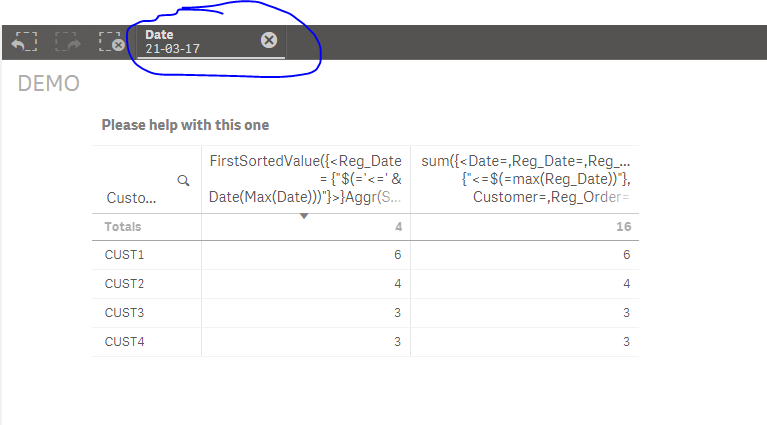
Try to select a date Sunny and see if the other 2 expressions still work?
sunny_talwar
- Mark as New
- Bookmark
- Subscribe
- Mute
- Subscribe to RSS Feed
- Permalink
- Report Inappropriate Content
First one with date selection
Second one with date selection
OmarBenSalem
- Mark as New
- Bookmark
- Subscribe
- Mute
- Subscribe to RSS Feed
- Permalink
- Report Inappropriate Content
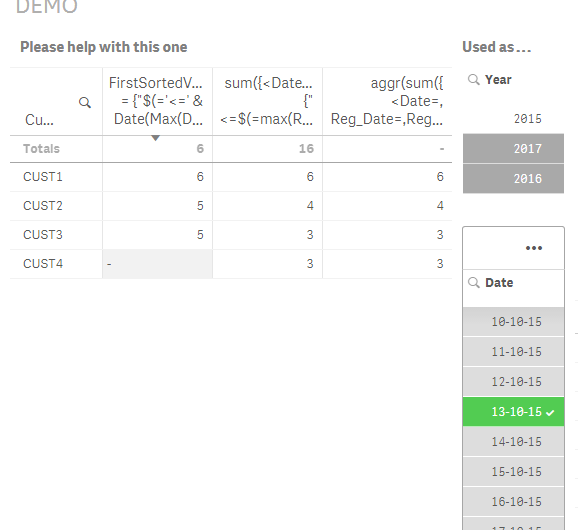
No, select date in 2015 for example.
ramzi-manoubi
- Mark as New
- Bookmark
- Subscribe
- Mute
- Subscribe to RSS Feed
- Permalink
- Report Inappropriate Content
Both, thank you very much for your time and insights. I didn't even know the existence of the function FirstSortedValue.
This expression works, also with filtering on 2015. 
FirstSortedValue({<Reg_Date = {"$(='<=' & Date(Max(Date)))"}>}Aggr(Sum(Value), Reg_Date, Customer), -Aggr(Reg_Date, Reg_Date, Customer))
