Unlock a world of possibilities! Login now and discover the exclusive benefits awaiting you.

- Qlik Community
- :
- Forums
- :
- Analytics & AI
- :
- Products & Topics
- :
- Visualization and Usability
- :
- Set Analysis trouble
- Subscribe to RSS Feed
- Mark Topic as New
- Mark Topic as Read
- Float this Topic for Current User
- Bookmark
- Subscribe
- Mute
- Printer Friendly Page

 OmarBenSalem
- Mark as New
- Bookmark
- Subscribe
- Mute
- Subscribe to RSS Feed
- Permalink
- Report Inappropriate Content
Set Analysis trouble
Hi all ( stalwar1)
I have a little issue with a set analysis; let me explain.
Here's my data:
load * Inline [
Année, Mois, Semaine, Sales
2018, 3 , 13, 200
2017, 3 , 13, 250
2018, 4 , 13, 600
2017, 4 , 13, 500
2018, 5 , 14, 200
2017, 5 , 14, 250
2018, 5 , 15, 600
2017, 5 , 15, 500
];
As u can see, the main ISSUE with this is that some weeks are at the same time part of 2 Months
This part where week 13 is at the same time part of Month 3 and 4
2018, 3 , 13, 200
2017, 3 , 13, 250
2018, 4 , 13, 600
2017, 4 , 13, 500
What we aim to do is : when the user select a Week, we show the Sales of the whole Month associated to the Selected Week.
Example;
we select Week 14:
it should be as follow:
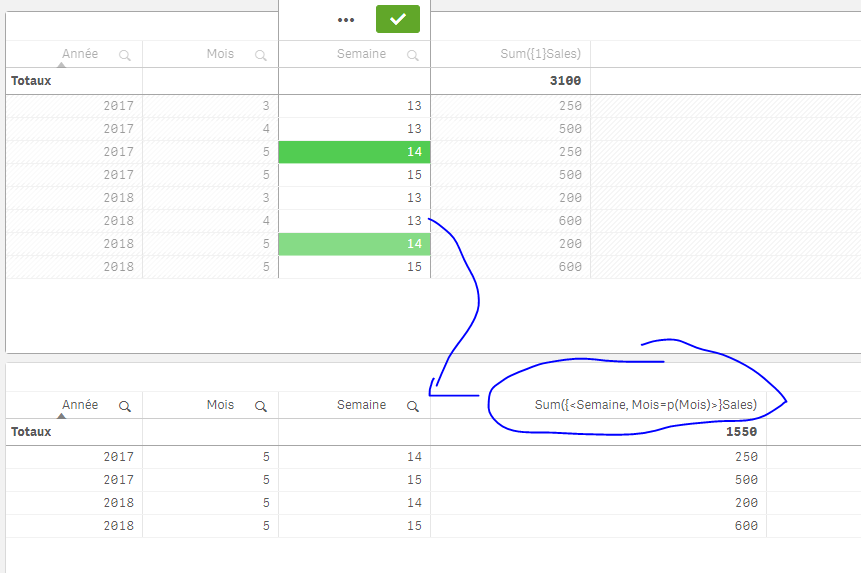
This is CORRECT using this expression : Sum({<Semaine, Mois=p({<Mois>}Mois)>}Sales)
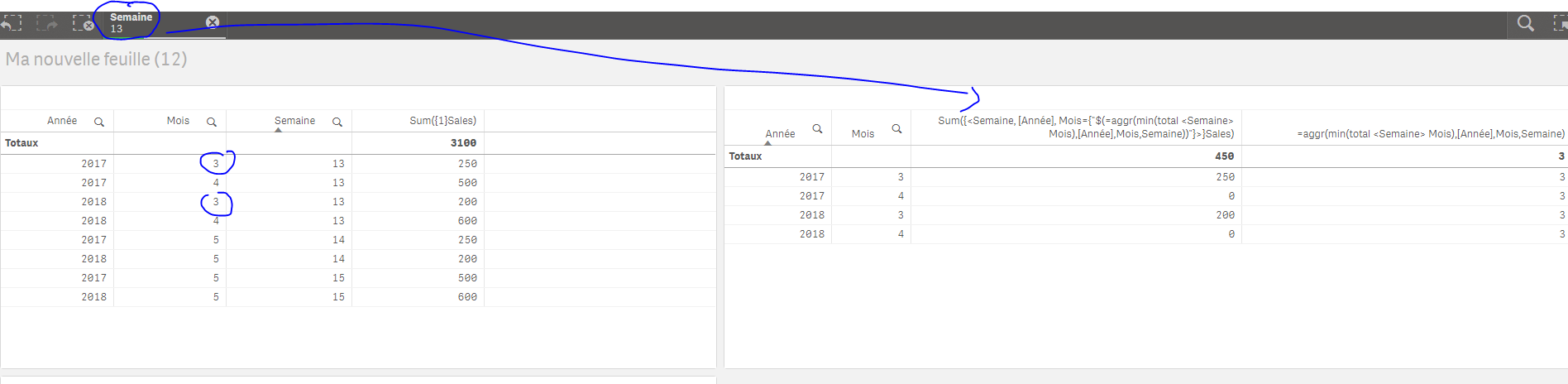
Now, the issue as mentionned is with week 13, we should have the Sales for the min Month associated to the week; which means : Mois=3
Here's how I've done it :
Sum({<Semaine, [Année], Mois={"$(=aggr(min(total <Semaine> Mois),[Année],Mois,Semaine))"}>}Sales)
Result: (when I select a Week, it works just AS I EXPECT)
But when I do not select a thing, it only give back ZEROS:
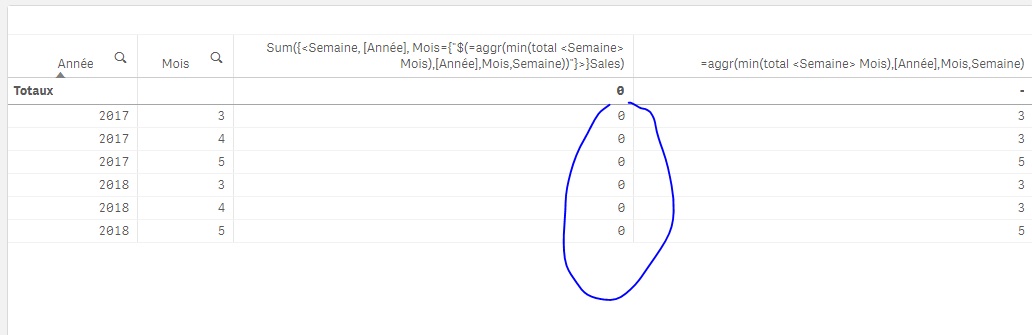
Why is this happening? especially when this part give back the Month it should give back (aggr(min(total <Semaine> Mois),[Année],Mois,Semaine))
I can do an if statement to correct this (to play with the selections) but I'd prefer an expression that would work no matter what.
Anay help is appreciated !
Thanks
- « Previous Replies
-
- 1
- 2
- Next Replies »
Accepted Solutions

 sunny_talwar
- Mark as New
- Bookmark
- Subscribe
- Mute
- Subscribe to RSS Feed
- Permalink
- Report Inappropriate Content
Or this
Sum({<Semaine, [Année], Mois = p(Mois)>} Aggr(If(Only({<Semaine, [Année]>} Mois) = Min({<Semaine, [Année]>} TOTAL <Semaine> Mois), Only({<Semaine, [Année]>} Sales)), [Année], Mois, Semaine))
 kaushiknsolanki
- Mark as New
- Bookmark
- Subscribe
- Mute
- Subscribe to RSS Feed
- Permalink
- Report Inappropriate Content
Hi,
Check the attached qvw file.
A small change in script can help you do that.
Regards,
Kaushik Solanki
sunny_talwar
- Mark as New
- Bookmark
- Subscribe
- Mute
- Subscribe to RSS Feed
- Permalink
- Report Inappropriate Content
Because set analysis is evaluated once per chart, this won't work.... right now you have multiple values per dimension for your inner aggregation... which is why when the set analysis is evaluated (aggr(min(total <Semaine> Mois),[Année],Mois,Semaine)) it is evaluated as a null. HINT: Add this to a text box object to see it's value when nothing is selected vs. when 13 is selected.
You can use Aggr with if statement to fix this instead of using set analysis here
sunny_talwar
- Mark as New
- Bookmark
- Subscribe
- Mute
- Subscribe to RSS Feed
- Permalink
- Report Inappropriate Content
Here is what I think can be used
Sum({<Semaine, [Année]>} Aggr(If(Mois = Min(TOTAL <Semaine> Mois), Sales), [Année], Mois, Semaine))
OmarBenSalem
- Mark as New
- Bookmark
- Subscribe
- Mute
- Subscribe to RSS Feed
- Permalink
- Report Inappropriate Content
Thanks Kaushik, I'm aware of a solution based on the script but unfortunately this is not an option;
and besides, I don't have Qlikview installed in my post 😕
sunny_talwar
- Mark as New
- Bookmark
- Subscribe
- Mute
- Subscribe to RSS Feed
- Permalink
- Report Inappropriate Content
Or this
Sum({<Semaine, [Année], Mois = p(Mois)>} Aggr(If(Only({<Semaine, [Année]>} Mois) = Min({<Semaine, [Année]>} TOTAL <Semaine> Mois), Only({<Semaine, [Année]>} Sales)), [Année], Mois, Semaine))
kaushiknsolanki
- Mark as New
- Bookmark
- Subscribe
- Mute
- Subscribe to RSS Feed
- Permalink
- Report Inappropriate Content
Opps my bad.
Let me try few things and see if it works in frontend.
Regards,
Kaushik Solanki
OmarBenSalem
- Mark as New
- Bookmark
- Subscribe
- Mute
- Subscribe to RSS Feed
- Permalink
- Report Inappropriate Content
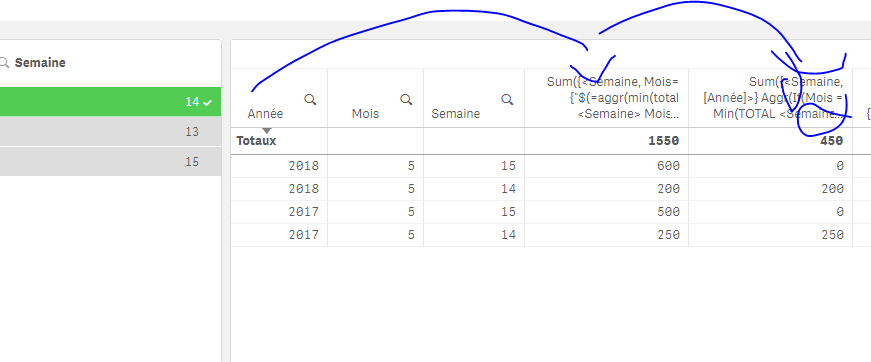
This will give back only the sales for the Min Week:
kaushiknsolanki
- Mark as New
- Bookmark
- Subscribe
- Mute
- Subscribe to RSS Feed
- Permalink
- Report Inappropriate Content
You Rocked Man... 
Regards,
Kaushik Solanki
OmarBenSalem
- Mark as New
- Bookmark
- Subscribe
- Mute
- Subscribe to RSS Feed
- Permalink
- Report Inappropriate Content
BINGO !!

- « Previous Replies
-
- 1
- 2
- Next Replies »