Unlock a world of possibilities! Login now and discover the exclusive benefits awaiting you.

- Qlik Community
- :
- Forums
- :
- Analytics & AI
- :
- Products & Topics
- :
- Visualization and Usability
- :
- Set Analysis trouble
- Subscribe to RSS Feed
- Mark Topic as New
- Mark Topic as Read
- Float this Topic for Current User
- Bookmark
- Subscribe
- Mute
- Printer Friendly Page

 OmarBenSalem
- Mark as New
- Bookmark
- Subscribe
- Mute
- Subscribe to RSS Feed
- Permalink
- Report Inappropriate Content
Set Analysis trouble
Hi all ( stalwar1)
I have a little issue with a set analysis; let me explain.
Here's my data:
load * Inline [
Année, Mois, Semaine, Sales
2018, 3 , 13, 200
2017, 3 , 13, 250
2018, 4 , 13, 600
2017, 4 , 13, 500
2018, 5 , 14, 200
2017, 5 , 14, 250
2018, 5 , 15, 600
2017, 5 , 15, 500
];
As u can see, the main ISSUE with this is that some weeks are at the same time part of 2 Months
This part where week 13 is at the same time part of Month 3 and 4
2018, 3 , 13, 200
2017, 3 , 13, 250
2018, 4 , 13, 600
2017, 4 , 13, 500
What we aim to do is : when the user select a Week, we show the Sales of the whole Month associated to the Selected Week.
Example;
we select Week 14:
it should be as follow:
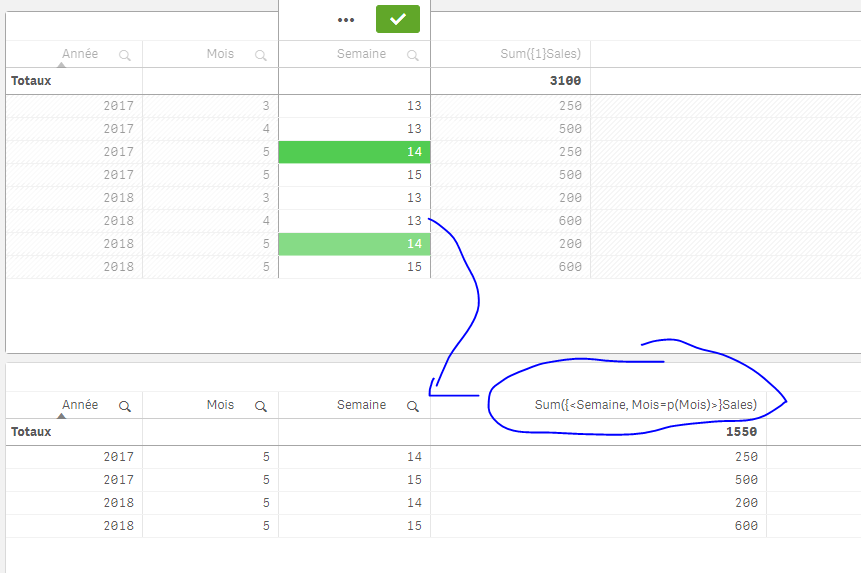
This is CORRECT using this expression : Sum({<Semaine, Mois=p({<Mois>}Mois)>}Sales)
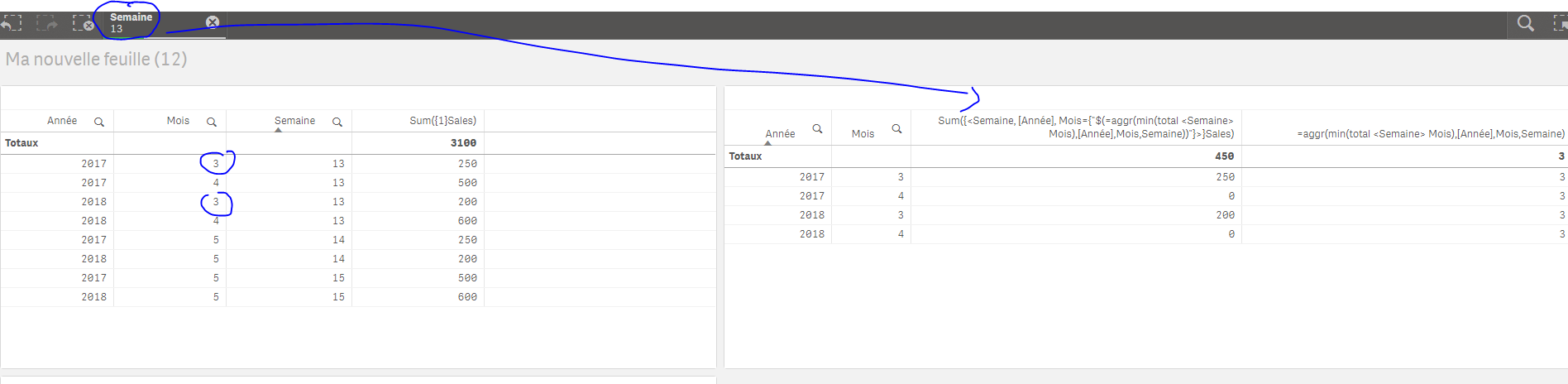
Now, the issue as mentionned is with week 13, we should have the Sales for the min Month associated to the week; which means : Mois=3
Here's how I've done it :
Sum({<Semaine, [Année], Mois={"$(=aggr(min(total <Semaine> Mois),[Année],Mois,Semaine))"}>}Sales)
Result: (when I select a Week, it works just AS I EXPECT)
But when I do not select a thing, it only give back ZEROS:
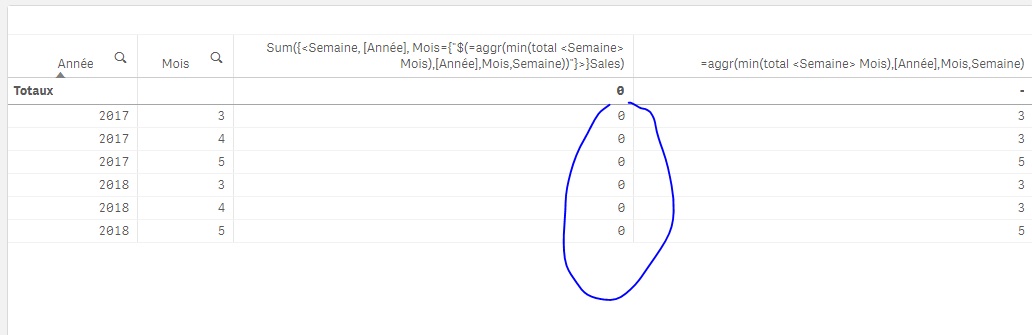
Why is this happening? especially when this part give back the Month it should give back (aggr(min(total <Semaine> Mois),[Année],Mois,Semaine))
I can do an if statement to correct this (to play with the selections) but I'd prefer an expression that would work no matter what.
Anay help is appreciated !
Thanks
- « Previous Replies
-
- 1
- 2
- Next Replies »

 sunny_talwar
- Mark as New
- Bookmark
- Subscribe
- Mute
- Subscribe to RSS Feed
- Permalink
- Report Inappropriate Content
Try the modified version
Sum({<Semaine, [Année], Mois = p(Mois)>} Aggr(If(Only({<Semaine, [Année]>} Mois) = Min({<Semaine, [Année]>} TOTAL <Semaine> Mois), Only({<Semaine, [Année]>} Sales)), [Année], Mois, Semaine))
OmarBenSalem
- Mark as New
- Bookmark
- Subscribe
- Mute
- Subscribe to RSS Feed
- Permalink
- Report Inappropriate Content
He's on a whole other planet of his own 

 andrey_krylov
- Mark as New
- Bookmark
- Subscribe
- Mute
- Subscribe to RSS Feed
- Permalink
- Report Inappropriate Content
Maybe this
Sum({<Semaine, [Année], Mois={"$(=If(GetSelectedCount(Semaine) = 1, Min(Mois), '*'))"}>}Sales)

- « Previous Replies
-
- 1
- 2
- Next Replies »