Unlock a world of possibilities! Login now and discover the exclusive benefits awaiting you.

- Qlik Community
- :
- Forums
- :
- Analytics & AI
- :
- Products & Topics
- :
- Visualization and Usability
- :
- Set Intersection with exclusion
- Subscribe to RSS Feed
- Mark Topic as New
- Mark Topic as Read
- Float this Topic for Current User
- Bookmark
- Subscribe
- Mute
- Printer Friendly Page

 mloy3
mloy3
- Mark as New
- Bookmark
- Subscribe
- Mute
- Subscribe to RSS Feed
- Permalink
- Report Inappropriate Content
Set Intersection with exclusion
| Work Unit ID | Task ID |
| A | 1 |
| A | 2 |
| A | 3 |
| B | 1 |
| B | 3 |
| B | 4 |
| C | 2 |
| C | 3 |
| C | 4 |
| D | 1 |
Hi! I been cranking my head for the past few hours in trying to get to the results but to no avail. I am trying to count the instances whereby a work unit id has been associated with Task id 1, but 2 is not associated.
In the table above I would need 2 results, 1 for B and D each.
Tried this but didnt work:
count({<[Work Unit ID]=P({<Task ID={1}>}[Work Unit ID])>*<[Work Unit ID]=E({<Task ID={2}>}[Work Unit ID])>}Work Unit ID)
Accepted Solutions

 Vegar
Vegar
- Mark as New
- Bookmark
- Subscribe
- Mute
- Subscribe to RSS Feed
- Permalink
- Report Inappropriate Content
You missed out some parantheses/brackets [] and a distinct
=count({<[Work Unit ID]=P({<[Task ID]={1}>}[Work Unit ID])> * <[Work Unit ID]=E({<[Task ID]={2}>}[Work Unit ID])>} DISTINCT[Work Unit ID])
Qlik Community MVP

 jonathandienst
- Mark as New
- Bookmark
- Subscribe
- Mute
- Subscribe to RSS Feed
- Permalink
- Report Inappropriate Content
You are missing some square brackets:
Count({
	<[Work Unit ID]=P({<[Task ID]={1}>} [Work Unit ID])>*
	<[Work Unit ID]=E({<[Task ID]={2}>} [Work Unit ID])>
    }
[Work Unit ID])
Vegar
- Mark as New
- Bookmark
- Subscribe
- Mute
- Subscribe to RSS Feed
- Permalink
- Report Inappropriate Content
You missed out some parantheses/brackets [] and a distinct
=count({<[Work Unit ID]=P({<[Task ID]={1}>}[Work Unit ID])> * <[Work Unit ID]=E({<[Task ID]={2}>}[Work Unit ID])>} DISTINCT[Work Unit ID])
Qlik Community MVP
mloy3
- Mark as New
- Bookmark
- Subscribe
- Mute
- Subscribe to RSS Feed
- Permalink
- Report Inappropriate Content
Hi Jontydkpi, thanks for the quick reply. Even after adding [] to all the Task ID and Work Unit ID, i find this formula to yield 0 result.
Vegar
- Mark as New
- Bookmark
- Subscribe
- Mute
- Subscribe to RSS Feed
- Permalink
- Report Inappropriate Content
Try this script:
LOAD * inline [
Work Unit ID,Task ID
A,1
A,2
A,3
B,1
B,3
B,4
C,2
C,3
C,4
D,1];
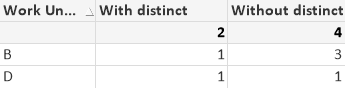
Using the two expressions by @jonathandienst and me will result in this table-.
Qlik Community MVP
mloy3
- Mark as New
- Bookmark
- Subscribe
- Mute
- Subscribe to RSS Feed
- Permalink
- Report Inappropriate Content
mloy3
- Mark as New
- Bookmark
- Subscribe
- Mute
- Subscribe to RSS Feed
- Permalink
- Report Inappropriate Content
