Unlock a world of possibilities! Login now and discover the exclusive benefits awaiting you.

- Qlik Community
- :
- Forums
- :
- Analytics & AI
- :
- Products & Topics
- :
- Visualization and Usability
- :
- Set analysis - Filter Pane (qliksense)
- Subscribe to RSS Feed
- Mark Topic as New
- Mark Topic as Read
- Float this Topic for Current User
- Bookmark
- Subscribe
- Mute
- Printer Friendly Page

- Mark as New
- Bookmark
- Subscribe
- Mute
- Subscribe to RSS Feed
- Permalink
- Report Inappropriate Content
Set analysis - Filter Pane (qliksense)
Hi,
My case regards the situation that I want to apply the filter pane so that the rank function works properly.
Database consists of the 10 observations. 1 observation is "User" and the latter 9 are the remaining set.
I would like the 'user' observation to be always displayed in the table and participate in the ranking function, whereas the other 9 observations should be responsive to filter panes I apply.
The case regard the filter pane functionality.
1. when I choose just a field "Category" then a filter pane looks like this:
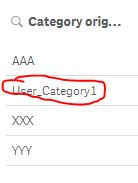
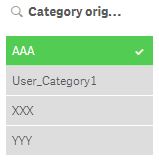
And I need to remove the User_Category1, marked as red, from filter pane (because User is always displayed in a table therefore there is no logic reason to show it on filter pane).
2. I apply then for dimension: Aggr(Only({$<Category-={'User_Category1'}>} Category), Category):
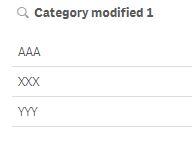
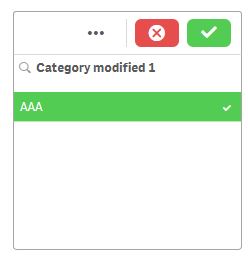
It is ok but when I choose one category then other disappear (virtual table). It is hard to select multiple choices.
3. Then I apply Aggr(Only({1<Category-={'User_Category1'}>} Category), Category):
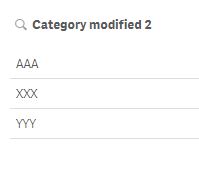
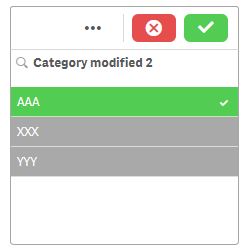
It almost works, it displays the filter pane selection properly (good), when I select one value then it also shows other possibilities (good), however these are greyed (bad). I would like them to be normally selectable as in point 1 filter pane.
The problem is with greyed categories are that they:
1. Suggest user that the multiple choice is not possible whereas it is possible.
2. I want to apply other visualization for filter pane: http://branch.qlik.com/#!/project/57b75fd3b3122e2cd1e72fdf
which works not intuitively when the categories are greyed for multiple choice.
The question is: Maybe other function can be used instead of Aggr(only set analysis) or I should try different set analysis conditions. The task seemed simple at the beginning, I just want to remove one selection possibility from Filter Pane keeping its features.

 beck_bakytbek
- Mark as New
- Bookmark
- Subscribe
- Mute
- Subscribe to RSS Feed
- Permalink
- Report Inappropriate Content
Hi Marciej,
look at this, here i created event like a filter for pre-selected values: like a triggers in Qlik View but in Qlik Sense
i hope that helps
Beck
- Mark as New
- Bookmark
- Subscribe
- Mute
- Subscribe to RSS Feed
- Permalink
- Report Inappropriate Content
Not pretty sure If I understood. I looked at your proposal, but I see it is like triggers/bookmarks. I need something which allows me to customize filter pane (delete one option from selection possibilities) and also to make it 100% working for remaining selections.
I do not want to pre-select anything.