Unlock a world of possibilities! Login now and discover the exclusive benefits awaiting you.

- Qlik Community
- :
- Forums
- :
- Analytics & AI
- :
- Products & Topics
- :
- Visualization and Usability
- :
- Re: Show 2 years only
- Subscribe to RSS Feed
- Mark Topic as New
- Mark Topic as Read
- Float this Topic for Current User
- Bookmark
- Subscribe
- Mute
- Printer Friendly Page

 Luisanabria
- Mark as New
- Bookmark
- Subscribe
- Mute
- Subscribe to RSS Feed
- Permalink
- Report Inappropriate Content
Show 2 years only
Hi everyone,
l have a conecction to a sql server, and have data since 2015, but l only want to work with 2021 and 2022, is possible to see only that in for example a table or filter?
Set Analysis is good option?
I used set analysis in another model and that model has MasterCalendar but in this new one l dont want to use MasterCalendar and l think it has relationship for use Set Analysis
Or how can l see only that years?
Thank you all
- Subscribe by Topic:
-
Data Load Editor
-
dimension
-
expression
-
General Question
-
Script
-
Set Analysis
-
Variables
Accepted Solutions

 Taoufiq_Zarra
- Mark as New
- Bookmark
- Subscribe
- Mute
- Subscribe to RSS Feed
- Permalink
- Report Inappropriate Content
irst, if you don't need the other years, you can filter from the load script the two years
for example :
load .... where year=2021 or year=2020
otherwise in set analysis you can use for your measure:
sum( {<YEAR={'2021','2022'}>}YOURMEASURE)
or you can filter the dimension with the if function for example
if(YEAR=2021 or YEAR=2022,YEAR) and delete the null value
Taoufiq ZARRA
"Please LIKE posts and "Accept as Solution" if the provided solution is helpful "
(you can mark up to 3 "solutions") 😉

 BrunPierre
- Mark as New
- Bookmark
- Subscribe
- Mute
- Subscribe to RSS Feed
- Permalink
- Report Inappropriate Content
To load only the required years into the data model try this
SQL SELECT *
FROM SQL.dbo.TABLE
Where date_field >= DATEADD(yy, -1, GETDATE()); //Fetching only 2021 and 2022
Alternatively, you can try the below set analysis expression
Sum({<[Year Field]={'>=$(=max([Year Field])-2)<$(=max([Year Field]))'}>} [Measure Field])
Taoufiq_Zarra
- Mark as New
- Bookmark
- Subscribe
- Mute
- Subscribe to RSS Feed
- Permalink
- Report Inappropriate Content
irst, if you don't need the other years, you can filter from the load script the two years
for example :
load .... where year=2021 or year=2020
otherwise in set analysis you can use for your measure:
sum( {<YEAR={'2021','2022'}>}YOURMEASURE)
or you can filter the dimension with the if function for example
if(YEAR=2021 or YEAR=2022,YEAR) and delete the null value
Taoufiq ZARRA
"Please LIKE posts and "Accept as Solution" if the provided solution is helpful "
(you can mark up to 3 "solutions") 😉
BrunPierre
- Mark as New
- Bookmark
- Subscribe
- Mute
- Subscribe to RSS Feed
- Permalink
- Report Inappropriate Content
To load only the required years into the data model try this
SQL SELECT *
FROM SQL.dbo.TABLE
Where date_field >= DATEADD(yy, -1, GETDATE()); //Fetching only 2021 and 2022
Alternatively, you can try the below set analysis expression
Sum({<[Year Field]={'>=$(=max([Year Field])-2)<$(=max([Year Field]))'}>} [Measure Field])
Luisanabria
- Mark as New
- Bookmark
- Subscribe
- Mute
- Subscribe to RSS Feed
- Permalink
- Report Inappropriate Content
Thanks to @Taoufiq_Zarra and you for your help. It works good
Its first time l work with connection, always worked with LOAD by excel
Even l have another fast question. In my script, l have this:
if(len( ContactName) >=1,1,0) ) as Nombre Contacto
so now in a table lm using ContactName Field, and in color expresion using this:
if([Nombre Contacto ]<1,rgb(235,0,0),rgb(231,239,220))
but it doesnt paint Red color, only the green, and in next Column paint correctly Red Color and green

Do you know why this happend? l check in the connection exporting to excel and is Empty the field so ldk why no works good
Thank you again
BrunPierre
- Mark as New
- Bookmark
- Subscribe
- Mute
- Subscribe to RSS Feed
- Permalink
- Report Inappropriate Content
@Luisanabriaperhaps this
IF([Nombre Contacto ]=0,rgb(235,0,0),rgb(231,239,220))
Luisanabria
- Mark as New
- Bookmark
- Subscribe
- Mute
- Subscribe to RSS Feed
- Permalink
- Report Inappropriate Content
Hi Peter
I try it and still not painting the red color

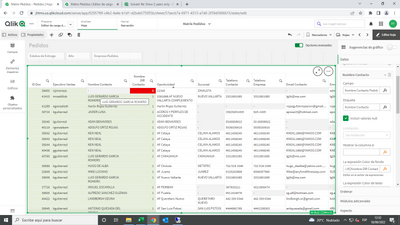
I try many ways of condition but is not working
BrunPierre
- Mark as New
- Bookmark
- Subscribe
- Mute
- Subscribe to RSS Feed
- Permalink
- Report Inappropriate Content
I suppose you can refer to the expression Name rather than using the actual expression.
In short, your expression name is "Nombre DIR Contacto" so the colour expression perhaps this
IF((([Nombre DIR Contacto] = 0, rgb(235,0,0)
and [Nombre DIR Contacto] = 1,rgb(231,239,220))
Hope this helps you.
