Unlock a world of possibilities! Login now and discover the exclusive benefits awaiting you.

- Qlik Community
- :
- Forums
- :
- Analytics & AI
- :
- Products & Topics
- :
- Visualization and Usability
- :
- Re: Show only some data/column in a graph
- Subscribe to RSS Feed
- Mark Topic as New
- Mark Topic as Read
- Float this Topic for Current User
- Bookmark
- Subscribe
- Mute
- Printer Friendly Page

 Ari_vzla
- Mark as New
- Bookmark
- Subscribe
- Mute
- Subscribe to RSS Feed
- Permalink
- Report Inappropriate Content
Show only some data/column in a graph
Hi team,
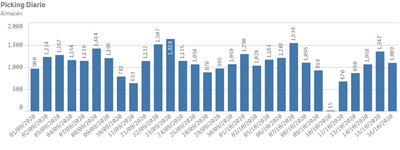
I have a graph but I need show only some information, the ghaphs that I have are below:
For first graph, I only need show the last 5 days.
For this graph I tried with
Count({<[Picks per day 2020.Creation Date] = {">=$(=WeekStart((Today()-7)))<= $(=WeekEnd((Today()-7)))"}>}[Qty pickeadores])
but I dont have any result.
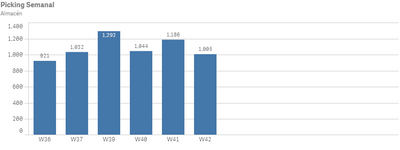
For second graph I need show only the week number of the last month
Please, somebody know how can I solve it?
Thank you
Arieli

 Vegar
Vegar
- Mark as New
- Bookmark
- Subscribe
- Mute
- Subscribe to RSS Feed
- Permalink
- Report Inappropriate Content
Your expression looks OK. Are you using [Picks per day 2020.Creation Date] as your dimension in the bar chart? Or are you using an other date field?
Qlik Community MVP
Ari_vzla
- Mark as New
- Bookmark
- Subscribe
- Mute
- Subscribe to RSS Feed
- Permalink
- Report Inappropriate Content
Thank you so much, the expresion is correct, it was my mistake reading data. Now, I have an issue with graph of Weeks, always return 5 days, even I assigned holidays in october.
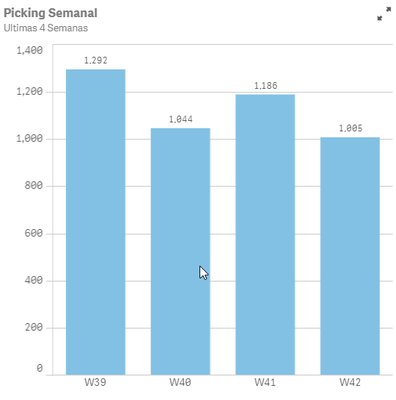
This is the formula
Count({<[Picks per day 2020.Creation Date.autoCalendar.Date] = {">=$(=WeekStart((Today()-35)))<= $(=WeekEnd((Today()-7)))"}>}[Qty pickeadores])/(NetWorkDays(WeekStart(date(today(),-35)), weekend(date(today(),-7)
),$(Holidays)))
And as holidays assigned Oct/12. Week 41 should be show 4 days, but every weeks show 5 days.
This is the formula just for the networkday
(NetWorkDays(WeekStart(date(today(),-35)), weekend(date(today(),-7)),$(Holidays)))
And how the graph looks
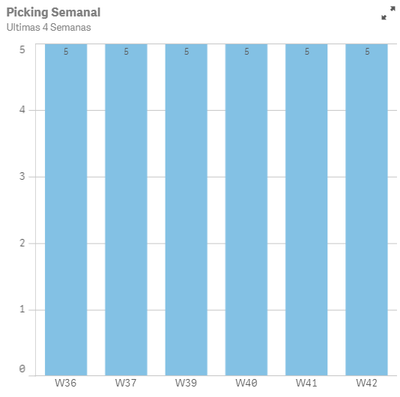
I am not sure what is the issue.
Thank you
Arieli

 ArnadoSandoval
- Mark as New
- Bookmark
- Subscribe
- Mute
- Subscribe to RSS Feed
- Permalink
- Report Inappropriate Content
Hi @Ari_vzla
I replied to another of your topics where you are also implementing the function, NetWorkDays, there I explained the behaviour of the NetWorkDays and how it is impacting your formula; Would you please checkout that reply? it may help you with this one, as both issues involved the NetWorkDays!
Hope this helps,
A journey of a thousand miles begins with a single step.
Ari_vzla
- Mark as New
- Bookmark
- Subscribe
- Mute
- Subscribe to RSS Feed
- Permalink
- Report Inappropriate Content
Thank Arnaldo, I already tried with your suggestion, but get the same result, 5 days for all weeks even I have holidays
ArnadoSandoval
- Mark as New
- Bookmark
- Subscribe
- Mute
- Subscribe to RSS Feed
- Permalink
- Report Inappropriate Content
Hi @Ari_vzla
I will give a try as I prepared some test data for this data structure!
A journey of a thousand miles begins with a single step.
