Unlock a world of possibilities! Login now and discover the exclusive benefits awaiting you.

- Qlik Community
- :
- Forums
- :
- Analytics & AI
- :
- Products & Topics
- :
- Visualization and Usability
- :
- Re: Stack Bar in Qlik sense
- Subscribe to RSS Feed
- Mark Topic as New
- Mark Topic as Read
- Float this Topic for Current User
- Bookmark
- Subscribe
- Mute
- Printer Friendly Page

 vikasmahajan
- Mark as New
- Bookmark
- Subscribe
- Mute
- Subscribe to RSS Feed
- Permalink
- Report Inappropriate Content
Stack Bar in Qlik sense
Hi all,
Please find attached excel sheet I wanted to create a stack bar like attached in excel in Qlik Sense .
Thanks
Vikas
If the issue is solved please mark the answer with Accept as Solution & like it.
If you want to go quickly, go alone. If you want to go far, go together.

Accepted Solutions

 OmarBenSalem
- Mark as New
- Bookmark
- Subscribe
- Mute
- Subscribe to RSS Feed
- Permalink
- Report Inappropriate Content
1) create a master dimension for your field company, and assigne the colors u want to its values: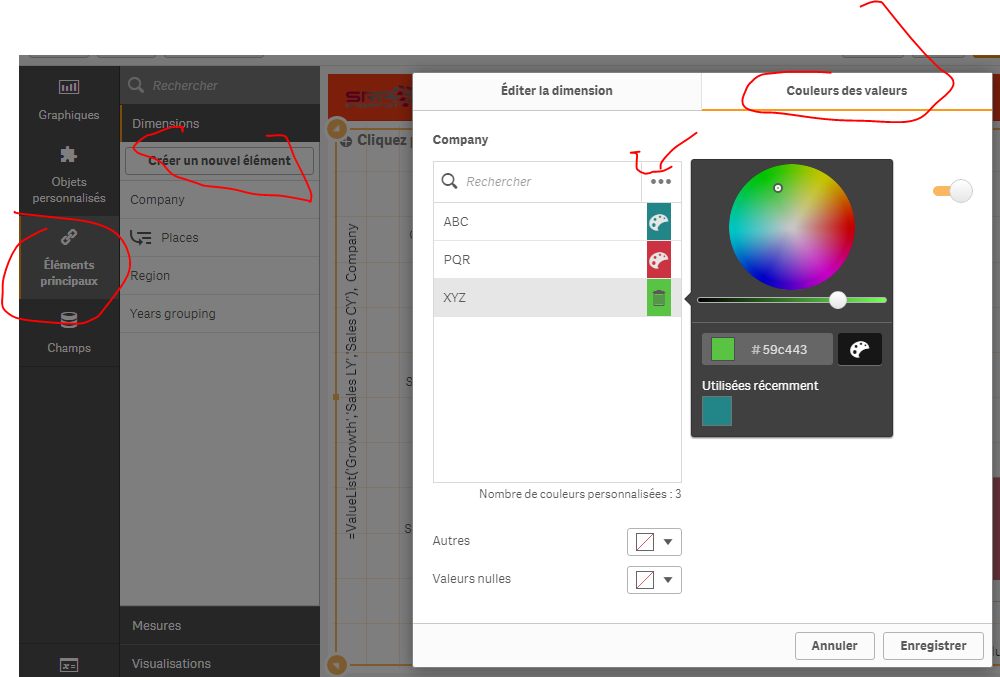
2) in ur bar chart:
dim 1 = =ValueList('Growth','Sales LY','Sales CY')
dim2= your created master measure
as a measure :
if(ValueList('Growth','Sales LY','Sales CY')='Growth', num(Sum(Grow),'# ##0,00%'),
if(ValueList('Growth','Sales LY','Sales CY')='Sales LY', sum([Sale LY]),
if(ValueList('Growth','Sales LY','Sales CY')='Sales CY',sum([Sale CY]))))
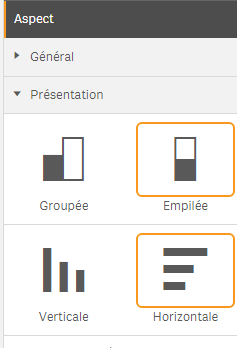
under aspect :
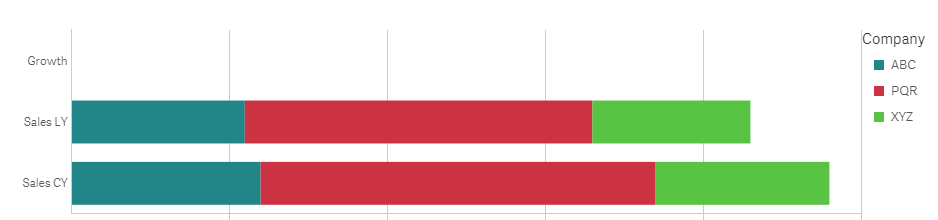
result:
OmarBenSalem
- Mark as New
- Bookmark
- Subscribe
- Mute
- Subscribe to RSS Feed
- Permalink
- Report Inappropriate Content
1) create a master dimension for your field company, and assigne the colors u want to its values:
2) in ur bar chart:
dim 1 = =ValueList('Growth','Sales LY','Sales CY')
dim2= your created master measure
as a measure :
if(ValueList('Growth','Sales LY','Sales CY')='Growth', num(Sum(Grow),'# ##0,00%'),
if(ValueList('Growth','Sales LY','Sales CY')='Sales LY', sum([Sale LY]),
if(ValueList('Growth','Sales LY','Sales CY')='Sales CY',sum([Sale CY]))))
under aspect :
result:
vikasmahajan
- Mark as New
- Bookmark
- Subscribe
- Mute
- Subscribe to RSS Feed
- Permalink
- Report Inappropriate Content
Thanks perfect
If the issue is solved please mark the answer with Accept as Solution & like it.
If you want to go quickly, go alone. If you want to go far, go together.
vikasmahajan
- Mark as New
- Bookmark
- Subscribe
- Mute
- Subscribe to RSS Feed
- Permalink
- Report Inappropriate Content
Will try and mark correct!!
Thanks
Vikas
If the issue is solved please mark the answer with Accept as Solution & like it.
If you want to go quickly, go alone. If you want to go far, go together.
