Unlock a world of possibilities! Login now and discover the exclusive benefits awaiting you.

- Qlik Community
- :
- Forums
- :
- Analytics & AI
- :
- Products & Topics
- :
- Visualization and Usability
- :
- Re: Store a date in a variable with quotes
- Subscribe to RSS Feed
- Mark Topic as New
- Mark Topic as Read
- Float this Topic for Current User
- Bookmark
- Subscribe
- Mute
- Printer Friendly Page

 ruben_moya
- Mark as New
- Bookmark
- Subscribe
- Mute
- Subscribe to RSS Feed
- Permalink
- Report Inappropriate Content
Store a date in a variable with quotes
Dear Experts,
The following set analysis only works when the date is introduce between quotes:
[CPago_Date]= {'24/09/2019'}
I would need that date to be the date before today:
vToday = date(Today()-1)
I've tried many different things but I can't get any results
[CPago_Date]= {'$(vToday())'}
I hope I explained myself clearly enough, once again, thanks a lot for your time!
 AdiPai
- Mark as New
- Bookmark
- Subscribe
- Mute
- Subscribe to RSS Feed
- Permalink
- Report Inappropriate Content
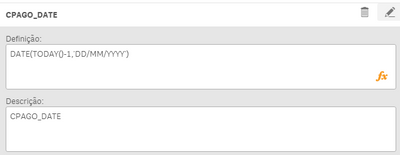
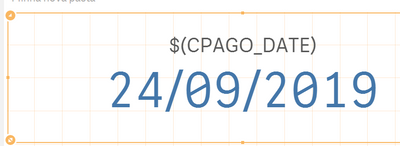
Try This
DATE(TODAY()-1,'DD/MM/YYYY')

 dplr-rn
- Mark as New
- Bookmark
- Subscribe
- Mute
- Subscribe to RSS Feed
- Permalink
- Report Inappropriate Content
2 options
1-i dont think your date field is date so make convert it to date using date# and date
2- in variable declare it like so =chr(39) & date(Today()-1) & chr(39). this will give the output you want but not sure if it will work. i would recommend option 1
ruben_moya
- Mark as New
- Bookmark
- Subscribe
- Mute
- Subscribe to RSS Feed
- Permalink
- Report Inappropriate Content
Hi,
thanks a lot for your reply. Unfortunately I ve already tried all those options. As I mentioned before I need the date quoted
[CPago_Date]= {'24/09/2019'}
Ive also tried concatenating today's date with chr(39), but even though I get the date between quote marks, It doesn't work.
I was hoping to find a way to solve my problem by using variables, but I can't find the solution
[CPago_Date]= {'$(variable)'}

 marcus_sommer
- Mark as New
- Bookmark
- Subscribe
- Mute
- Subscribe to RSS Feed
- Permalink
- Report Inappropriate Content
The suggestion from dilipranjith with a variable-creation of:
vToday = chr(39) & date(Today()-1) & chr(39);
should work by calling the variable without quotes, like:
[CPago_Date]= {$(vToday )}
Beside this - although rather seldom applied - best practice is to avoid all this formatting stuff by using always pure numerical values for each kind of calculation or matching.
- Marcus
dplr-rn
- Mark as New
- Bookmark
- Subscribe
- Mute
- Subscribe to RSS Feed
- Permalink
- Report Inappropriate Content
What's your column type for your date field? Converting it to date / numeric is the most sustainable and flexible option
ruben_moya
- Mark as New
- Bookmark
- Subscribe
- Mute
- Subscribe to RSS Feed
- Permalink
- Report Inappropriate Content
Thanks for your replies.
Im using master calendar
If I use year or month without quotes it would work perfectly:
Sum({<[CPago_Year]={2019},
[CPago_%Flag_SameDay] = {1}, [CPago_%Flag_SameMonth] = {1}, [CPago_%Flag_ThisYear] = {1}>}sales_amount)
Sum({<[CPago_Month]={feb.},
[CPago_%Flag_SameDay] = {1}, [CPago_%Flag_SameMonth] = {1}, [CPago_%Flag_ThisYear] = {1}>}sales_amount)
when it comes to dates I have to use quotes.
Sum({<[CPago_Date]={'01/01/2019'},
[CPago_%Flag_SameDay] = {1}, [CPago_%Flag_SameMonth] = {1}, [CPago_%Flag_ThisYear] = {1}>}sales_amount)
As you said before, I will have to check how CPago_Date was created in the calendar and its format.
marcus_sommer
- Mark as New
- Bookmark
- Subscribe
- Mute
- Subscribe to RSS Feed
- Permalink
- Report Inappropriate Content
Dates are also just numbers - quite often they are formatted in any way but this is not needed (in fact it's the opposite) to match/calculate with them. Just add in your master-calendar:
num(CPago_Date) as CPago_DateNUM
and then for
vToday = today()-1
will
[CPago_DateNUM]={$(vToday)}
work.
- Marcus
