Unlock a world of possibilities! Login now and discover the exclusive benefits awaiting you.

- Qlik Community
- :
- Forums
- :
- Analytics & AI
- :
- Products & Topics
- :
- Visualization and Usability
- :
- Re: Subtracting values in Same column - Current to...
- Subscribe to RSS Feed
- Mark Topic as New
- Mark Topic as Read
- Float this Topic for Current User
- Bookmark
- Subscribe
- Mute
- Printer Friendly Page

 mkb_Qlik
- Mark as New
- Bookmark
- Subscribe
- Mute
- Subscribe to RSS Feed
- Permalink
- Report Inappropriate Content
Subtracting values in Same column - Current to previous row
Hello,
I have a table like below,
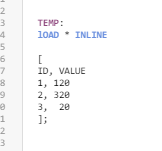
I need the results as like below snapshot,
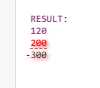
How to accomplish this in Qlik Load Script
- Tags:
- qlik sense app
Accepted Solutions

 Quy_Nguyen
- Mark as New
- Bookmark
- Subscribe
- Mute
- Subscribe to RSS Feed
- Permalink
- Report Inappropriate Content
Try this:
If(isNull(Above(Sum(Value))) or (field <> Above(field)),Sum(Value),Sum(Value) - Above(Sum(Value)))

 asinha1991
- Mark as New
- Bookmark
- Subscribe
- Mute
- Subscribe to RSS Feed
- Permalink
- Report Inappropriate Content
RESULTTBL:
Load VALUE- if(isnull(previous(VALUE),0,previous(VALUE)) as RESULT
Resident Temp;
 Ksrinivasan
- Mark as New
- Bookmark
- Subscribe
- Mute
- Subscribe to RSS Feed
- Permalink
- Report Inappropriate Content
Hi,
If(ID='1',0,VALUE-Above(VALUE))
You can try this.
K. Srinivasan
mkb_Qlik
- Mark as New
- Bookmark
- Subscribe
- Mute
- Subscribe to RSS Feed
- Permalink
- Report Inappropriate Content
Hello Thanks for your response.
How we can accomplish this as Measure expression. For example my data looks like below
Load * inline
[
id value
1, 100
1,20
2,30
3,40];
Quy_Nguyen
- Mark as New
- Bookmark
- Subscribe
- Mute
- Subscribe to RSS Feed
- Permalink
- Report Inappropriate Content
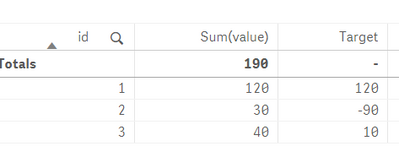
In the dashboard, create a table:
+ Dimension: id
+ Measure 1: Sum(value)
+ Measure 2: If(isNull(Above(Sum(value))), Sum(value), Sum(value) - Above(Sum(value)))
Is this what you expected:
mkb_Qlik
- Mark as New
- Bookmark
- Subscribe
- Mute
- Subscribe to RSS Feed
- Permalink
- Report Inappropriate Content
Hello,
Thanks for the example, In case if i have multiple dimensions, how to handle it. For example refer below data.
Load * Inline
[
field, ID,Value
A,1,120
A,2,30
B,1,120
B,2,45
C,1,456
D,2,50];
Quy_Nguyen
- Mark as New
- Bookmark
- Subscribe
- Mute
- Subscribe to RSS Feed
- Permalink
- Report Inappropriate Content
Try this:
If(isNull(Above(Sum(Value))) or (field <> Above(field)),Sum(Value),Sum(Value) - Above(Sum(Value)))
