Unlock a world of possibilities! Login now and discover the exclusive benefits awaiting you.

- Qlik Community
- :
- Forums
- :
- Analytics & AI
- :
- Products & Topics
- :
- Visualization and Usability
- :
- Re: Syntax for using qsVariable to render chart ba...
- Subscribe to RSS Feed
- Mark Topic as New
- Mark Topic as Read
- Float this Topic for Current User
- Bookmark
- Subscribe
- Mute
- Printer Friendly Page

 dreweezy
- Mark as New
- Bookmark
- Subscribe
- Mute
- Subscribe to RSS Feed
- Permalink
- Report Inappropriate Content
Syntax for using qsVariable to render chart based on button
Hi, I believe my previous thread was never uploaded. I am trying to grab the top 10 and bottom 10 values using the qsVariable.
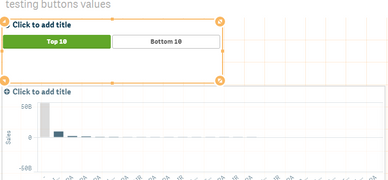
Inside my variable for the top and bottom 10 I have:
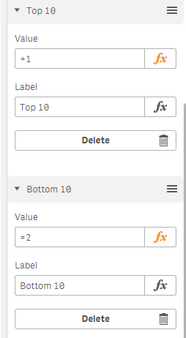
I am trying to enter a syntax (using probably if statement) so that my bar chart will render based on when a user selects one of the buttons.
I have something like but doesn't seem to work.
if('$(vTopBot)'=1,num Sum({<ACCOUNT={"=Rank(Sum(SALES))<=10"}>},
if('$(vTopBot)'=2,num Sum({<ACCOUNT={"=Rank(-Sum(SALES))<=10"}>})
))

 R_Kaymakchiev
- Mark as New
- Bookmark
- Subscribe
- Mute
- Subscribe to RSS Feed
- Permalink
- Report Inappropriate Content
Hi,
have you tried instead of doing nested if statement, just a single one ?
The code should be something like this:
if(' $(vTopBot)'=1 ,num Sum({<ACCOUNT={"=Rank(Sum(SALES))<=10"}>} ,
num Sum({<ACCOUNT={"=Rank(-Sum(SALES))<=10"}>} )

 Channa
- Mark as New
- Bookmark
- Subscribe
- Mute
- Subscribe to RSS Feed
- Permalink
- Report Inappropriate Content
i have similar post answered search for
qsVariable to render chart based on newly created buttons
