Unlock a world of possibilities! Login now and discover the exclusive benefits awaiting you.

- Qlik Community
- :
- Forums
- :
- Analytics & AI
- :
- Products & Topics
- :
- Visualization and Usability
- :
- Table - show condition
- Subscribe to RSS Feed
- Mark Topic as New
- Mark Topic as Read
- Float this Topic for Current User
- Bookmark
- Subscribe
- Mute
- Printer Friendly Page

 motzfeldt01
- Mark as New
- Bookmark
- Subscribe
- Mute
- Subscribe to RSS Feed
- Permalink
- Report Inappropriate Content
Table - show condition
Hi,
I have made this table:
| Company | Rank | Gross Profit |
|---|---|---|
| A | 1 | 100$ |
| B | 2 | 98$ |
| C | 3 | 93$ |
| D | 4 | 90$ |
| E | 5 | 87$ |
| F | 6 | 84$ |
| G | 7 | 82$ |
| H | 8 | 77$ |
And a filter called "ChosenCompany".
I would like to make a condition, thus the table are only showing:
- the three companies above the chosen company based on rank
- the three companies below the chosen company based on rank
- and the chosen company
Does anyone have an idea how to do this?
motzfeldt01
- Mark as New
- Bookmark
- Subscribe
- Mute
- Subscribe to RSS Feed
- Permalink
- Report Inappropriate Content
Hi Omar,
It works, thank you. But I forgot to mention, that I also have a filter on the dimension: [Indsutry]. Thus the rank are based on each industry in the dataset.
Can I add a set analysis?
Like this:
{$<Industry={$(vChosenIndustry)}>}
 OmarBenSalem
- Mark as New
- Bookmark
- Subscribe
- Mute
- Subscribe to RSS Feed
- Permalink
- Report Inappropriate Content
Try to create a table source as u've done in ur first post; It would be easier to help once you exactly describe the desired output with a given input.
Ps: You can mark the given responses as helpful if they were 
motzfeldt01
- Mark as New
- Bookmark
- Subscribe
- Mute
- Subscribe to RSS Feed
- Permalink
- Report Inappropriate Content
Of course. Here are the detailed version:
In my qlik app, I have from a filter chosen Company E.
This gives the following table.
| Company | Rank | Gross Profit |
|---|---|---|
| A | 1 | 100$ |
| B | 2 | 98$ |
| C | 3 | 93$ |
| D | 4 | 90$ |
| E | 5 | 87$ |
| F | 6 | 84$ |
| G | 7 | 82$ |
| H | 8 | 77$ |
| I | 9 | 66$ |
| J | 10 | 62$ |
All 10 companies are within the same industry.
Rank are made by this expression:
=Rank(Sum({<[Company]=,
Indsutry={$(vChosenIndustry)},
[Year] = {$(vThisYear)}>}
[Gross profit]))
Gross profit are made by this expression:
=Sum({$<[Company]=,
[Year]={$(vThisYear)},
Industry={$(vChosenIndustry)}>}
[Gross profit]
But I want Qlik to give me this table:
| Company | Rank | Gross Profit |
|---|---|---|
| B | 2 | 98$ |
| C | 3 | 93$ |
| D | 4 | 90$ |
| E | 5 | 87$ |
| F | 6 | 84$ |
| G | 7 | 82$ |
| H | 8 | 77$ |
Thus the table are only showing:
- the three companies above the chosen company based on rank
- the three companies below the chosen company based on rank
- and the chosen company
Let me know if I need to elaborate further 🙂
Thanks in advance!

 jyothish8807
- Mark as New
- Bookmark
- Subscribe
- Mute
- Subscribe to RSS Feed
- Permalink
- Report Inappropriate Content
Hi Omar,
Nice solution, can you please help me to understand the below syntax ?
rank(sum({1}Gross),Company) --> How are you using Company as a parameter, and how does it work ?
Thanks,
KC
KC
OmarBenSalem
- Mark as New
- Bookmark
- Subscribe
- Mute
- Subscribe to RSS Feed
- Permalink
- Report Inappropriate Content
This rank the Companies based on their sum(Gross)
Company with the most sum(Gross) will be number 1 etc..
jyothish8807
- Mark as New
- Bookmark
- Subscribe
- Mute
- Subscribe to RSS Feed
- Permalink
- Report Inappropriate Content
Thanks for the explanation ...
Is it same to .....
Aggr(rank(sum({1}Gross)),Company) ?
Br,
KC
KC
motzfeldt01
- Mark as New
- Bookmark
- Subscribe
- Mute
- Subscribe to RSS Feed
- Permalink
- Report Inappropriate Content
Is it possible omarbensalem? 🙂
OmarBenSalem
- Mark as New
- Bookmark
- Subscribe
- Mute
- Subscribe to RSS Feed
- Permalink
- Report Inappropriate Content
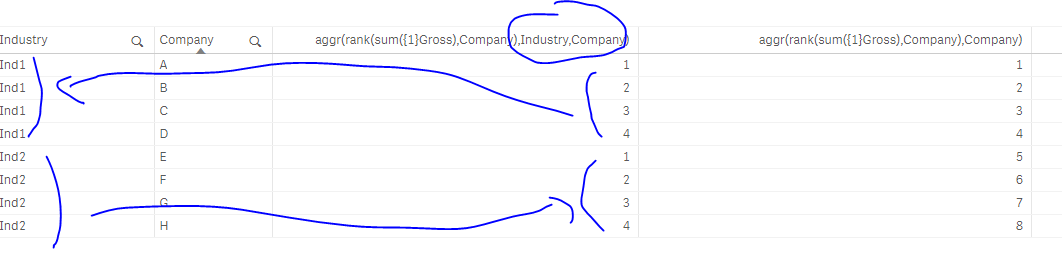
it's : Aggr(rank(sum({1}Gross)),Company) ,Company)
and yes, it's the same thing; because u can rank the companies based on its industry for example; this is why I want to introduce the aggr() notion;
in that case (ank the companies based on their industry), u should tell Qlik to do so with the aggr():
Aggr(rank(sum({1}Gross)),Company) ,Industry,Company)
This translate to :
rank the companies based on the sum(Gross) but rank them on their own Industry
here's an explanation by example:
motzfeldt01
- Mark as New
- Bookmark
- Subscribe
- Mute
- Subscribe to RSS Feed
- Permalink
- Report Inappropriate Content
Do you mean like this?
if(getselectedcount([Company])=0 and (Industry)=0,sum([Gross Profit]),
sum({<[Company]=
{"=rank(Aggr(sum({1}[Gross Profit]),[Company]), Industry, [Company])<=max(total aggr(rank(sum({<[Company]>}[Gross Profit]),[Company]),Industry, [Company]))+3"}>
*
<[Company]=
{"=rank(Aggr(sum({1}[Gross Profit]),[Company]), Industry, [Company])>=max(total aggr(rank(sum({<[Company]>}[Gross Profit]),[Company]),Industry, [Company]))-3"}>
}[Gross Profit])
)
Doesn't seem to work.
OmarBenSalem
- Mark as New
- Bookmark
- Subscribe
- Mute
- Subscribe to RSS Feed
- Permalink
- Report Inappropriate Content
try this: ( youssefbelloum , this might interest u)
if(GetSelectedCount(Company)=0,sum(Gross),
sum({
<Industry=p(Industry),Company={"=sum({1}aggr({1}rank(sum({1}Gross),Company),Industry,Company))<=max({<Industry=p(Industry)>}total <Industry> aggr({1}rank(sum({1}Gross),Company),Industry, Company))+1"}>
*
<Industry=p(Industry),Company={"=sum({1}aggr({1}rank(sum({1}Gross),Company),Industry,Company))>=max({<Industry=p(Industry)>}total <Industry> aggr({1}rank(sum({1}Gross),Company),Industry, Company))-1"}>
}
Gross)
)
Suppose this is what you have;
Company, Gross, Industry
K, 120, Ind1
A,100, Ind1
B,98, Ind1
C,93,Ind2
D,90,Ind1
L, 80, Ind1
E,87,Ind2
F,84,Ind2
G,82,Ind2
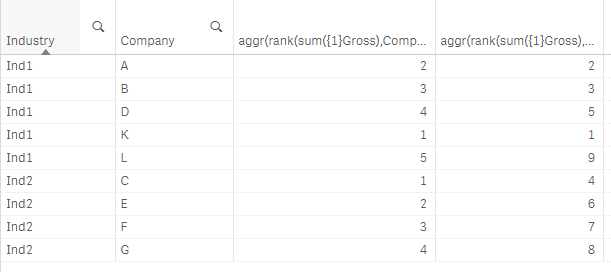
If I select Company B; I want to show A,B and D, the one before and after it in rank in the Ind1:
Result:

If I select E :

