Unlock a world of possibilities! Login now and discover the exclusive benefits awaiting you.

- Qlik Community
- :
- Forums
- :
- Analytics & AI
- :
- Products & Topics
- :
- Visualization and Usability
- :
- Re: Table with big volume of data - Need for optim...
- Subscribe to RSS Feed
- Mark Topic as New
- Mark Topic as Read
- Float this Topic for Current User
- Bookmark
- Subscribe
- Mute
- Printer Friendly Page

- Mark as New
- Bookmark
- Subscribe
- Mute
- Subscribe to RSS Feed
- Permalink
- Report Inappropriate Content
Table with big volume of data - Need for optimization
Hello,
I would like to display a simple table (i.e. 5 columns), but with millions of lines. I would like to have a condition on one of the column. Unfortunately, the performance are not good and I am seeking help for optimization.
Here's my load script:
Sale:
Load * inline
[
SaleID, SaleAmount, SaleYear, SaleMonth, SaleCity, SaleDay
101, 100, 2016, 1, PAR, 10
102, 10, 2016, 1, LON, 11
103, 150, 2016, 3, HEL, 9
104, 210, 2016, 4, FRA, 2
105, 40, 2016, 4, PAR, 13
106, 345, 2016, 8, LON, 21
107, 35, 2016, 8, FRA, 25
108, 50, 2015, 1, PAR, 11
109, 25, 2015, 2, PAR, 15
110, 235, 2015, 6, LON, 23
111, 125, 2015, 8, FRA, 5
112, 25, 2015, 8, HEL, 25
etc...
];
I would like to display all the Sales made this year. Here's my table:
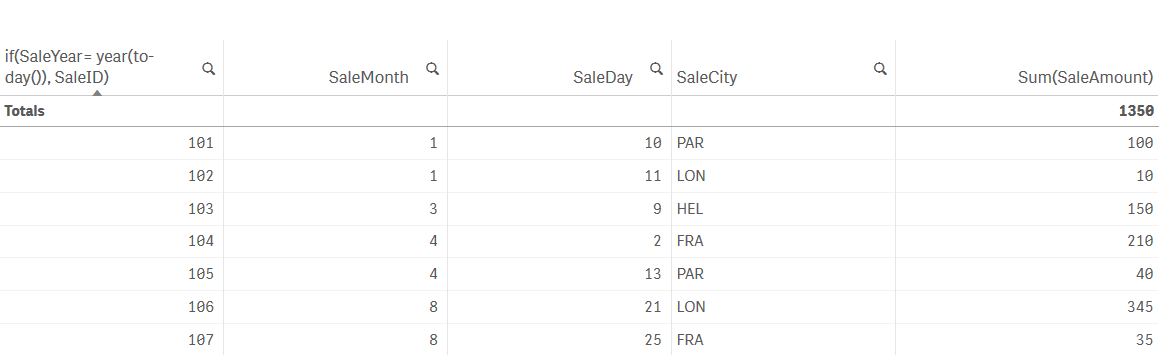
I suspect that having the field "if(SaleYear= year(today()), SaleID)" as a dimension in the column of the table degrades the performance. Would you have any recommendation in order to improve the response time?
Thanks
Annick
Accepted Solutions

 miguelbraga
- Mark as New
- Bookmark
- Subscribe
- Mute
- Subscribe to RSS Feed
- Permalink
- Report Inappropriate Content
Take a look as my solution:
Use a PreLoad statement and define as a new variable 
Hope it helps.
Regards,
MB
 Colin-Albert
- Mark as New
- Bookmark
- Subscribe
- Mute
- Subscribe to RSS Feed
- Permalink
- Report Inappropriate Content
Remove the calculated dimension and add a filter pane using SaleYear.
You can then select 2016 or any other Year.
miguelbraga
- Mark as New
- Bookmark
- Subscribe
- Mute
- Subscribe to RSS Feed
- Permalink
- Report Inappropriate Content
Take a look as my solution:
Use a PreLoad statement and define as a new variable
Hope it helps.
Regards,
MB