Unlock a world of possibilities! Login now and discover the exclusive benefits awaiting you.

- Qlik Community
- :
- Forums
- :
- Analytics & AI
- :
- Products & Topics
- :
- Visualization and Usability
- :
- To Show Percentage in Pivot Table
- Subscribe to RSS Feed
- Mark Topic as New
- Mark Topic as Read
- Float this Topic for Current User
- Bookmark
- Subscribe
- Mute
- Printer Friendly Page

- Mark as New
- Bookmark
- Subscribe
- Mute
- Subscribe to RSS Feed
- Permalink
- Report Inappropriate Content
To Show Percentage in Pivot Table
| Item | July$ | July% | Aug$ | Aug% |
|---|---|---|---|---|
| A | 20,000 | 20% | 10,000 | 20% |
| B | 40,000 | 40% | 35,000 | 70% |
| C | 40,000 | 40% | 5,000 | 10% |
How to display July% and Aug % in Pivot table?

 sunny_talwar
- Mark as New
- Bookmark
- Subscribe
- Mute
- Subscribe to RSS Feed
- Permalink
- Report Inappropriate Content
I am assuming you have two dimensions here, so try this to get percentages
Sum(Measure)/Sum(TOTAL <MonthField> Measure)
 rubenmarin
- Mark as New
- Bookmark
- Subscribe
- Mute
- Subscribe to RSS Feed
- Permalink
- Report Inappropriate Content
Hi, there is a keyword TOTAL that is used to avoid chart dimensions. In example, to sum all the items:
Sum(TOTAL ValueField)
So, if for example your expression is:
Sum(Value)
The percentage can be:
Sum(Value)/Sum(TOTAL Value)
If you are using a vertical dimension for months, you can set in TOTAL wich fields to totalize, in example:
Sum(Value)/Sum(TOTAL <MonthField> Value) // Will get the percentage per month (MonthField dimension is not ignored)
Hope I have explained.
- Mark as New
- Bookmark
- Subscribe
- Mute
- Subscribe to RSS Feed
- Permalink
- Report Inappropriate Content
I'm using "measures" instead of dimensions; both for July$ and July%.
The formula for July$ is
Sum({<[Doc FY]={'2017'}>}[Amount in local cur.])
where I'm filtering Document Financial Year 2017. The value is Amount in local currency.
I have put this formula for July % and its error? How to correct this ya? I'm really new to QlikSense.
Sum({<[Doc FY]={'2017'}>}[Amount in local cur.])/Sum(TOTAL <[Doc Mth]>({<[Doc FY]={'2017'}>}[Amount in local cur.]))
sunny_talwar
- Mark as New
- Bookmark
- Subscribe
- Mute
- Subscribe to RSS Feed
- Permalink
- Report Inappropriate Content
Try this:
Sum({<[Doc FY]={'2017'}>}[Amount in local cur.])/Sum(TOTAL {<[Doc FY]={'2017'}>} [Amount in local cur.])
- Mark as New
- Bookmark
- Subscribe
- Mute
- Subscribe to RSS Feed
- Permalink
- Report Inappropriate Content
It works! Thanks... !
Sunny T wrote:
Try this:
Sum({<[Doc FY]={'2017'}>}[Amount in local cur.])/Sum(TOTAL {<[Doc FY]={'2017'}>} [Amount in local cur.])
- Mark as New
- Bookmark
- Subscribe
- Mute
- Subscribe to RSS Feed
- Permalink
- Report Inappropriate Content
Now the requirement has changed. The above formula resulted as follow
Item 2017 Jul% Aug%
100% 20% 80%
A 25% 5% 20%
B 25% 5% 20%
C 50% 10% 40%
The gold is to have each column row total to be 100%. Can you please advise the formula?
sunny_talwar
- Mark as New
- Bookmark
- Subscribe
- Mute
- Subscribe to RSS Feed
- Permalink
- Report Inappropriate Content
Do you have two expressions and 1 dimension or 2 dimension and 1 expression? Can list all your dimensions and expressions here?

 sanket94
- Mark as New
- Bookmark
- Subscribe
- Mute
- Subscribe to RSS Feed
- Permalink
- Report Inappropriate Content
Hi,
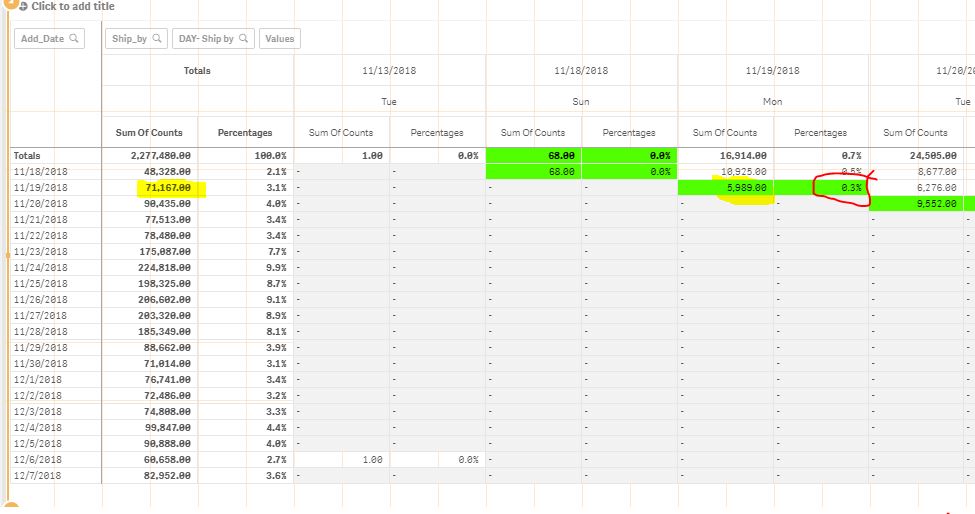
I am trying to total up by the date and not the total of entire data . For example attached :
Sum of Counts:5989
If I use total formula it takes: 2277480
Percent shows up as 0.3%
But I want to use
Sum of counts:5989
Total should be using: 71167
The correct percentage should be 8%
.
Could someone help me with this? Thank you in advance.