Unlock a world of possibilities! Login now and discover the exclusive benefits awaiting you.

- Qlik Community
- :
- Forums
- :
- Analytics & AI
- :
- Products & Topics
- :
- Visualization and Usability
- :
- Re: Top 20 based on measure value
- Subscribe to RSS Feed
- Mark Topic as New
- Mark Topic as Read
- Float this Topic for Current User
- Bookmark
- Subscribe
- Mute
- Printer Friendly Page

 ks20
ks20
- Mark as New
- Bookmark
- Subscribe
- Mute
- Subscribe to RSS Feed
- Permalink
- Report Inappropriate Content
Top 20 based on measure value
Hi All,
I need Top 20 records based on measure value in table view.
1 dimension and 3 measures.
Dimension: Customer
Measure 1: Calls
Measure 2: Total Calls
Measure 3: Conversion %
Need top 20 based on Measure 3, though I got top 20 using this formula
If(Rank(measure, 1, 0) <= 20,measure)
Using this formula I get top 20 but I also get null values for rest of the records, how do I remove thoes nulls values and only showcase top 20 records.
Thank you in advance!
- « Previous Replies
-
- 1
- 2
- Next Replies »
Accepted Solutions

 vinieme12
- Mark as New
- Bookmark
- Subscribe
- Mute
- Subscribe to RSS Feed
- Permalink
- Report Inappropriate Content
Use a Calculated Dimension , move the condition from measure to dimension to restrict top 20 customers
Dimension
Customer
= Aggr ( If(Rank(measure, 1, 0) <= 20, Customer) , Customer)
<< Uncheck Include Null Values for this Dimension
Measure
Calls
Total Calls
Conversion %
If a post helps to resolve your issue, please accept it as a Solution.
vinieme12
- Mark as New
- Bookmark
- Subscribe
- Mute
- Subscribe to RSS Feed
- Permalink
- Report Inappropriate Content
reverse the ranking using negative values
= Aggr ( If(Rank( -(measure), 1, 0) <= 20, Customer) , Customer)
If a post helps to resolve your issue, please accept it as a Solution.
vinieme12
- Mark as New
- Bookmark
- Subscribe
- Mute
- Subscribe to RSS Feed
- Permalink
- Report Inappropriate Content
Use a Calculated Dimension , move the condition from measure to dimension to restrict top 20 customers
Dimension
Customer
= Aggr ( If(Rank(measure, 1, 0) <= 20, Customer) , Customer)
<< Uncheck Include Null Values for this Dimension
Measure
Calls
Total Calls
Conversion %
If a post helps to resolve your issue, please accept it as a Solution.
ks20
- Mark as New
- Bookmark
- Subscribe
- Mute
- Subscribe to RSS Feed
- Permalink
- Report Inappropriate Content
Hi Vineeth,
Thanks for your response, it worked perfectly!
ks20
- Mark as New
- Bookmark
- Subscribe
- Mute
- Subscribe to RSS Feed
- Permalink
- Report Inappropriate Content
Hey Vineeth,
I was trying the same for bottom 20 records, where I used
= Aggr ( If(Rank(measure, 1, 0) >= 20, Customer) , Customer)
But I am getting more than 20 records. Kindly correct me if I am using wrong measure.
Thank you!
vinieme12
- Mark as New
- Bookmark
- Subscribe
- Mute
- Subscribe to RSS Feed
- Permalink
- Report Inappropriate Content
reverse the ranking using negative values
= Aggr ( If(Rank( -(measure), 1, 0) <= 20, Customer) , Customer)
If a post helps to resolve your issue, please accept it as a Solution.
ks20
- Mark as New
- Bookmark
- Subscribe
- Mute
- Subscribe to RSS Feed
- Permalink
- Report Inappropriate Content
Thank you once again.
ks20
- Mark as New
- Bookmark
- Subscribe
- Mute
- Subscribe to RSS Feed
- Permalink
- Report Inappropriate Content
Hello again @vinieme12 ,
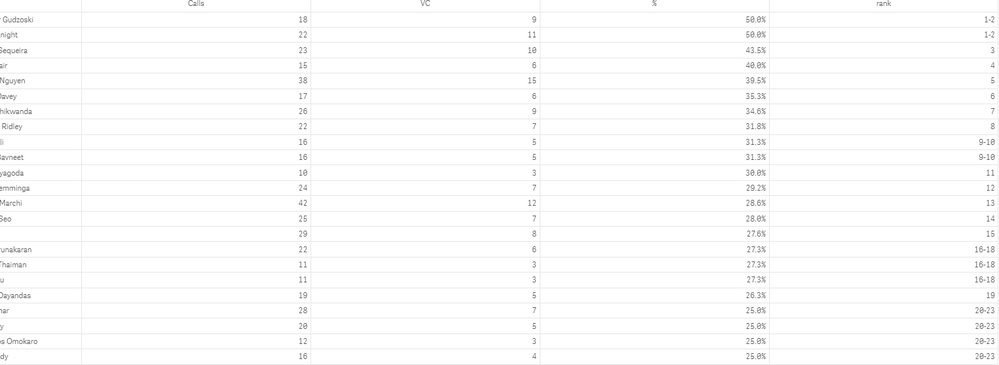
In the following scenario, for top 20 and bottom 20 values, if the rank is same for last 4 records, it showing all the 4 records with rank 20. Whereas, it should only show top 20 records, with respect to max measure value.
Any suggestion on the same? Thank you
vinieme12
- Mark as New
- Bookmark
- Subscribe
- Mute
- Subscribe to RSS Feed
- Permalink
- Report Inappropriate Content
do a weighted rank based on multiple measures
If a post helps to resolve your issue, please accept it as a Solution.
ks20
- Mark as New
- Bookmark
- Subscribe
- Mute
- Subscribe to RSS Feed
- Permalink
- Report Inappropriate Content
Can you explain it further?
 premacharya0903
- Mark as New
- Bookmark
- Subscribe
- Mute
- Subscribe to RSS Feed
- Permalink
- Report Inappropriate Content
Is there any way to display others for the remaining values , along with the top 20 ?

- « Previous Replies
-
- 1
- 2
- Next Replies »