Unlock a world of possibilities! Login now and discover the exclusive benefits awaiting you.

- Qlik Community
- :
- Forums
- :
- Analytics & AI
- :
- Products & Topics
- :
- Visualization and Usability
- :
- % Total stacked bar
- Subscribe to RSS Feed
- Mark Topic as New
- Mark Topic as Read
- Float this Topic for Current User
- Bookmark
- Subscribe
- Mute
- Printer Friendly Page

 Ronald
- Mark as New
- Bookmark
- Subscribe
- Mute
- Subscribe to RSS Feed
- Permalink
- Report Inappropriate Content
% Total stacked bar
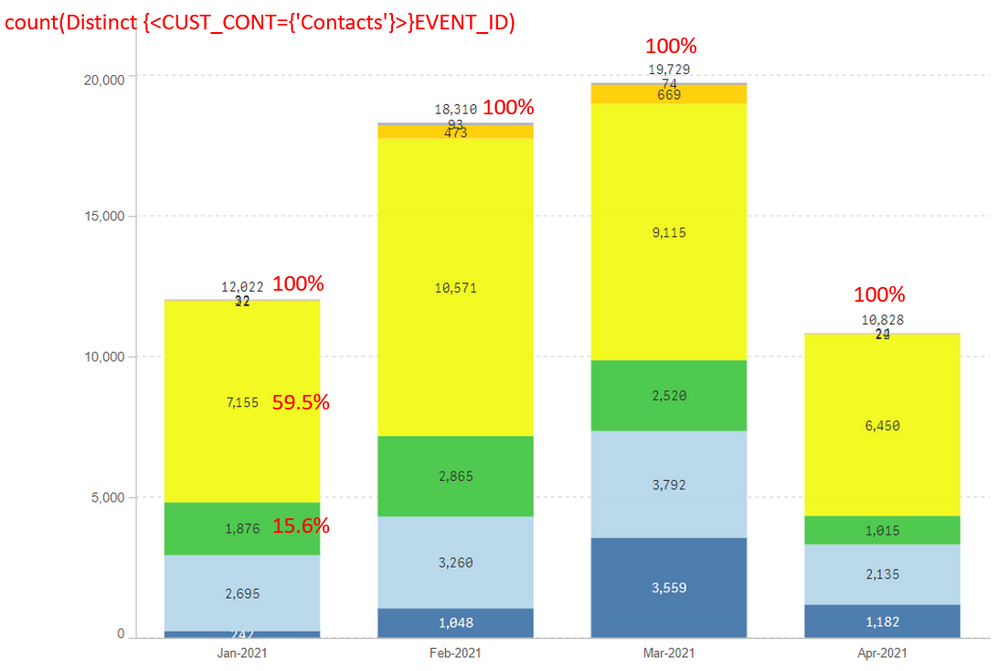
Hi everyone,
I have a problem with calculating the % total of each stacked bar; but it must be for every month, but for the calculation I use count (Distinct {<CUST_CONT={'CONTACTS'}>} Event_ID), then the final measure could be:
count (Distinct {<CUST_CONT={'CONTACTS'}>} Event_ID)/count (TOTAL <DATE>Distinct {<CUST_CONT={'CONTACTS'}>} Event_ID)
but don´t work.
Please your help.
Accepted Solutions

 JuanGerardo
- Mark as New
- Bookmark
- Subscribe
- Mute
- Subscribe to RSS Feed
- Permalink
- Report Inappropriate Content
Hi @Ronald, when using TOTAL you can use field names in <> to have subtotals. In your case you are showing months but subtotaling by days. I think you need to use a month field (create it as Month(DATE) in script if you need), then use it as chart dimension and subtotal by this field:
count (Distinct {<CUST_CONT={'CONTACTS'}>} Event_ID)/count (TOTAL <MONTH> Distinct {<CUST_CONT={'CONTACTS'}>} Event_ID)
JG
JuanGerardo
- Mark as New
- Bookmark
- Subscribe
- Mute
- Subscribe to RSS Feed
- Permalink
- Report Inappropriate Content
Hi @Ronald, when using TOTAL you can use field names in <> to have subtotals. In your case you are showing months but subtotaling by days. I think you need to use a month field (create it as Month(DATE) in script if you need), then use it as chart dimension and subtotal by this field:
count (Distinct {<CUST_CONT={'CONTACTS'}>} Event_ID)/count (TOTAL <MONTH> Distinct {<CUST_CONT={'CONTACTS'}>} Event_ID)
JG
Ronald
- Mark as New
- Bookmark
- Subscribe
- Mute
- Subscribe to RSS Feed
- Permalink
- Report Inappropriate Content
Thanks, it works!!! great.
