Unlock a world of possibilities! Login now and discover the exclusive benefits awaiting you.

Announcements
Want to see what's currently in public preview? We've pulled it all together in one place. Check it out here
- Qlik Community
- :
- Forums
- :
- Analytics & AI
- :
- Products & Topics
- :
- Visualization and Usability
- :
- Use a variable to name a title
Options
- Subscribe to RSS Feed
- Mark Topic as New
- Mark Topic as Read
- Float this Topic for Current User
- Bookmark
- Subscribe
- Mute
- Printer Friendly Page
Turn on suggestions
Auto-suggest helps you quickly narrow down your search results by suggesting possible matches as you type.
Showing results for

 BenjaminCoe1440
Contributor III
2023-02-01
10:23 AM
- Mark as New
- Bookmark
- Subscribe
- Mute
- Subscribe to RSS Feed
- Permalink
- Report Inappropriate Content
Use a variable to name a title
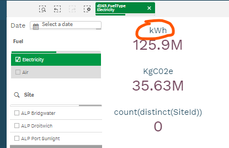

How do I get the title of the KPI highlighted in Orange to change when I select a different filter?
For instance, if "Air compressor" is selected then "m^3" will be the title of the KPI.
(NB: 'Fuel' filter is always only one selected value)
Labels (7)
Labels
- Subscribe by Topic:
-
Developers
-
expression
-
filter
-
General Question
-
Qlik Cloud
-
Script
-
Set Analysis
1,344 Views
1 Solution
Accepted Solutions

 vinieme12
Champion III
2023-02-01
10:42 PM
- Mark as New
- Bookmark
- Subscribe
- Mute
- Subscribe to RSS Feed
- Permalink
- Report Inappropriate Content
use MaxString() as below
vTitle = MaxString(Unit)
Then in Label use = '$(vTitle)'
Vineeth Pujari
If a post helps to resolve your issue, please accept it as a Solution.
If a post helps to resolve your issue, please accept it as a Solution.
1,321 Views
2 Replies
vinieme12
Champion III
2023-02-01
10:42 PM
- Mark as New
- Bookmark
- Subscribe
- Mute
- Subscribe to RSS Feed
- Permalink
- Report Inappropriate Content
use MaxString() as below
vTitle = MaxString(Unit)
Then in Label use = '$(vTitle)'
Vineeth Pujari
If a post helps to resolve your issue, please accept it as a Solution.
If a post helps to resolve your issue, please accept it as a Solution.
1,322 Views

 sidhiq91
Specialist II
2023-02-02
12:18 AM
- Mark as New
- Bookmark
- Subscribe
- Mute
- Subscribe to RSS Feed
- Permalink
- Report Inappropriate Content
@BenjaminCoe1440 A small addition to what @vinieme12 just mentioned above.
You can use something like below expression too:
= if(IsNull(GetFieldSelections(Fuel)), 'Total Value',$(Vtitle))
1,311 Views
