Unlock a world of possibilities! Login now and discover the exclusive benefits awaiting you.

- Qlik Community
- :
- Forums
- :
- Analytics & AI
- :
- Products & Topics
- :
- Visualization and Usability
- :
- Re: User Selects the interested columns
- Subscribe to RSS Feed
- Mark Topic as New
- Mark Topic as Read
- Float this Topic for Current User
- Bookmark
- Subscribe
- Mute
- Printer Friendly Page

 vidyasagar159
- Mark as New
- Bookmark
- Subscribe
- Mute
- Subscribe to RSS Feed
- Permalink
- Report Inappropriate Content
User Selects the interested columns
Hi,
New bee here please help. I have at least 50 columns in my data set. Currently, I am displaying 5 by default in a standard table. However, the requirement is to create a filter list of all the columns. So that User can choose his own columns and they will be replaced by the default columns. For this, I have done some sample any analysis but I am getting data as a cross join.
Step 1:
Test:
Load * Inline [
Fruits, Vegetables
Apple, Cabbage
Grapes, Onions,
Mangoes, Mint
];
Test1:
Load * Inline [
DIM
Fruits,
Vegetables,
];
Step2:
In the UI Added DIM to the filter. So that it will display both column names.
Step3:
Now added a PICK Match function in the table columns. But I am getting the result in the wrong way.
Column1 =pick(match(DIM,'Fruits',),Fruits)
Column2=pick(match(DIM,'Vegitables',),Vegitables)
Result:
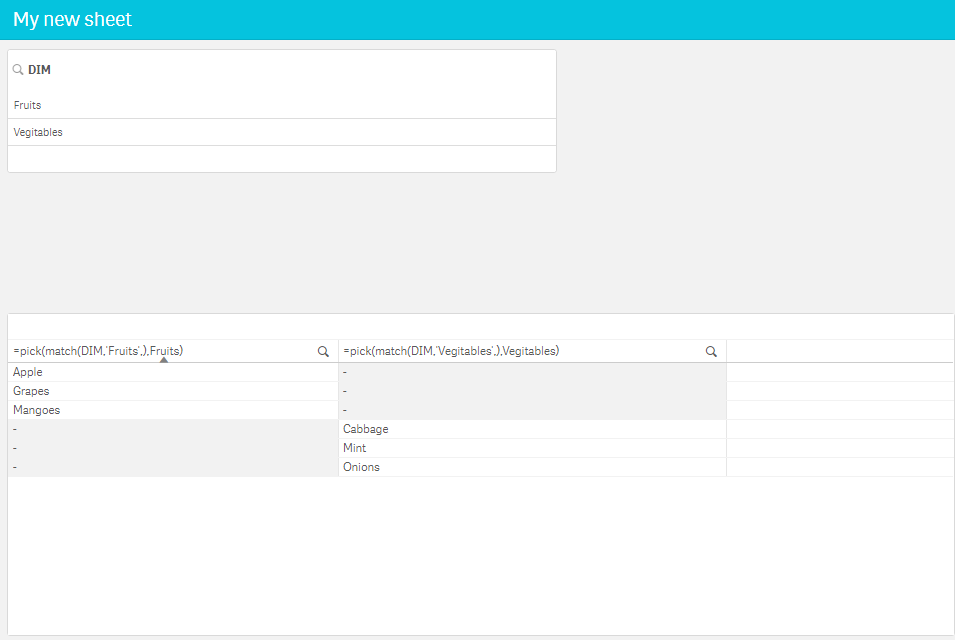
Expected Result:
| pick(match(DIM,'Fruits',),Fruits) | pick(match(DIM,'Vegitables',),Vegitables) |
| Apples | Cabbage |
| Grapes | Mint |
| Mangoes | Onions |
- Tags:
- chart

 Kushal_Chawda
- Mark as New
- Bookmark
- Subscribe
- Mute
- Subscribe to RSS Feed
- Permalink
- Report Inappropriate Content
Probably you need ad-hoc setup. Look at the blog below
vidyasagar159
- Mark as New
- Bookmark
- Subscribe
- Mute
- Subscribe to RSS Feed
- Permalink
- Report Inappropriate Content
Thanks for the response. But looks like QLIK SENSE doesn't support the syntax.
Kushal_Chawda
- Mark as New
- Bookmark
- Subscribe
- Mute
- Subscribe to RSS Feed
- Permalink
- Report Inappropriate Content
Which expression you are trying?
