Unlock a world of possibilities! Login now and discover the exclusive benefits awaiting you.

- Qlik Community
- :
- Forums
- :
- Analytics & AI
- :
- Products & Topics
- :
- Visualization and Usability
- :
- Re: Value changes after export to Excel
- Subscribe to RSS Feed
- Mark Topic as New
- Mark Topic as Read
- Float this Topic for Current User
- Bookmark
- Subscribe
- Mute
- Printer Friendly Page

 Shahzad_Ahsan
- Mark as New
- Bookmark
- Subscribe
- Mute
- Subscribe to RSS Feed
- Permalink
- Report Inappropriate Content
Value changes after export to Excel
Hi Experts
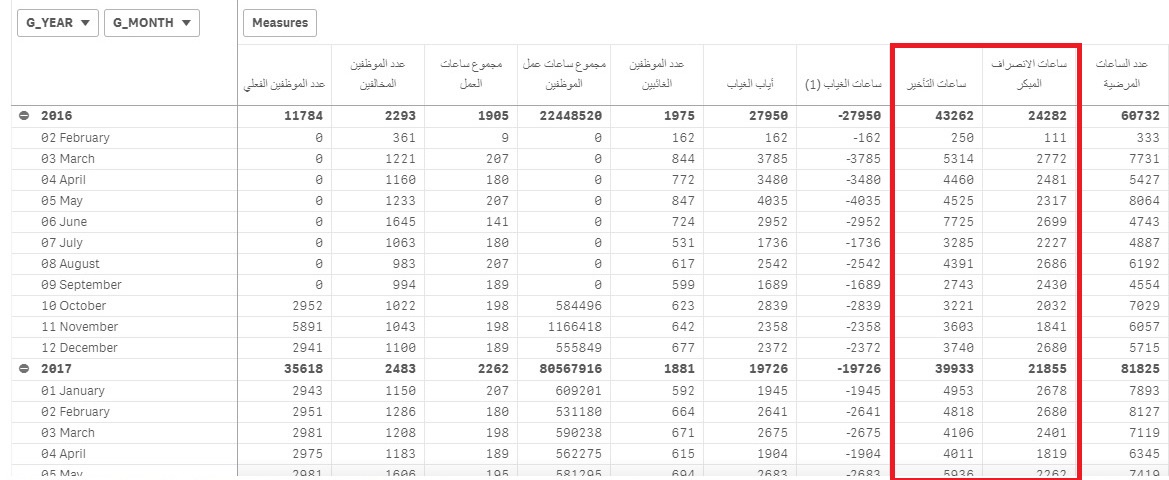
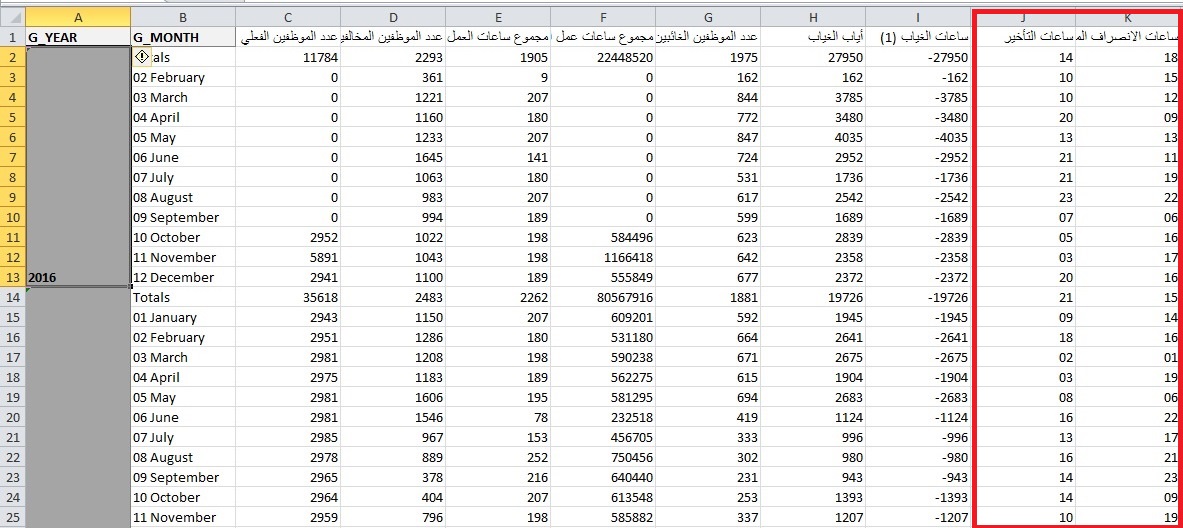
I am facing problem with hours. Please check the highlighted column of snapshot.
The value changes after exporting. I am using interval function that is why i am facing problem.
My measure is : interval(sum(early_hours),'hh')
Please suggest some changes in measure expression only. I don't want to make any changes in excel.
Accepted Solutions
Shahzad_Ahsan
- Mark as New
- Bookmark
- Subscribe
- Mute
- Subscribe to RSS Feed
- Permalink
- Report Inappropriate Content
After lots of research, solved by changing the measure:
Floor( interval(sum(early_hours),'hh')*24)
Number Format: Auto

 Chanty4u
- Mark as New
- Bookmark
- Subscribe
- Mute
- Subscribe to RSS Feed
- Permalink
- Report Inappropriate Content
try to set custom number format in setting in qliksense i think
Shahzad_Ahsan
- Mark as New
- Bookmark
- Subscribe
- Mute
- Subscribe to RSS Feed
- Permalink
- Report Inappropriate Content
Hi chanty
When I go to excel and set custom format to "
Shahzad_Ahsan
- Mark as New
- Bookmark
- Subscribe
- Mute
- Subscribe to RSS Feed
- Permalink
- Report Inappropriate Content
I have made number formatting as 'Duration' and Format Pattern as 'hh' . then also not working.
Shahzad_Ahsan
- Mark as New
- Bookmark
- Subscribe
- Mute
- Subscribe to RSS Feed
- Permalink
- Report Inappropriate Content
After lots of research, solved by changing the measure:
Floor( interval(sum(early_hours),'hh')*24)
Number Format: Auto
