Unlock a world of possibilities! Login now and discover the exclusive benefits awaiting you.

- Qlik Community
- :
- Forums
- :
- Analytics & AI
- :
- Products & Topics
- :
- Visualization and Usability
- :
- Re: Values Null on Script Qlikview
- Subscribe to RSS Feed
- Mark Topic as New
- Mark Topic as Read
- Float this Topic for Current User
- Bookmark
- Subscribe
- Mute
- Printer Friendly Page

 Fanch
Fanch
- Mark as New
- Bookmark
- Subscribe
- Mute
- Subscribe to RSS Feed
- Permalink
- Report Inappropriate Content
Values Null on Script Qlikview
Hi Everybody,
I need to build a historic table by An QlikView Script 🤔.
My script begin like this :
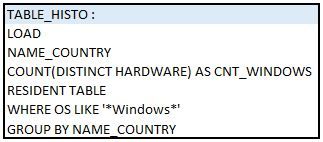
And the results :

But i want to have a result like this with the value 0 that replace the character "-" :

I've tried this 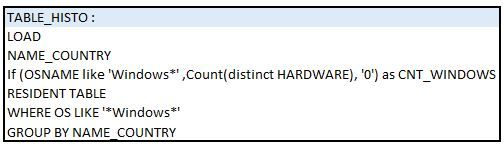
The script show me a issue "Invalid Expression" 🤕
Can you help me ?
Thanks,
Fanch
Accepted Solutions
Fanch
- Mark as New
- Bookmark
- Subscribe
- Mute
- Subscribe to RSS Feed
- Permalink
- Report Inappropriate Content
Hi everybody,
Find the solution and, for me, it's better to do like this.
After Load TABLE_HISTO, i build a another table :
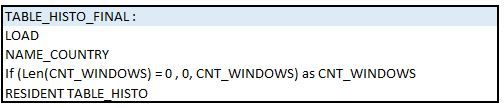
Thanks to Agigliotti, MayilVahanan and Ksrinivasan 😎
Have a nice day !

 agigliotti
- Mark as New
- Bookmark
- Subscribe
- Mute
- Subscribe to RSS Feed
- Permalink
- Report Inappropriate Content
Hi @Fanch ,
Maybe you can try with:
Count( Distinct Alt(HARDWARE, 0) ) AS CNT_WINDOWS
I hope it can help.
Best Regards
Follow me on my LinkedIn | Know Gamma Informatica at gammainformatica.it
Fanch
- Mark as New
- Bookmark
- Subscribe
- Mute
- Subscribe to RSS Feed
- Permalink
- Report Inappropriate Content
Hi agigliotti,
Thanks for your help, but i always have the same issue even with the try :
Alt( Count(distinct MATNUM)), 0) 🤔
 MayilVahanan
- Mark as New
- Bookmark
- Subscribe
- Mute
- Subscribe to RSS Feed
- Permalink
- Report Inappropriate Content
HI @Fanch
I think, country2 doesn't have OS like windows. In that case try like below,
T:
Load * Inline
[
Country, Hardware, OS
1, 20, Windows 10
2,30,Linux
3, 35,Windows 9
];
Join
Load Country, Count(DISTINCT Hardware) as CNT Resident T where OS like '*windo*' Group by Country;
Final:
NoConcatenate
Load Country, Alt(CNT,0) as CNT, Hardware, OS Resident T;
DROP Table T;
Change the column & table name based on ur source;
Please close the thread by marking correct answer & give likes if you like the post.

 Ksrinivasan
- Mark as New
- Bookmark
- Subscribe
- Mute
- Subscribe to RSS Feed
- Permalink
- Report Inappropriate Content
hi,
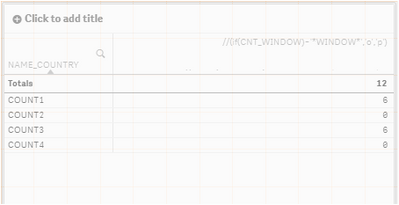
My dummy data:
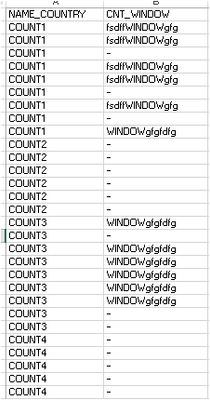
DIM: NAME_COUNTRY,
MEASURE: Sum(If(WildMatch(CNT_WINDOW,'*WINDOW*'),1,0))
ksrinivasan
Fanch
- Mark as New
- Bookmark
- Subscribe
- Mute
- Subscribe to RSS Feed
- Permalink
- Report Inappropriate Content
Hi everybody,
Find the solution and, for me, it's better to do like this.
After Load TABLE_HISTO, i build a another table :
Thanks to Agigliotti, MayilVahanan and Ksrinivasan 😎
Have a nice day !
