Unlock a world of possibilities! Login now and discover the exclusive benefits awaiting you.

Announcements
Share your agentic AI experience, learn from others, and earn a new badge: Put Agentic AI to Work
- Qlik Community
- :
- Forums
- :
- Analytics & AI
- :
- Products & Topics
- :
- Visualization and Usability
- :
- Visualization App QS
Options
- Subscribe to RSS Feed
- Mark Topic as New
- Mark Topic as Read
- Float this Topic for Current User
- Bookmark
- Subscribe
- Mute
- Printer Friendly Page
Turn on suggestions
Auto-suggest helps you quickly narrow down your search results by suggesting possible matches as you type.
Showing results for

 ezec1807
Creator
2018-04-24
09:10 AM
- Mark as New
- Bookmark
- Subscribe
- Mute
- Subscribe to RSS Feed
- Permalink
- Report Inappropriate Content
Visualization App QS
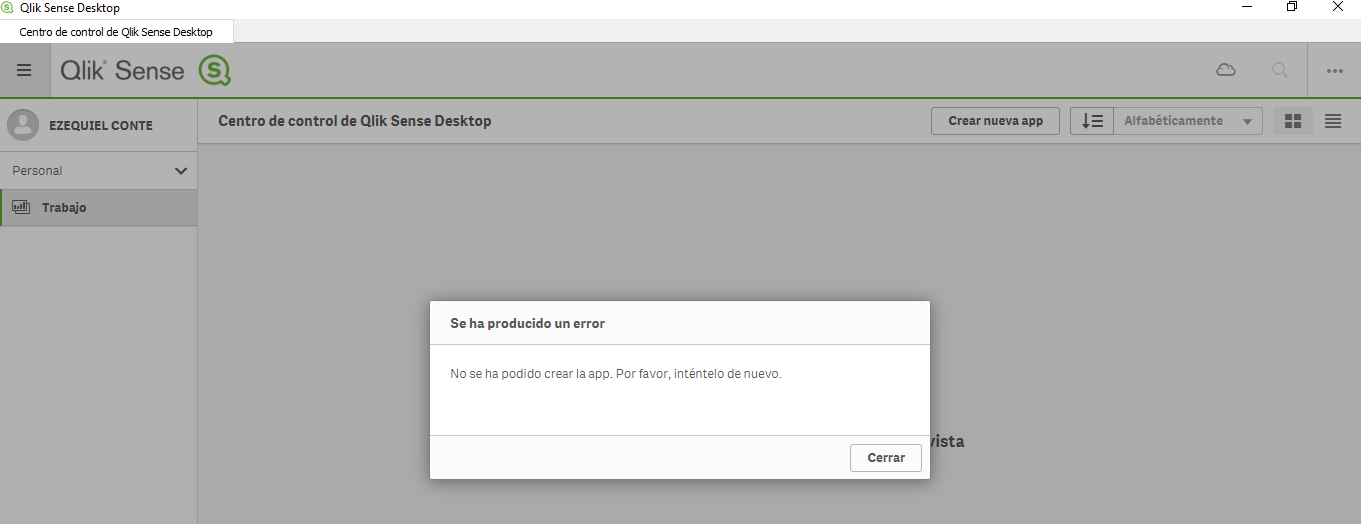
Good! I reinstalled Qlik Sense Desktop and when I go to the control center there is no app. The developed app is in "C: \ Users \ {user} \ Documents \ Qlik \ Sense \ Apps". I installed it again but the same thing happens. Also when I want to create an app I get the msj that is shown in the image. It lets me drag app (.qvf) to the control center and opens them without problem. Thank you! regards
.png)
808 Views
1 Reply

 bwisealiahmad
Partner - Specialist
2018-07-23
11:39 AM
- Mark as New
- Bookmark
- Subscribe
- Mute
- Subscribe to RSS Feed
- Permalink
- Report Inappropriate Content
Hi,
So in the "C:\Users\{UserName}\Documents\Qlik\Sense\Apps" you have your apps? And you can confirm they are .qvf files?
754 Views
