Unlock a world of possibilities! Login now and discover the exclusive benefits awaiting you.

- Qlik Community
- :
- Forums
- :
- Analytics & AI
- :
- Products & Topics
- :
- Visualization and Usability
- :
- Re: What is wrong with my date set expression
- Subscribe to RSS Feed
- Mark Topic as New
- Mark Topic as Read
- Float this Topic for Current User
- Bookmark
- Subscribe
- Mute
- Printer Friendly Page

- Mark as New
- Bookmark
- Subscribe
- Mute
- Subscribe to RSS Feed
- Permalink
- Report Inappropriate Content
What is wrong with my date set expression
Hi guys,
I can't get set expressions working with dates. e.g. Show me only row counts for first day of last month.
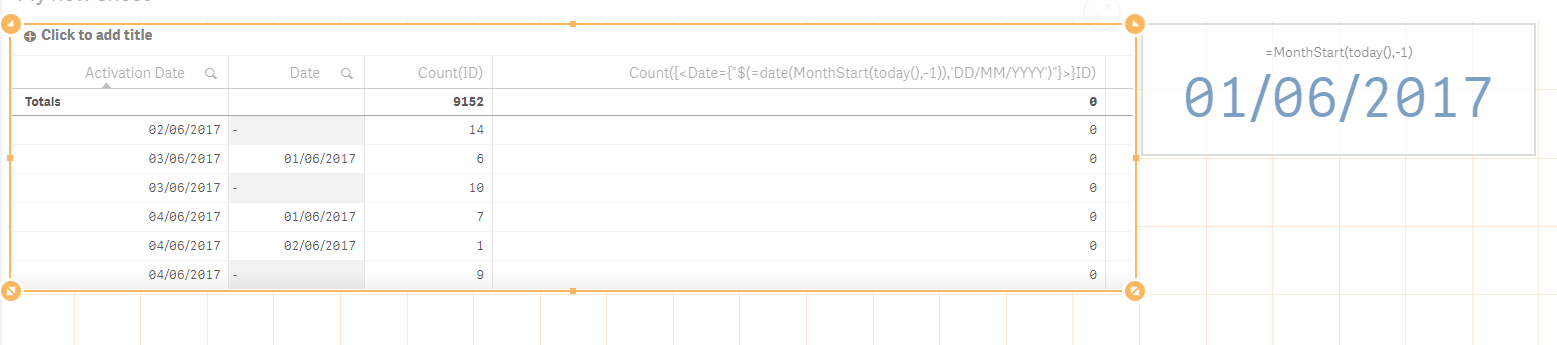
The column is calculated as:
Count({<Date={"$(=date(MonthStart(today(),-1)),'DD/MM/YYYY')"}>}ID)
I would expect to see values in the 2nd and 4th row, but instead I see 0 for every row. The date format seems to match (as you can see in KPI indicator). The data model is super simple:
Load
ID,
date(date#(date, 'YYYY-MM-DD'), 'DD/MM/YYYY') as [Date],
date(date#(activation_date, 'YYYY-MM-DD'), 'DD/MM/YYYY') as [Activation Date];
Select
ID,
cast(created as date) as date,
cast(activation_date as date) as activation_date
from table;
What am I doing wrong?

 rittermd
- Mark as New
- Bookmark
- Subscribe
- Mute
- Subscribe to RSS Feed
- Permalink
- Report Inappropriate Content
I would try displaying the entire expression to get the first day of the month just to confirm that you are still getting what you expect.
date(MonthStart(today(),-1)),'DD/MM/YYYY')

 sunny_talwar
- Mark as New
- Bookmark
- Subscribe
- Mute
- Subscribe to RSS Feed
- Permalink
- Report Inappropriate Content
May be try this
Count({<Date={"$(=Date(MonthStart(Today(), -1), 'DD/MM/YYYY'))"}>} ID)
- Mark as New
- Bookmark
- Subscribe
- Mute
- Subscribe to RSS Feed
- Permalink
- Report Inappropriate Content
Hi,
better create a variable for that and use it in the expression.
Regards,
Sadasiva
 Kushal_Chawda
- Mark as New
- Bookmark
- Subscribe
- Mute
- Subscribe to RSS Feed
- Permalink
- Report Inappropriate Content
Error in your expression, ')' is missing for $()
Count({<Date={"$(=date(MonthStart(today(),-1)),'DD/MM/YYYY')"}>}ID)
Change it to below
Count({<Date={"$(=date(MonthStart(today(),-1),'DD/MM/YYYY'))"}>}ID)
sunny_talwar
- Mark as New
- Bookmark
- Subscribe
- Mute
- Subscribe to RSS Feed
- Permalink
- Report Inappropriate Content
Cheating karta hai meri 
Kushal_Chawda
- Mark as New
- Bookmark
- Subscribe
- Mute
- Subscribe to RSS Feed
- Permalink
- Report Inappropriate Content
samjana chahiye na bhai
sunny_talwar
- Mark as New
- Bookmark
- Subscribe
- Mute
- Subscribe to RSS Feed
- Permalink
- Report Inappropriate Content
Hahahaha 
Sahi bolta hai tu