Unlock a world of possibilities! Login now and discover the exclusive benefits awaiting you.

- Qlik Community
- :
- Forums
- :
- Analytics & AI
- :
- Products & Topics
- :
- Visualization and Usability
- :
- Re: While and If statements
- Subscribe to RSS Feed
- Mark Topic as New
- Mark Topic as Read
- Float this Topic for Current User
- Bookmark
- Subscribe
- Mute
- Printer Friendly Page

 LesJean
- Mark as New
- Bookmark
- Subscribe
- Mute
- Subscribe to RSS Feed
- Permalink
- Report Inappropriate Content
While and If statements
Hello everyone,
I'm new to Qlik Sense so I'm sorry if this is a trivial question.
I was wondering how to implement the following logic (written in pseudo-code) in Qlik Sense (or even if it is possible at all to do so):
//tblCurrent
//tblNew

While(//check every row in tblCurrent)
{
    If(tblCurrent_Field1 = "x") Then
    {
       If(tblCurrent_Field2 = "Option1") Then
       {
           //Create a row in tblNew with tblNew_FieldReason = "Option1")
       }
       If(tblCurrent_Field2 = "Option2") Then
       {
           //Create a row in tblNew with tblNew_FieldReason = "Option2")
       }
       If(tblCurrent_Field2 = "Option3") Then
       {
           //Create a row in tblNew with tblNew_FieldReason = "Option3")
       }
       If(tblCurrent_Field2 = " ") Then
       {
           //Do not load this row inside tblNew
       }
    }
}
If it possible, I can't seem to find the exact syntax I need to make this work.
Any help would be greatly appreciated.
Thank you,
LesJean
- Tags:
- if
Accepted Solutions

 kaanerisen
- Mark as New
- Bookmark
- Subscribe
- Mute
- Subscribe to RSS Feed
- Permalink
- Report Inappropriate Content
Hi LesJean,
I am not pretty sure what you need with this explanation. If you would share a sample data and sample output for the issue, ıt would be easy to understand for everyone.
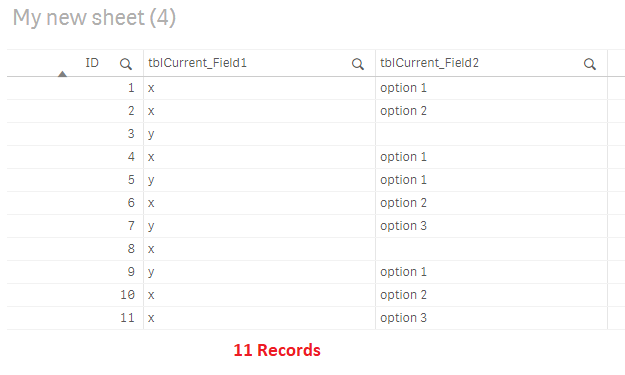
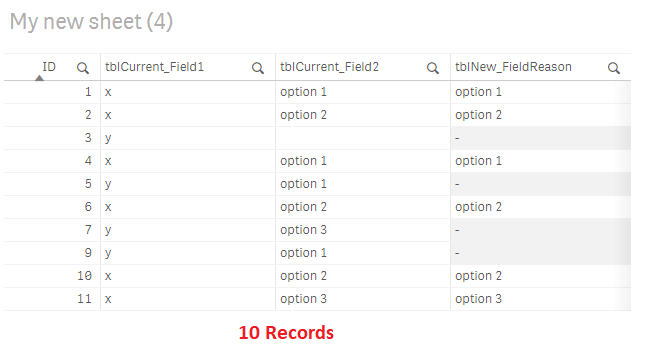
If I got this correctly, below script will work for you. CurrentTable is created for sample data.
CurrentTable:
load * Inline [
ID,tblCurrent_Field1,tblCurrent_Field2
1,'x','option 1'
2,'x','option 2'
3,'y',''
4,'x','option 1'
5,'y','option 1'
6,'x','option 2'
7,'y','option 3'
8,'x',''
9,'y','option 1'
10,'x','option 2'
11,'x','option 3'
];
NoConcatenate
NewTable:
load
ID,
tblCurrent_Field1,
tblCurrent_Field2,
IF(tblCurrent_Field1='x',
IF(tblCurrent_Field2='option 1','option 1',
IF(tblCurrent_Field2='option 2','option 2',
IF(tblCurrent_Field2='option 3','option 3'
)))) as tblNew_FieldReason
Resident CurrentTable
where not (tblCurrent_Field1='x' and len(tblCurrent_Field2)=0);
drop table CurrentTable;
Sample Data:
New Table:
Hope it helps..

 m_woolf
- Mark as New
- Bookmark
- Subscribe
- Mute
- Subscribe to RSS Feed
- Permalink
- Report Inappropriate Content
Try:
If(tblCurrent_Field1 = 'x' and tblCurrent_Field2 = 'Option1', 'Option1',
If(tblCurrent_Field2 = Option2', 'Option2',
If(tblCurrent_Field2 = 'Option3','Option3'))) as tblNew_FieldReason,
LesJean
- Mark as New
- Bookmark
- Subscribe
- Mute
- Subscribe to RSS Feed
- Permalink
- Report Inappropriate Content
Hello Mwoolf,
Firstly, I want to thank you for your quick answer!
I seem to be getting a syntax error after the first comma as shown in the picture below.

Do you have any clue as to why I might be getting this error?
Thank you,
LesJean
kaanerisen
- Mark as New
- Bookmark
- Subscribe
- Mute
- Subscribe to RSS Feed
- Permalink
- Report Inappropriate Content
Hi LesJean,
I am not pretty sure what you need with this explanation. If you would share a sample data and sample output for the issue, ıt would be easy to understand for everyone.
If I got this correctly, below script will work for you. CurrentTable is created for sample data.
CurrentTable:
load * Inline [
ID,tblCurrent_Field1,tblCurrent_Field2
1,'x','option 1'
2,'x','option 2'
3,'y',''
4,'x','option 1'
5,'y','option 1'
6,'x','option 2'
7,'y','option 3'
8,'x',''
9,'y','option 1'
10,'x','option 2'
11,'x','option 3'
];
NoConcatenate
NewTable:
load
ID,
tblCurrent_Field1,
tblCurrent_Field2,
IF(tblCurrent_Field1='x',
IF(tblCurrent_Field2='option 1','option 1',
IF(tblCurrent_Field2='option 2','option 2',
IF(tblCurrent_Field2='option 3','option 3'
)))) as tblNew_FieldReason
Resident CurrentTable
where not (tblCurrent_Field1='x' and len(tblCurrent_Field2)=0);
drop table CurrentTable;
Sample Data:
New Table:
Hope it helps..
m_woolf
- Mark as New
- Bookmark
- Subscribe
- Mute
- Subscribe to RSS Feed
- Permalink
- Report Inappropriate Content
I don't see any reason why you would get a syntax error with this code.
You should look at the code from Kaanerisen. My code looks at Current_Field1 ='x' for only the first if.
Kaanerisen's would use that logic for all 3 ifs.
LesJean
- Mark as New
- Bookmark
- Subscribe
- Mute
- Subscribe to RSS Feed
- Permalink
- Report Inappropriate Content
Kaanerisen solutions seems to be working for me.
My thanks to both of you for your time.
