Unlock a world of possibilities! Login now and discover the exclusive benefits awaiting you.

- Qlik Community
- :
- Forums
- :
- Analytics & AI
- :
- Products & Topics
- :
- Visualization and Usability
- :
- Re: Wrong Sum in Table
- Subscribe to RSS Feed
- Mark Topic as New
- Mark Topic as Read
- Float this Topic for Current User
- Bookmark
- Subscribe
- Mute
- Printer Friendly Page

 beck_bakytbek
- Mark as New
- Bookmark
- Subscribe
- Mute
- Subscribe to RSS Feed
- Permalink
- Report Inappropriate Content
Wrong Sum in Table
Hi Folks,
i got a question (please see attached screenshot):
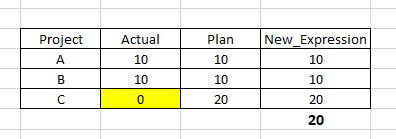
For my Project C in Column: New_Expression i created the following expression: if(sum(Actual) = 0, sum(Plan), sum(Actual)) this expression does work.
But as total Sum i have only 20 instead 40, i am using in this case the straight table. My expected Output is: Sum = 40
Does anobody know how to resolve this issue.
Thanks a lot in advance for any suggestions and feedbacks
Bek
Accepted Solutions

 lironbaram
- Mark as New
- Bookmark
- Subscribe
- Mute
- Subscribe to RSS Feed
- Permalink
- Report Inappropriate Content
yes you can do it with aggr() function
sum(aggr( if(sum(Actual) = 0, sum(Plan), sum(Actual)),Project))- Mark as New
- Bookmark
- Subscribe
- Mute
- Subscribe to RSS Feed
- Permalink
- Report Inappropriate Content
Hi ,
Qlik engine is calculating the total in app level using the expression, it doesn't sum the rows
so in your case on app level sum(Actual)>0 so you get 20 as the total
you need to change the total function in the measure from Auto to Sum

beck_bakytbek
- Mark as New
- Bookmark
- Subscribe
- Mute
- Subscribe to RSS Feed
- Permalink
- Report Inappropriate Content
Hi Lironbaram, first of all thanks a lot for your time and help, Yes it is a good suggestion. I wanted to know, is that possible to resolve this issue maybe by using of functin: Aggr ().
Do you have any idea?
Thanks a lot
lironbaram
- Mark as New
- Bookmark
- Subscribe
- Mute
- Subscribe to RSS Feed
- Permalink
- Report Inappropriate Content
yes you can do it with aggr() function
sum(aggr( if(sum(Actual) = 0, sum(Plan), sum(Actual)),Project))- Mark as New
- Bookmark
- Subscribe
- Mute
- Subscribe to RSS Feed
- Permalink
- Report Inappropriate Content
Hi Lironbaram, thanks a lot for your help and time
