Unlock a world of possibilities! Login now and discover the exclusive benefits awaiting you.

- Qlik Community
- :
- Forums
- :
- Analytics & AI
- :
- Products & Topics
- :
- Visualization and Usability
- :
- Re: accumulate values by a certain column
- Subscribe to RSS Feed
- Mark Topic as New
- Mark Topic as Read
- Float this Topic for Current User
- Bookmark
- Subscribe
- Mute
- Printer Friendly Page

 yacine
- Mark as New
- Bookmark
- Subscribe
- Mute
- Subscribe to RSS Feed
- Permalink
- Report Inappropriate Content
accumulate values by a certain column
hello everyone,
i want to sum values and accumulate them depending on a certain dimension.
i have this table:
| Quarter | Depart | Prod |
| Q1 | A | 10 |
| Q1 | A | 22 |
| Q1 | B | 61 |
| Q2 | A | 651 |
| Q2 | B | 651 |
| Q2 | B | 8 |
| Q3 | A | 51 |
| Q3 | B | 84 |
| Q3 | A | 654 |
| Q4 | A | 132 |
| Q4 | B | 321 |
| Q4 | A | 15 |
and i want to sum the Prod by Quarter and Depart, amd then accumulate the Prod values (as show in the table below):
| Quarter | Depart | Prod | Accum. Prod |
| Q1 | A | 32 | 32 |
| Q2 | A | 651 | 683 |
| Q3 | A | 705 | 1388 |
| Q4 | A | 15 | 1403 |
| Q1 | B | 61 | 61 |
| Q2 | B | 659 | 720 |
| Q3 | B | 84 | 804 |
| Q4 | B | 321 | 1125 |
thank you in advance.
Accepted Solutions

 Ruhulessin
- Mark as New
- Bookmark
- Subscribe
- Mute
- Subscribe to RSS Feed
- Permalink
- Report Inappropriate Content
Hi @yacine,
There is also a possibility to calculate this in script, by creating the right order and using Previous() and Peek().
PFA my example app which follows this script:
t1:
LOAD * INLINE [
Quarter, Depart, Prod
Q1, A, 10
Q1, A, 22
Q1, B, 61
Q2, A, 651
Q2, B, 651
Q2, B, 8
Q3, A, 51
Q3, B, 84
Q3, A, 654
Q4, A, 132
Q4, B, 321
Q4, A, 15
];
NOCONCATENATE
t2:
LOAD
Quarter
, Depart
, Sum(Prod) AS Prod
RESIDENT t1
GROUP BY
Quarter
, Depart
;
DROP TABLE t1
;
NOCONCATENATE
t3:
LOAD *
, If(Previous(Depart) = Depart
, Peek(ProdAcc, -1) + Prod
, Prod
) AS ProdAcc
;
LOAD *
RESIDENT t2
ORDER BY
Depart, Quarter Asc
;
DROP TABLE t2
;

-Ruben
 SchalkF
- Mark as New
- Bookmark
- Subscribe
- Mute
- Subscribe to RSS Feed
- Permalink
- Report Inappropriate Content
Hi,
For your first question:
You can use aggr() to accomplish this (For your dataset, since it is small and simple, if you just do a Sum(Prod), it should already aggregate on Quarter,Depart):
Aggr(Sum(Prod), Quarter, Depart)
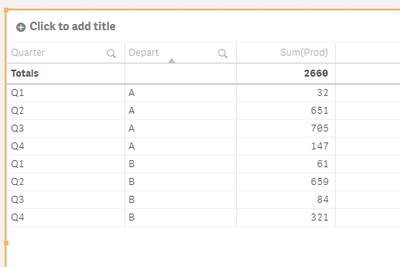
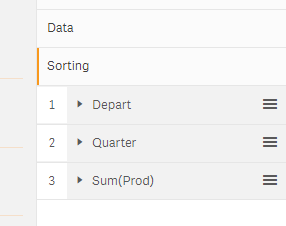
I just change the sorting to sort on Depart first and then on Quarter:
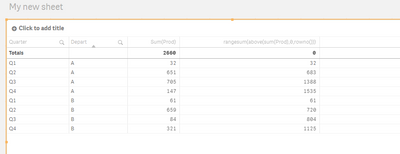
For you second requirement please have a look at the below thread:
https://community.qlik.com/t5/App-Development/Accumulation-in-Qlik-Sense/td-p/670706
rangesum(above(sum(Prod),0,rowno()))
Kind regards
Ruhulessin
- Mark as New
- Bookmark
- Subscribe
- Mute
- Subscribe to RSS Feed
- Permalink
- Report Inappropriate Content
Hi @yacine,
There is also a possibility to calculate this in script, by creating the right order and using Previous() and Peek().
PFA my example app which follows this script:
t1:
LOAD * INLINE [
Quarter, Depart, Prod
Q1, A, 10
Q1, A, 22
Q1, B, 61
Q2, A, 651
Q2, B, 651
Q2, B, 8
Q3, A, 51
Q3, B, 84
Q3, A, 654
Q4, A, 132
Q4, B, 321
Q4, A, 15
];
NOCONCATENATE
t2:
LOAD
Quarter
, Depart
, Sum(Prod) AS Prod
RESIDENT t1
GROUP BY
Quarter
, Depart
;
DROP TABLE t1
;
NOCONCATENATE
t3:
LOAD *
, If(Previous(Depart) = Depart
, Peek(ProdAcc, -1) + Prod
, Prod
) AS ProdAcc
;
LOAD *
RESIDENT t2
ORDER BY
Depart, Quarter Asc
;
DROP TABLE t2
;
-Ruben
yacine
- Mark as New
- Bookmark
- Subscribe
- Mute
- Subscribe to RSS Feed
- Permalink
- Report Inappropriate Content
thank you very much @Ruhulessin
