Unlock a world of possibilities! Login now and discover the exclusive benefits awaiting you.

- Qlik Community
- :
- Forums
- :
- Analytics & AI
- :
- Products & Topics
- :
- Visualization and Usability
- :
- Re: adding values to empty fields on script level
- Subscribe to RSS Feed
- Mark Topic as New
- Mark Topic as Read
- Float this Topic for Current User
- Bookmark
- Subscribe
- Mute
- Printer Friendly Page

- Mark as New
- Bookmark
- Subscribe
- Mute
- Subscribe to RSS Feed
- Permalink
- Report Inappropriate Content
adding values to empty fields on script level
Hi!
I have 2 tables:
Table [ProductID] contains all product details including ListingId (unique identifier) and ProductColor.
ListingId | ProductColor |
1 | Beige |
2 | Beige |
3 | Black |
4 | Black |
5 | Black |
6 | Blue |
Table [Sales] contains all sales data for sold products including LIstingId and QuantitySold
ListingId | QuantitySold |
1 | 1 |
3 | 12 |
I want to add a “Sold/unsold” flag so I can analyze the unsold items. So I tried to add the “Sold/unsold” field to the ProductID table so that it looks like this:
ListingId | ProductColor | Sold/unsold |
1 | Beige | 1 |
2 | Beige | 0 |
3 | Black | 1 |
4 | Black | 0 |
5 | Black | 0 |
6 | Blue | 0 |
I added the following script after loading the 2 tables but the Sold/unsold Flag shows “-“ for the unsold items so I can’t use it in my analysis.
Join (productID)load [ListingId],
if(LEN(Trim(QuantitySold))=0,0,1) as [sold/unsold] resident Sales;
I also tried:
Join(productID)load [ListingId],
if(IsNull(QuantitySold),0,1) as [sold/unsold] resident Sales;
This what the data looks like:

Where did I go wrong?
- Tags:
- empty field
Accepted Solutions

 OmarBenSalem
- Mark as New
- Bookmark
- Subscribe
- Mute
- Subscribe to RSS Feed
- Permalink
- Report Inappropriate Content
You can use Mapping table as follow:
Mappingtable:
Mapping Load * Inline [
ListingId,QuantitySold
1,1
3,12
];
table:
load * , if (Quantity=0,0,1) as Flag;
load*, ApplyMap('Mappingtable',ListingId,0) as Quantity;
Load * Inline [
ListingId,ProductColor
1,Beige
2,Beige
3,Black
4,Black
5,Black
6,Blue
];
Result:
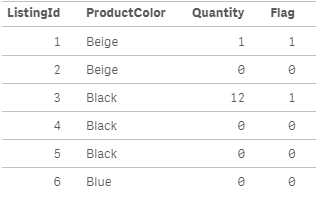
OmarBenSalem
- Mark as New
- Bookmark
- Subscribe
- Mute
- Subscribe to RSS Feed
- Permalink
- Report Inappropriate Content
You can use Mapping table as follow:
Mappingtable:
Mapping Load * Inline [
ListingId,QuantitySold
1,1
3,12
];
table:
load * , if (Quantity=0,0,1) as Flag;
load*, ApplyMap('Mappingtable',ListingId,0) as Quantity;
Load * Inline [
ListingId,ProductColor
1,Beige
2,Beige
3,Black
4,Black
5,Black
6,Blue
];
Result:
- Mark as New
- Bookmark
- Subscribe
- Mute
- Subscribe to RSS Feed
- Permalink
- Report Inappropriate Content
Test:
Mapping
Load * inline [
ListingId,QuantitySold
1,1
3,12];
A:
Load *,if(ApplyMap('Test',ListingId,0)<>0,1,0) inline [
ListingId,ProductColor
1,Beige
2,Beige
3,Black
4,Black
5,Black
6,Blue];
- Mark as New
- Bookmark
- Subscribe
- Mute
- Subscribe to RSS Feed
- Permalink
- Report Inappropriate Content
Thanks Omar and Shiva! I was able to get this done with your instructions on apply map.
Can you please let me know what was wrong with my join script logic that it didn't work?