Unlock a world of possibilities! Login now and discover the exclusive benefits awaiting you.

- Qlik Community
- :
- Forums
- :
- Analytics & AI
- :
- Products & Topics
- :
- Visualization and Usability
- :
- Re: calculation help
- Subscribe to RSS Feed
- Mark Topic as New
- Mark Topic as Read
- Float this Topic for Current User
- Bookmark
- Subscribe
- Mute
- Printer Friendly Page

 mahitham
- Mark as New
- Bookmark
- Subscribe
- Mute
- Subscribe to RSS Feed
- Permalink
- Report Inappropriate Content
calculation help
Hi Experts,
Can any one please help me on below requirement.
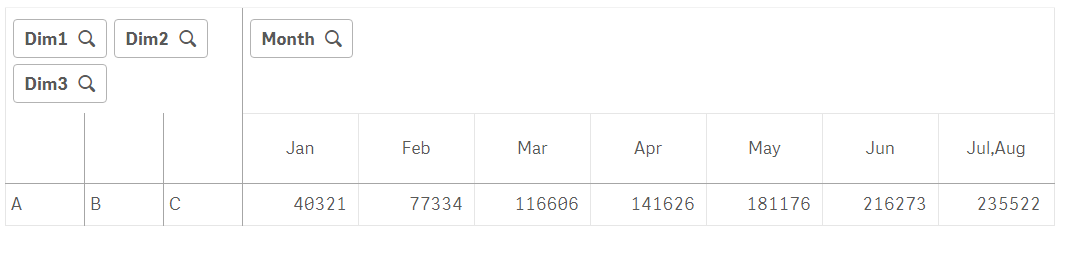
In the below pivot table I have 3 Dimensions, Month Column and One measure is
Sum({<Agency={'USA'}>}Sales) here I am getting below output.
In the below screen shot right now getting each month related sales.
The requirement is I have to show current month + Previous month sales under each month instead of actual month sales as mentioned in the expected output row
Please help me on this.
Thanks in advance
Accepted Solutions

 petter
- Mark as New
- Bookmark
- Subscribe
- Mute
- Subscribe to RSS Feed
- Permalink
- Report Inappropriate Content
I think this will calculate the right sum for you:
RangeSum( Before(TOTAL Sum(Sales),0,ColumnNo(TOTAL)))

- Mark as New
- Bookmark
- Subscribe
- Mute
- Subscribe to RSS Feed
- Permalink
- Report Inappropriate Content
The simplest way is using before() function
Sum({<Agency={'USA'}>}Sales) + before(Sum({<Agency={'USA'}>}Sales), 1)
mahitham
- Mark as New
- Bookmark
- Subscribe
- Mute
- Subscribe to RSS Feed
- Permalink
- Report Inappropriate Content
Hi,
Thanks for your reply. Its not working

 BalaBhaskar_Qli
- Mark as New
- Bookmark
- Subscribe
- Mute
- Subscribe to RSS Feed
- Permalink
- Report Inappropriate Content
Month
=RangeSum(Above(TOTAL Sum(Sales), 0, RowNo(TOTAL)))
BalaBhaskar_Qli- Mark as New
- Bookmark
- Subscribe
- Mute
- Subscribe to RSS Feed
- Permalink
- Report Inappropriate Content
Change your dimensions...
=Aggr(RangeSum(Above(Sum(Sales), 0, RowNo())),Year, (Month, (NUMERIC)))
=aggr(rangesum(above(Sum(Sales),0,RowNo())),Month)
=Aggr(RangeSum(Above(Sum({<Month>}Sales), 0, RowNo())),Year, Month)
petter
- Mark as New
- Bookmark
- Subscribe
- Mute
- Subscribe to RSS Feed
- Permalink
- Report Inappropriate Content
I think this will calculate the right sum for you:
RangeSum( Before(TOTAL Sum(Sales),0,ColumnNo(TOTAL)))
- Mark as New
- Bookmark
- Subscribe
- Mute
- Subscribe to RSS Feed
- Permalink
- Report Inappropriate Content
Oh, sorry, did not notice the accumulation
RangeSum(before(Sum({<Agency={'USA'}>}Sales), 0, ColumnNo(TOTAL))) should work