Unlock a world of possibilities! Login now and discover the exclusive benefits awaiting you.

- Qlik Community
- :
- Forums
- :
- Analytics & AI
- :
- Products & Topics
- :
- Visualization and Usability
- :
- convert value tu second
- Subscribe to RSS Feed
- Mark Topic as New
- Mark Topic as Read
- Float this Topic for Current User
- Bookmark
- Subscribe
- Mute
- Printer Friendly Page

- Mark as New
- Bookmark
- Subscribe
- Mute
- Subscribe to RSS Feed
- Permalink
- Report Inappropriate Content
convert value tu second
Hello,
i would like too convert a nummeric feld to add to a date.
I have two column
Column one is al value 35 and column is a date with time. The value 35 must be add too date in second´s.
Can anyone help me, how must i do to get the right date
31.12.2016 12:30:13 + 35 second´s
are 31.12.2016 12:30:48
Thank´s for your help

 Vegar
Vegar
- Mark as New
- Bookmark
- Subscribe
- Mute
- Subscribe to RSS Feed
- Permalink
- Report Inappropriate Content
Interval( TimeColumn + interval#(secondsColumn, 's') ) as NewTime
Qlik Community MVP
 sunny_talwar
- Mark as New
- Bookmark
- Subscribe
- Mute
- Subscribe to RSS Feed
- Permalink
- Report Inappropriate Content
Two options
TimeStamp(Date + Seconds/(60*60*24))
or
TimeStamp(Date + Interval#(Seconds, 'ss'))
sunny_talwar
- Mark as New
- Bookmark
- Subscribe
- Mute
- Subscribe to RSS Feed
- Permalink
- Report Inappropriate Content
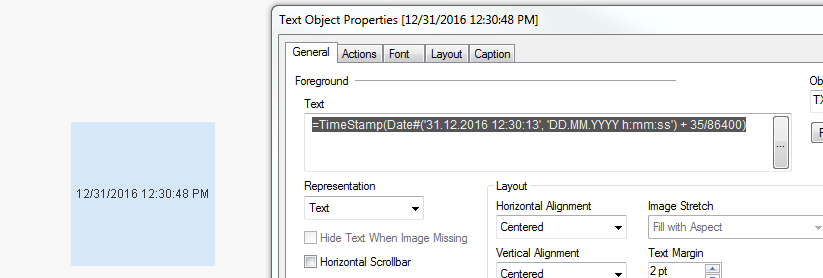
Here is a tested sample
=TimeStamp(Date#('31.12.2016 12:30:13', 'DD.MM.YYYY h:mm:ss') + 35/86400)
- Mark as New
- Bookmark
- Subscribe
- Mute
- Subscribe to RSS Feed
- Permalink
- Report Inappropriate Content
Good Mornig,
thank´s the formel is the super. What does 60*60*24 mean?

 tresB
tresB
- Mark as New
- Bookmark
- Subscribe
- Mute
- Subscribe to RSS Feed
- Permalink
- Report Inappropriate Content
1 day = 24*60*60 seconds
Vegar
- Mark as New
- Bookmark
- Subscribe
- Mute
- Subscribe to RSS Feed
- Permalink
- Report Inappropriate Content
60 seconds, 60 minutes, 24hours. It's used for converting days to seconds one second equals 1/(60*60*24)
Qlik Community MVP
- Mark as New
- Bookmark
- Subscribe
- Mute
- Subscribe to RSS Feed
- Permalink
- Report Inappropriate Content
Okay,
Thank you very much
sunny_talwar
- Mark as New
- Bookmark
- Subscribe
- Mute
- Subscribe to RSS Feed
- Permalink
- Report Inappropriate Content
If you got what you wanted, please close this thread by marking correct and helpful responses.
Qlik Community Tip: Marking Replies as Correct or Helpful
Best,
Sunny