Unlock a world of possibilities! Login now and discover the exclusive benefits awaiting you.

- Qlik Community
- :
- Forums
- :
- Analytics & AI
- :
- Products & Topics
- :
- Visualization and Usability
- :
- Re: counting by range
- Subscribe to RSS Feed
- Mark Topic as New
- Mark Topic as Read
- Float this Topic for Current User
- Bookmark
- Subscribe
- Mute
- Printer Friendly Page

 wanyunyang
- Mark as New
- Bookmark
- Subscribe
- Mute
- Subscribe to RSS Feed
- Permalink
- Report Inappropriate Content
counting by range
I'm trying to create a table in qlik sense which shows sales range and # of customers in each range:
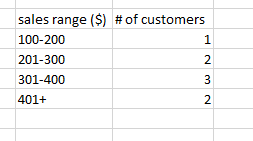
How can I create sales range in table? What will the function for counting customers be like?
Thanks in advance!
Accepted Solutions

 sunny_talwar
- Mark as New
- Bookmark
- Subscribe
- Mute
- Subscribe to RSS Feed
- Permalink
- Report Inappropriate Content
May be try to create buckets here like this
Dimension
Aggr(If(Sum(Sales) > 100 and Sum(Sales) <= 200, Dual('100-200', 1),
If(Sum(Sales) > 200 and Sum(Sales) <= 300, Dual('201-300', 2),
If(Sum(Sales) > 300 and Sum(Sales) <= 400, Dual('301-400', 3), Dual('401+', 4)))), Customer)
Expression
Count(DISTINCT Customer)
sunny_talwar
- Mark as New
- Bookmark
- Subscribe
- Mute
- Subscribe to RSS Feed
- Permalink
- Report Inappropriate Content
May be try to create buckets here like this
Dimension
Aggr(If(Sum(Sales) > 100 and Sum(Sales) <= 200, Dual('100-200', 1),
If(Sum(Sales) > 200 and Sum(Sales) <= 300, Dual('201-300', 2),
If(Sum(Sales) > 300 and Sum(Sales) <= 400, Dual('301-400', 3), Dual('401+', 4)))), Customer)
Expression
Count(DISTINCT Customer)
