Unlock a world of possibilities! Login now and discover the exclusive benefits awaiting you.

- Qlik Community
- :
- Forums
- :
- Analytics & AI
- :
- Products & Topics
- :
- Visualization and Usability
- :
- Re: counting in multiple columns
- Subscribe to RSS Feed
- Mark Topic as New
- Mark Topic as Read
- Float this Topic for Current User
- Bookmark
- Subscribe
- Mute
- Printer Friendly Page

 qliknoob79
- Mark as New
- Bookmark
- Subscribe
- Mute
- Subscribe to RSS Feed
- Permalink
- Report Inappropriate Content
counting in multiple columns
Hi, I'm very new to Qlik sense and have tried looking for a solution to my problem but I'm struggling to understand some of the answers for questions similar to mine.
My data looks something like this:
| drug1 | drug2 | drug3 |
| doxycycline | doxycline | azithromycin |
| amoxicillin | amoxillin | |
| doxycycline | amoxillin | ceftriaxone |
| doxycycline | amoxicillin | |
| ceftriaxone | azithromycin | amoxicillin |
| azithromycin | ceftriaxone | amoxicillin |
And I would like to count the number of times a drug appears (in any column). I create a tablet and add a dimension:
=drug1
Then I add a column and make it a measure:
Count(drug1)+Count(drug2)+Count(drug3)
But this doesn't give me the right answer:
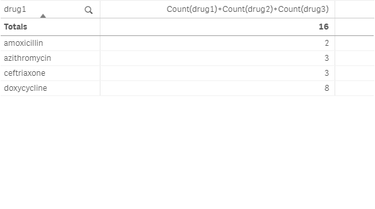
The total is correct but the count for each drug is incorrect. How do I fix this please.
Accepted Solutions

 Vegar
Vegar
- Mark as New
- Bookmark
- Subscribe
- Mute
- Subscribe to RSS Feed
- Permalink
- Report Inappropriate Content
You do not have association between the drug1 row containing Amoxicillin an any row where drug2 or 3 contains the drug. Your count is counting any drug associated with the drug1 value, not the same drug. Do a selection in drug1 and look at the table you will see what I mean.
In order to do what you want you will need to create association between a field value and all the rows containing the value.
I assume you got more than just these three fields in your table, I assume you got some kind of ID.
(If not then you can add something like this in your original table drug1 & '|' & drug2 & '|' & drug3 as ID )
| Id | drug1 | drug2 | drug3 |
| 1 | doxycycline | doxycline | azithromycin |
| 2 | amoxicillin | amoxillin | |
| 3 | doxycycline | amoxillin | ceftriaxone |
| 4 | doxycycline | amoxicillin | |
| 5 | ceftriaxone | azithromycin | amoxicillin |
| 6 | azithromycin | ceftriaxone | amoxicilli |
Add a table like this and your problem will be solved more easily.
Load
ID,
Subfield(drug1 & '|' & drug2 & '|' & drug3, '|') as drug
Resident DrugTable;
Qlik Community MVP
Vegar
- Mark as New
- Bookmark
- Subscribe
- Mute
- Subscribe to RSS Feed
- Permalink
- Report Inappropriate Content
You do not have association between the drug1 row containing Amoxicillin an any row where drug2 or 3 contains the drug. Your count is counting any drug associated with the drug1 value, not the same drug. Do a selection in drug1 and look at the table you will see what I mean.
In order to do what you want you will need to create association between a field value and all the rows containing the value.
I assume you got more than just these three fields in your table, I assume you got some kind of ID.
(If not then you can add something like this in your original table drug1 & '|' & drug2 & '|' & drug3 as ID )
| Id | drug1 | drug2 | drug3 |
| 1 | doxycycline | doxycline | azithromycin |
| 2 | amoxicillin | amoxillin | |
| 3 | doxycycline | amoxillin | ceftriaxone |
| 4 | doxycycline | amoxicillin | |
| 5 | ceftriaxone | azithromycin | amoxicillin |
| 6 | azithromycin | ceftriaxone | amoxicilli |
Add a table like this and your problem will be solved more easily.
Load
ID,
Subfield(drug1 & '|' & drug2 & '|' & drug3, '|') as drug
Resident DrugTable;
Qlik Community MVP

 Rohan
Rohan
- Mark as New
- Bookmark
- Subscribe
- Mute
- Subscribe to RSS Feed
- Permalink
- Report Inappropriate Content
Hello,
Just a little modification to your solution.
Rather than creating an unique id & then doing sub-fields as drug. Try concatenating the drug 1, drug 2 & drug 3 into a single column as Drug & get a count of Drug.
[Drug] :
load
drug1 as drug,
'1' as flag
resident <Tablename which contains Drug details>;
load
drug2 as drug,
'2' as flag
resident <Tablename which contains Drug details>;
load
drug3 as drug,
'3' as flag
resident <Tablename which contains Drug details>;
Now, in the Front end get Drug as Dimension & count(Drug) as measure in a Straight Table.
Thanks & regards.
qliknoob79
- Mark as New
- Bookmark
- Subscribe
- Mute
- Subscribe to RSS Feed
- Permalink
- Report Inappropriate Content
Great guys,
Both these ways worked but as I will need to filter by an ID ( i.e a prescribing doctor) the first suggestion seems to work for me at this stage. Now to transfer this idea to a much larger data set.
Thanks very much for your help.
