Unlock a world of possibilities! Login now and discover the exclusive benefits awaiting you.

- Qlik Community
- :
- Forums
- :
- Analytics & AI
- :
- Products & Topics
- :
- Visualization and Usability
- :
- Re: double values
- Subscribe to RSS Feed
- Mark Topic as New
- Mark Topic as Read
- Float this Topic for Current User
- Bookmark
- Subscribe
- Mute
- Printer Friendly Page

 soniasweety
- Mark as New
- Bookmark
- Subscribe
- Mute
- Subscribe to RSS Feed
- Permalink
- Report Inappropriate Content
double values
Hi all,
is there any way to show both values and % at a time on pie chart Qliskense?
anyone has some sample please share
- Tags:
- pie
- « Previous Replies
-
- 1
- 2
- Next Replies »
Accepted Solutions

 OmarBenSalem
- Mark as New
- Bookmark
- Subscribe
- Mute
- Subscribe to RSS Feed
- Permalink
- Report Inappropriate Content
the
sum(YourMeasure) = count({<JDate={">=$(=vStartDate)<=$(=vEndDate)"},[JStatus]={'Joined'}>}[ID])
maybe it's a syntax thing: let's try again:
dimension:
=[In/Ex]&' : '& aggr(num(count({<JDate={">=$(=vStartDate)<=$(=vEndDate)"},[JStatus]={'Joined'}>}[ID])
/count( total {<[In/Ex]=,JDate={">=$(=vStartDate)<=$(=vEndDate)"},[JStatus]={'Joined'}>}[ID]),'#,##0.00%'),[In/Ex])
measure:
count({<JDate={">=$(=vStartDate)<=$(=vEndDate)"},[JStatus]={'Joined'}>}[ID])
OmarBenSalem
- Mark as New
- Bookmark
- Subscribe
- Mute
- Subscribe to RSS Feed
- Permalink
- Report Inappropriate Content
sure:
in u pie chart;
as dimension:
=YourDim&' : '& aggr(num(sum(YourMeasure)/sum(total{<YourDim>} YourMeasure),'#,##0.00%'),YourDim)
as a measure:
sum(YourMeasure)
Under aspect > presentation, show the values:
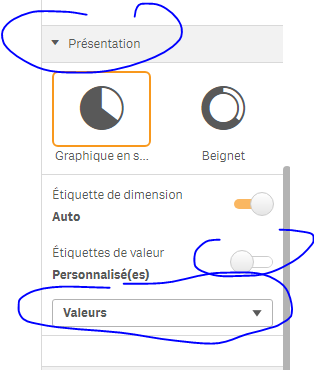
result (per aalogy): 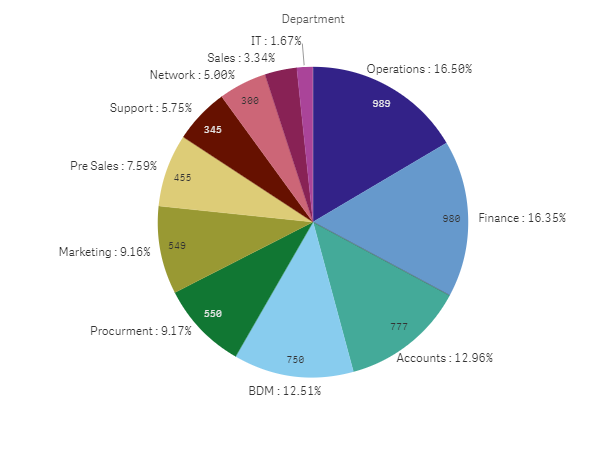
soniasweety
- Mark as New
- Bookmark
- Subscribe
- Mute
- Subscribe to RSS Feed
- Permalink
- Report Inappropriate Content
thanks.
but in my case its not working below am using what is the issue here?
Dim: [In/Ex]
Meausre:count({<JDate={">=$(=vStartDate)<=$(=vEndDate)"},[JStatus]={'Joined'}>}[ID])
=[In/Ex]' : '& aggr(num(sum(count({<JDate={">=$(=vStartDate)<=$(=vEndDate)"},[JStatus]={'Joined'}>}[ID]))
/sum(total{<[In/Ex]>}
count({<JDate={">=$(=vStartDate)<=$(=vEndDate)"},
[JStatus]={'Join'}>}[ID])),'#,##0.00%'),[In/Ex])
OmarBenSalem
- Mark as New
- Bookmark
- Subscribe
- Mute
- Subscribe to RSS Feed
- Permalink
- Report Inappropriate Content
Your dim would be :
=[In/Ex]' : '&
aggr(num( (count({<JDate={">=$(=vStartDate)<=$(=vEndDate)"},[JStatus]={'Joined'}>}[ID])
/
count(total {<[In/Ex]=, JDate={">=$(=vStartDate)<=$(=vEndDate)"},[JStatus]={'Joined'}>}[ID])),'#,##0.00%'),[In/Ex])
soniasweety
- Mark as New
- Bookmark
- Subscribe
- Mute
- Subscribe to RSS Feed
- Permalink
- Report Inappropriate Content
showing as invalid dimension
and what could be my measure? can I add sum(my meausre) ?
OmarBenSalem
- Mark as New
- Bookmark
- Subscribe
- Mute
- Subscribe to RSS Feed
- Permalink
- Report Inappropriate Content
the
sum(YourMeasure) = count({<JDate={">=$(=vStartDate)<=$(=vEndDate)"},[JStatus]={'Joined'}>}[ID])
maybe it's a syntax thing: let's try again:
dimension:
=[In/Ex]&' : '& aggr(num(count({<JDate={">=$(=vStartDate)<=$(=vEndDate)"},[JStatus]={'Joined'}>}[ID])
/count( total {<[In/Ex]=,JDate={">=$(=vStartDate)<=$(=vEndDate)"},[JStatus]={'Joined'}>}[ID]),'#,##0.00%'),[In/Ex])
measure:
count({<JDate={">=$(=vStartDate)<=$(=vEndDate)"},[JStatus]={'Joined'}>}[ID])
soniasweety
- Mark as New
- Bookmark
- Subscribe
- Mute
- Subscribe to RSS Feed
- Permalink
- Report Inappropriate Content
yes its working thanks a lot 
but colour it is showing grey only one colour . total pie. ?
I want two colurs
OmarBenSalem
- Mark as New
- Bookmark
- Subscribe
- Mute
- Subscribe to RSS Feed
- Permalink
- Report Inappropriate Content
under color, color by dimension and choose ur original dimension (not the modified one) but [In/Ex].
soniasweety
- Mark as New
- Bookmark
- Subscribe
- Mute
- Subscribe to RSS Feed
- Permalink
- Report Inappropriate Content
thanks omerben2016
OmarBenSalem
- Mark as New
- Bookmark
- Subscribe
- Mute
- Subscribe to RSS Feed
- Permalink
- Report Inappropriate Content
it's omarbensalem 

- « Previous Replies
-
- 1
- 2
- Next Replies »