Unlock a world of possibilities! Login now and discover the exclusive benefits awaiting you.

- Qlik Community
- :
- Forums
- :
- Analytics & AI
- :
- Products & Topics
- :
- Visualization and Usability
- :
- Re: errors with dataload
- Subscribe to RSS Feed
- Mark Topic as New
- Mark Topic as Read
- Float this Topic for Current User
- Bookmark
- Subscribe
- Mute
- Printer Friendly Page

 leocattqv
- Mark as New
- Bookmark
- Subscribe
- Mute
- Subscribe to RSS Feed
- Permalink
- Report Inappropriate Content
errors with dataload
Hi everyone, I do know if my last post went thorugh so I will try again,
I am new to Qliksense, but something strange is happening. I am using the quick load of data successfully, but when I try to make some modifications to the data, I am erroring out. I realize this could be a very easy fix, but can someone give me a direction?
My code is this:
LOAD
SITE,
WEEK_ENDING_DATE,
Period,
"WEEK",
No_Complaints,
No_Ship,
GOAL,
CPM,
NOTES,
Date(monthstart([WEEK_ENDING_DATE]), 'YYYY/MM') as CREATION_Month;
SQL SELECT *
FROM [lib://Automation/QUALITY_SCORECARD_DATA.xlsx]
(ooxml, embedded labels, table is Sheet1);
this is the error, it only happens when I start to play around with the script. Any Ideas?
There is no open data connection. Missing or failed "CONNECT" statement.
The error occurred here:
SQL SELECT *
FROM [lib://Automation/QUALITY_SCORECARD_DATA.xlsx]
(ooxml, embedded labels, table is Sheet1)
Accepted Solutions

 jagan
jagan
- Mark as New
- Bookmark
- Subscribe
- Mute
- Subscribe to RSS Feed
- Permalink
- Report Inappropriate Content
Hi,
When you are loading data from Excel file there is no need of SQL SELECT, try below script.
LOAD
SITE,
WEEK_ENDING_DATE,
Period,
"WEEK",
No_Complaints,
No_Ship,
GOAL,
CPM,
NOTES,
Date(monthstart([WEEK_ENDING_DATE]), 'YYYY/MM') as CREATION_Month
FROM [lib://Automation/QUALITY_SCORECARD_DATA.xlsx]
(ooxml, embedded labels, table is Sheet1);
If you are loading data from database then you need to use SQL SELECT like below
TableName:
SELECT
*
FROM TableName;
Hope this helps you.
Regards,
Jagan.
jagan
- Mark as New
- Bookmark
- Subscribe
- Mute
- Subscribe to RSS Feed
- Permalink
- Report Inappropriate Content
Hi,
When you are loading data from Excel file there is no need of SQL SELECT, try below script.
LOAD
SITE,
WEEK_ENDING_DATE,
Period,
"WEEK",
No_Complaints,
No_Ship,
GOAL,
CPM,
NOTES,
Date(monthstart([WEEK_ENDING_DATE]), 'YYYY/MM') as CREATION_Month
FROM [lib://Automation/QUALITY_SCORECARD_DATA.xlsx]
(ooxml, embedded labels, table is Sheet1);
If you are loading data from database then you need to use SQL SELECT like below
TableName:
SELECT
*
FROM TableName;
Hope this helps you.
Regards,
Jagan.

- Mark as New
- Bookmark
- Subscribe
- Mute
- Subscribe to RSS Feed
- Permalink
- Report Inappropriate Content
It is very useful suggestion. I have one more question that when I connect to the Salesforce for Incremental load I got same error.
Can u plz suggest me.
Set vQVDPath = [lib://qvd2/table2.qvd]; //**************** Enter Location to save QVDs in the path should end it back slash. For example: C:\MyQVDs\
// For realtive paths are also possible. For example QVDs\ will put the QVDs in a subfolder from where the QVW is saved.
//Set the variables so the last time of script execution is known
SET vLastExecTime = 0; // resetting vLastExecTime
LET vLastExecTime = timestamp(if(isnull(QvdCreateTime('$(vQVDPath)ReloadHistory.QVD')), 0, ConvertToLocalTime(QvdCreateTime('$(vQVDPath)ReloadHistory.QVD'), 'GMT', 1)), 'YYYY-MM-DD hh:mm:ss');
LET vExecTime = timestamp(UTC(), 'YYYY-MM-DD hh:mm:ss');
LET vTodaysDate = today();
//For the 1st reload, this section will be skipped.
LET FirstReload = isnull(QvdCreateTime('$(vQVDPath)ReloadHistory.QVD'));
if Not $(FirstReload) then
// Read Reload History Data
ReloadHistory:
Load
No,
[Last Reload Ended],
[Reload Started]
FROM $(vQVDPath)ReloadHistory.qvd (qvd);
end if
ReloadHistory:
LOAD
Rowno() as no,
'$(vLastExecTime)' as [Last Reload Ended],
'$(vExecTime)' as [Reload Started]
Autogenerate(1);
//ReloadHistory.qvd will keep track of when the last reload occurred for incremental loading purposes. If you need to reload all the data then delete ReloadHistory.qvd from your file structure.
STORE * FROM ReloadHistory INTO $(vQVDPath)ReloadHistory.qvd;
//*****************Add a list of tables to be loaded from your data source below. Keep the first row "TableName". This is the name of the field.
TablesList:
Load * Inline [
TableName
Lead
];
For i = 0 to (NoOfRows('TablesList')-1);
Let varTableName = Peek('TableName',$(i), 'TablesList');
// Load Tables
$(varTableName)_SQL:
Select *
FROM $(varTableName)
FROM
WHERE LastModifiedDate >=$(vLastExecTime) and LastModifiedDate < $(vExecTime); //***************************Change the "LastModifiedDate" to the name of the field for the last modified data time stamp in your tables.
// For the 1st reload, this section will be skipped.
if Not $(FirstReload) and not isnull(QvdCreateTime('$(vQVDPath)$(varTableName)_SQL.qvd')) then
//CONCATENATE ($(varTableName))
$(varTableName)_SQL:
Load *
FROM $(vQVDPath)$(varTableName)_SQL.qvd (qvd)
WHERE NOT EXISTS(id); // *************************************** Change "Id" to the primary key for your tables (note all your tables must use the same name for the primary key for this script to work.
end if
// If table exists then proceed to the next step
if NoOfRows('$(varTableName)_SQL') > 0 then
STORE $(varTableName)_SQL INTO $(vQVDPath)$(varTableName)_SQL.qvd;
DROP TABLE $(varTableName)_SQL;
End if
Next;
Drop Table TablesList;
Error----
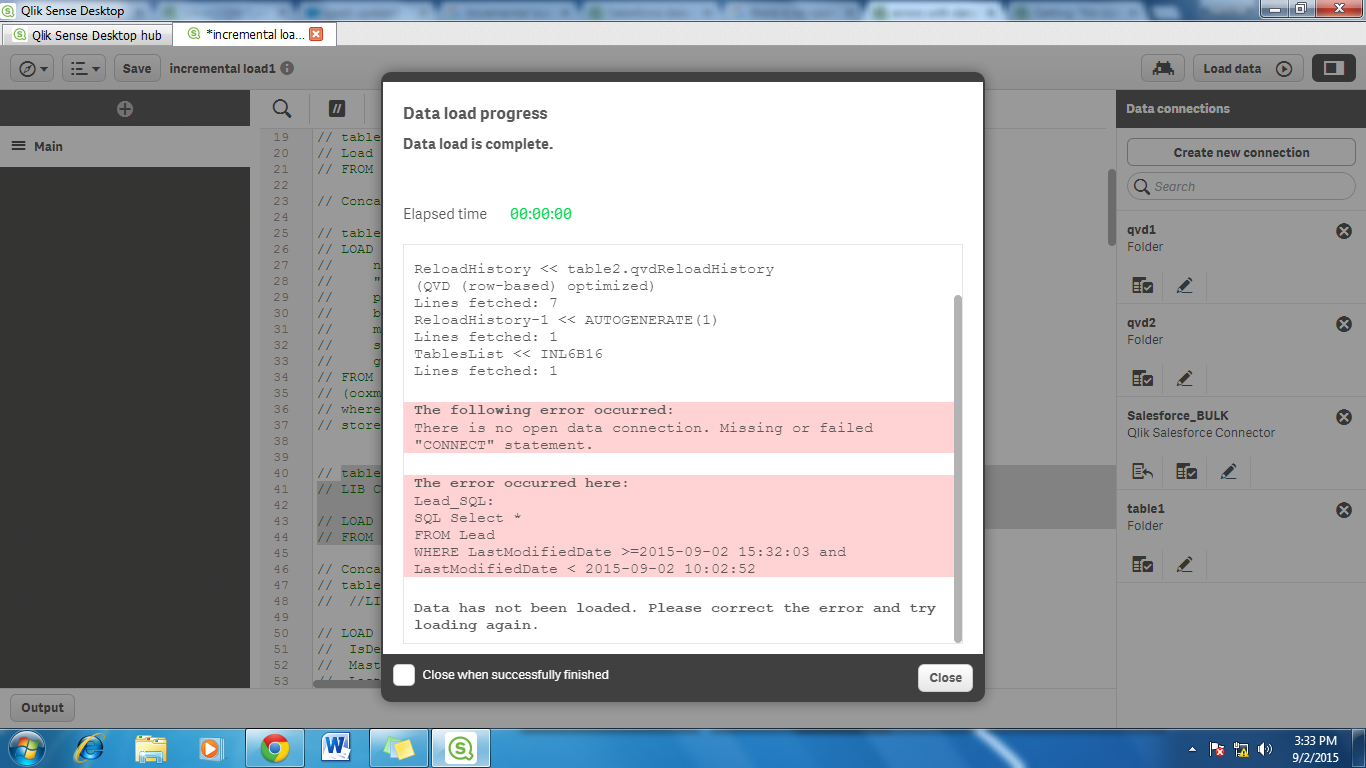
Could u plz help me out.
Thanks in advance.