Unlock a world of possibilities! Login now and discover the exclusive benefits awaiting you.

- Qlik Community
- :
- Forums
- :
- Analytics & AI
- :
- Products & Topics
- :
- Visualization and Usability
- :
- groups and subgroups in straight table
- Subscribe to RSS Feed
- Mark Topic as New
- Mark Topic as Read
- Float this Topic for Current User
- Bookmark
- Subscribe
- Mute
- Printer Friendly Page

 srujanaponnuru
- Mark as New
- Bookmark
- Subscribe
- Mute
- Subscribe to RSS Feed
- Permalink
- Report Inappropriate Content
groups and subgroups in straight table
Hi,
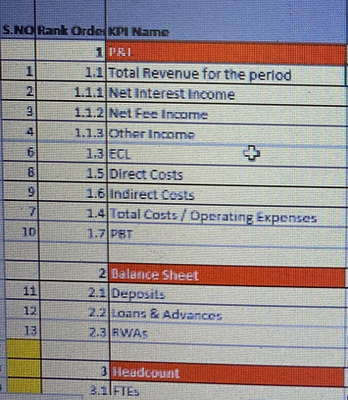
Below picture is my requirement. I need the format in straight table not in Vizlib.
1. P&I which is in Red color , is not from the source file. But under P&I there are Total revenue , net interest Income etc. are from the source file.
I need to get under P&I all the 1.1, 1.1.1,1.1.2 etc all that. How do we achieve that ?

 joaopaulo_delco
- Mark as New
- Bookmark
- Subscribe
- Mute
- Subscribe to RSS Feed
- Permalink
- Report Inappropriate Content
Hi @srujanaponnuru !
Unfortunately there's no easy way to make a P&L.
I recomend this article that help me a lot.
srujanaponnuru
- Mark as New
- Bookmark
- Subscribe
- Mute
- Subscribe to RSS Feed
- Permalink
- Report Inappropriate Content
Thank you but the link you have sent is not working. can u please resend again.
joaopaulo_delco
- Mark as New
- Bookmark
- Subscribe
- Mute
- Subscribe to RSS Feed
- Permalink
- Report Inappropriate Content
srujanaponnuru
- Mark as New
- Bookmark
- Subscribe
- Mute
- Subscribe to RSS Feed
- Permalink
- Report Inappropriate Content
i do not want to calculate anything , i just need the UI representation how can i get the same format which i have pasted above.
joaopaulo_delco
- Mark as New
- Bookmark
- Subscribe
- Mute
- Subscribe to RSS Feed
- Permalink
- Report Inappropriate Content
To use fields that is not in the source, you can use the valuelist() funcion.
srujanaponnuru
- Mark as New
- Bookmark
- Subscribe
- Mute
- Subscribe to RSS Feed
- Permalink
- Report Inappropriate Content
If possible cn u give me a small example of valuelist()
i am using a field name "Metric Name" as a dimension.
In metric name : Total revnue, net interest income, net margin etc are there.
now in P&I i need to show total revenue, net interest income
and in Balance sheet i need to show deposits etc.
