Unlock a world of possibilities! Login now and discover the exclusive benefits awaiting you.

- Qlik Community
- :
- Forums
- :
- Analytics & AI
- :
- Products & Topics
- :
- Visualization and Usability
- :
- how to set default seletion on multi fields
- Subscribe to RSS Feed
- Mark Topic as New
- Mark Topic as Read
- Float this Topic for Current User
- Bookmark
- Subscribe
- Mute
- Printer Friendly Page

 sdtfll
- Mark as New
- Bookmark
- Subscribe
- Mute
- Subscribe to RSS Feed
- Permalink
- Report Inappropriate Content
how to set default seletion on multi fields
Dears,
I have a table as below,
T1:
load * inline [
type,name,money
1,Grant,100
2,Edmond,200
3,Bob,300
4,Tony,400
];
I want to set default selection on type1 and type4, in first page the chart show money total 500 (100+400)
and also put a button in first page, the selection as below:
option 1 => show type1 and type4, the chart shows total money 500 (100+400)
option 2 => show type1 and type2, the chart shows total money 300 (100+200)
option 3 => show type 3 and type4, the chart shows total money 700 (300+400)
I have no idea how to solve it, thanks advanced.

 Or
Or
- Mark as New
- Bookmark
- Subscribe
- Mute
- Subscribe to RSS Feed
- Permalink
- Report Inappropriate Content
To apply multiple selection values, you can use e.g. (1|4) as your search string.

sdtfll
- Mark as New
- Bookmark
- Subscribe
- Mute
- Subscribe to RSS Feed
- Permalink
- Report Inappropriate Content
Thanks,
how to use it in formula?
like this : if(type='(1|4)', somefield,otherfield) ? it not work.
sdtfll
- Mark as New
- Bookmark
- Subscribe
- Mute
- Subscribe to RSS Feed
- Permalink
- Report Inappropriate Content
and I also have another problem about this question,
how to set the formula on the selection_button, which include three options:
option1, select type1 and type4
option2, select type1 and type2
option3, select type3 and type4
I write it like this:
=if(type=1 or type=4,'option1',if(type=1 or type=2,'option2',if(type=3 or type=4,'option3')))
but it cannot work,

 abhijitnalekar
- Mark as New
- Bookmark
- Subscribe
- Mute
- Subscribe to RSS Feed
- Permalink
- Report Inappropriate Content
Do you like to have 3 different buttons for 3 options or one single button?
Abhijit
keep Qliking...
Help users find answers! Don't forget to mark a solution that worked for you!

 Iswarya_
- Mark as New
- Bookmark
- Subscribe
- Mute
- Subscribe to RSS Feed
- Permalink
- Report Inappropriate Content
Hi @sdtfll ,
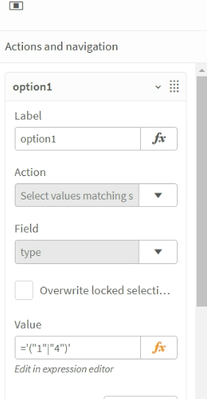
In the button, selection Action as 'Select values matching search criteria' and value as below:
Option 1: ='("1"|"4")'
Option 2: ='("1"|"2")'
Option 3: ='("3"|"4")'