Unlock a world of possibilities! Login now and discover the exclusive benefits awaiting you.

- Qlik Community
- :
- Forums
- :
- Analytics & AI
- :
- Products & Topics
- :
- Visualization and Usability
- :
- Re: if Expression
- Subscribe to RSS Feed
- Mark Topic as New
- Mark Topic as Read
- Float this Topic for Current User
- Bookmark
- Subscribe
- Mute
- Printer Friendly Page

 smilingjohn
- Mark as New
- Bookmark
- Subscribe
- Mute
- Subscribe to RSS Feed
- Permalink
- Report Inappropriate Content
if Expression
Hi All,
I have a below column in my DB which looks like the below screenshot. I want to remove 'Mode0' and also want to rename
'NoMode's as 'No Mod' to achive this i am trying to use this expression
=if(not Match(LABEL,'Mode0'),LABEL) and if(LABEL='NoModes','No mode',LABEL) but this is not working can anyone please help me on this
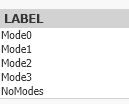
Thanks in Advance
Accepted Solutions

 BrunPierre
- Mark as New
- Bookmark
- Subscribe
- Mute
- Subscribe to RSS Feed
- Permalink
- Report Inappropriate Content
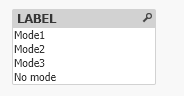
I believe that's the expected output
IF(WildMatch(LABEL,'*Mode0*'),NULL(),
IF(WildMatch(LABEL,'*NoModes*'),'No mode',LABEL)) AS LABEL

 Lakshminarayana
- Mark as New
- Bookmark
- Subscribe
- Mute
- Subscribe to RSS Feed
- Permalink
- Report Inappropriate Content
Please fine the below script and screenshot for your reference.
Script:
Test:
Load * Inline
[
ID,Sales
1,Mode0
2,Mode1
3,Mode2
5,NoMode
];
Test1:
NoConcatenate
Load
ID,
Sales,
IF(Sales<>'Mode0',Sales)as sales1
Resident Test;
drop Table Test;
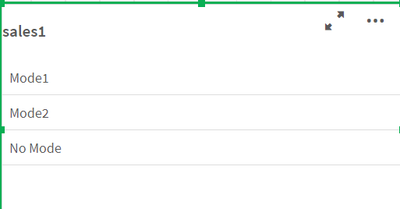
Expression:
=if(sales1='NoMode','No Mode',sales1)
To help users find verified answers, please don't forget to use the "Accept as Solution" button
BrunPierre
- Mark as New
- Bookmark
- Subscribe
- Mute
- Subscribe to RSS Feed
- Permalink
- Report Inappropriate Content
I believe that's the expected output
IF(WildMatch(LABEL,'*Mode0*'),NULL(),
IF(WildMatch(LABEL,'*NoModes*'),'No mode',LABEL)) AS LABEL
BrunPierre
- Mark as New
- Bookmark
- Subscribe
- Mute
- Subscribe to RSS Feed
- Permalink
- Report Inappropriate Content
@smilingjohn Is your question answered, please mark as such.
