Unlock a world of possibilities! Login now and discover the exclusive benefits awaiting you.

- Qlik Community
- :
- Forums
- :
- Analytics & AI
- :
- Products & Topics
- :
- Visualization and Usability
- :
- Re: master calendar
- Subscribe to RSS Feed
- Mark Topic as New
- Mark Topic as Read
- Float this Topic for Current User
- Bookmark
- Subscribe
- Mute
- Printer Friendly Page

 Luben
Luben
- Mark as New
- Bookmark
- Subscribe
- Mute
- Subscribe to RSS Feed
- Permalink
- Report Inappropriate Content
master calendar
hello there I am having issues with my dates in my calendar, the link to the calendar and data is off
here is the code for the script;
Let vMin = num(Addmonths(Today(),-12)) ;
Let vMax = num(today());
Temp:
Load
Date($(vMin) + Iterno() -1) as Date
Autogenerate 1
While Date($(vMin)) + Iterno() -1 <= $(vMax);
Calendar:
Load //Date,
Date as [Calendar Date],
Month(Date) as [Calendar Month],
Year(Date) as [Calendar Year],
Month(Date)&' '&Year(Date) as [Calendar Month Year],
If( Date - YearStart(Date) <= Today() - YearStart(Today()), 1, 0 ) as IsInYTD
//Month(Date) as [New Cal Month]
Resident Temp;
// Where Month(Date)&' '&Year(Date) <> 'Nov 2020';
Drop table Temp;
Data:
LOAD
Date("Quntity Creation Date") as [Calendar Date],
Year(Date("Quntity Creation Date")) as [Quntity Year],
"Quntity create Date"
From XYZ ;
why are they blank rows for the Calendar month calendar year
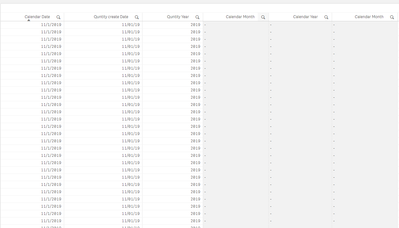
and the same when i pick calendar month i get blanks quantity year and create date
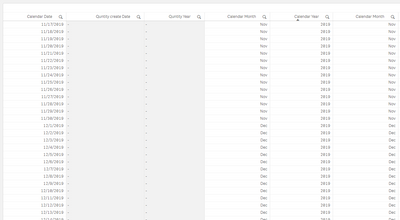
Accepted Solutions

 marcus_sommer
- Mark as New
- Bookmark
- Subscribe
- Mute
- Subscribe to RSS Feed
- Permalink
- Report Inappropriate Content
Although you used date(FIELD) for both date-fields the formatting is different. Usually that's not the case so I think that there are further load-statements involved - probably in beforehand.
But that's not the main-issue else your quantity date isn't a date else a timestamp and therefore they couldn't match. You could change it with:
Date(floor("Quntity Creation Date")) as [Calendar Date],
- Marcus
marcus_sommer
- Mark as New
- Bookmark
- Subscribe
- Mute
- Subscribe to RSS Feed
- Permalink
- Report Inappropriate Content
Although you used date(FIELD) for both date-fields the formatting is different. Usually that's not the case so I think that there are further load-statements involved - probably in beforehand.
But that's not the main-issue else your quantity date isn't a date else a timestamp and therefore they couldn't match. You could change it with:
Date(floor("Quntity Creation Date")) as [Calendar Date],
- Marcus
Luben
- Mark as New
- Bookmark
- Subscribe
- Mute
- Subscribe to RSS Feed
- Permalink
- Report Inappropriate Content
thanks Marcus that was the issue.
Thank you so much.
