Unlock a world of possibilities! Login now and discover the exclusive benefits awaiting you.

- Qlik Community
- :
- Forums
- :
- Analytics & AI
- :
- Products & Topics
- :
- Visualization and Usability
- :
- Re: match function of two fileds
- Subscribe to RSS Feed
- Mark Topic as New
- Mark Topic as Read
- Float this Topic for Current User
- Bookmark
- Subscribe
- Mute
- Printer Friendly Page

 Vince_CH
- Mark as New
- Bookmark
- Subscribe
- Mute
- Subscribe to RSS Feed
- Permalink
- Report Inappropriate Content
match function of two fileds
Dear friends,
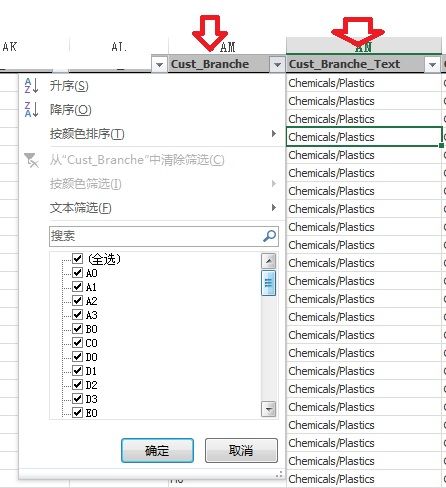
I have a question as illustrated like following photo, with two fields like below, two fields has different contents matched to each others. now I want to change all A1,2,3 to A0, and B1,2,3 to B0, and so on, also the behind cust_Branche_Text need to adapt to A0/B0/C0's matching content too. How the expression should be like here? thanks in advance.
- « Previous Replies
-
- 1
- 2
- Next Replies »
Accepted Solutions

 crusader_
- Mark as New
- Bookmark
- Subscribe
- Mute
- Subscribe to RSS Feed
- Permalink
- Report Inappropriate Content
ok, SOURCE_DATA table in my script exists just because I don't have any other tables (Sales) in your case, you don't need it at all..
NewText_Map:
MAPPING LOAD DISTINCT
Cust_Branche,
Cust_Branche_Text
RESIDENT Sales
WHERE WILDMATCH(Cust_Branche,'*0');
Replace_0:
MAPPING LOAD
RECNO() AS from,
0 AS to
AUTOGENERATE 9;
RESULTING_TABLE:
NOCONCATENATE
LOAD <list of your fields of Sales table except "Cust_Branche" and "Cust_Branche_Text">,
MAPSUBSTRING('Replace_0',Cust_Branche) AS Cust_Branche,
APPLYMAP('NewText_Map',MAPSUBSTRING('Replace_0',Cust_Branche)) AS Cust_Branche_Text
RESIDENT Sales;
DROP TABLE Sales;
Another thing, could you please check Value of "Cust_Branche" field for unexpected "Cust_Branche_Text" values (e.g. K8, K5 etc) ? If the value the same K8, K5, then for some reason MapSubString() function doesn't replace your number with 0 values... here you need to dig into...
Is it happens randomly or you can notice a pattern?
//Andrei

 Channa
- Mark as New
- Bookmark
- Subscribe
- Mute
- Subscribe to RSS Feed
- Permalink
- Report Inappropriate Content
if(cust_Branche_Text like 'A*', 'A0',if(cust_Branche_Text like 'B*','B0'))
crusader_
- Mark as New
- Bookmark
- Subscribe
- Mute
- Subscribe to RSS Feed
- Permalink
- Report Inappropriate Content
Hi,
Hope I understood your requirements correctly.
Please find attached qvw.
//Andrei
Vince_CH
- Mark as New
- Bookmark
- Subscribe
- Mute
- Subscribe to RSS Feed
- Permalink
- Report Inappropriate Content
Vince_CH
- Mark as New
- Bookmark
- Subscribe
- Mute
- Subscribe to RSS Feed
- Permalink
- Report Inappropriate Content
Channa
- Mark as New
- Bookmark
- Subscribe
- Mute
- Subscribe to RSS Feed
- Permalink
- Report Inappropriate Content
left('a1',1) &'0'
left (A1,1) will bring A and then concate with 0
Vince_CH
- Mark as New
- Bookmark
- Subscribe
- Mute
- Subscribe to RSS Feed
- Permalink
- Report Inappropriate Content
crusader_
- Mark as New
- Bookmark
- Subscribe
- Mute
- Subscribe to RSS Feed
- Permalink
- Report Inappropriate Content
Hi,
Please find below code:
SOURCE_DATA:
LOAD *, RECNO() AS ID;
LOAD * INLINE [
Code, Text
A0, Text0
A1, Text1
A2, Text2
B0, Btext0
C0, Ctext0
D0, Dtext0
D1, Dtext1
];
NewText_Map:
MAPPING LOAD DISTINCT
Code,
Text
RESIDENT SOURCE_DATA
WHERE WILDMATCH(Code,'*0');
Replace_0:
MAPPING LOAD
RECNO() AS from,
0 as to
AUTOGENERATE 9;
RESULTING_TABLE:
LOAD ID,
MAPSUBSTRING('Replace_0',Code) AS NewCode,
APPLYMAP('NewText_Map',MAPSUBSTRING('Replace_0',Code)) AS NewText
RESIDENT SOURCE_DATA;
Hope this helps.
//Andrei
Vince_CH
- Mark as New
- Bookmark
- Subscribe
- Mute
- Subscribe to RSS Feed
- Permalink
- Report Inappropriate Content
Also it seems some $Syn table was created, shall I dropoff the resulting table to reduce this?
Lastly, is what is the meaning of AUTOGENERATE 9 in the scripts?
thanks for the support!
crusader_
- Mark as New
- Bookmark
- Subscribe
- Mute
- Subscribe to RSS Feed
- Permalink
- Report Inappropriate Content
Hi,
I'll explain script line by line:
SOURCE_DATA:
LOAD *, RECNO() AS ID; /// This is just for me, to generate unique ID instead of hard-coding (1,2,3,....) - most likely you don't need it.
/////Below I'm loading sample of data
LOAD * INLINE [
Code, Text
A0, Text0
A1, Text1
A2, Text2
B0, Btext0
C0, Ctext0
D0, Dtext0
D1, Dtext1
];
/////This map is required to get a list of <X>0 codes and their descriptions, so I could replace Text later
NewText_Map:
MAPPING LOAD DISTINCT
Code,
Text
RESIDENT SOURCE_DATA
WHERE WILDMATCH(Code,'*0');
//This is a map to replace numbers 1,2,3,4,....9 to 0 if you have more than 9, generate more, e.g. 100 or 1000, what ever number you have, e.g. A125 -> A0
Replace_0:
MAPPING LOAD
RECNO() AS from,
0 as to
AUTOGENERATE 9; //easily could be changed to whatever other suitable number
//I intentionally built 2 separate tables in case you don't want to overwrite values but check the result first... To overwrite you just ned to modify the script as below:
RESULTING_TABLE:
NOCONCATENATE
LOAD ID,
MAPSUBSTRING('Replace_0',Code) AS Code,
APPLYMAP('NewText_Map',MAPSUBSTRING('Replace_0',Code)) AS Text
RESIDENT SOURCE_DATA;
DROP TABLE SOURCE_DATA;
Hope this help.
//Andrei

- « Previous Replies
-
- 1
- 2
- Next Replies »