Unlock a world of possibilities! Login now and discover the exclusive benefits awaiting you.

- Qlik Community
- :
- Forums
- :
- Analytics & AI
- :
- Products & Topics
- :
- Visualization and Usability
- :
- Re: need help on if condition
- Subscribe to RSS Feed
- Mark Topic as New
- Mark Topic as Read
- Float this Topic for Current User
- Bookmark
- Subscribe
- Mute
- Printer Friendly Page

 abubakarsiddiq7
- Mark as New
- Bookmark
- Subscribe
- Mute
- Subscribe to RSS Feed
- Permalink
- Report Inappropriate Content
need help on if condition
hi
need help on the below requirement
i have an expression like
=if((sum(X)-sum(Y))/sum(Y)>0,num(((sum(X)-sum(Y)/sum(Y)),'▲ ##.0%'),num(((sum(X)-sum(Y))/sum(Y)),'▼ ##.0%'))
this exp working fine but i need to show the symbols based on calculated expression in qlik sense
i need to show the value and up arrow and down arrow symbols based on calculation also differentiate the values and symbols with color (qlik sense Requirement ).

 JordyWegman
- Mark as New
- Bookmark
- Subscribe
- Mute
- Subscribe to RSS Feed
- Permalink
- Report Inappropriate Content
Hi,
Do you mean that the up/down arrows are working with your formula but you need the right coloring?
Jordy
Climber
abubakarsiddiq7
- Mark as New
- Bookmark
- Subscribe
- Mute
- Subscribe to RSS Feed
- Permalink
- Report Inappropriate Content
hi,
when i use chr () function i can see value and symbols but i can't use conditional colors .
i am implementing this in KPI Object (Qlik sense )
abubakarsiddiq7
- Mark as New
- Bookmark
- Subscribe
- Mute
- Subscribe to RSS Feed
- Permalink
- Report Inappropriate Content
yes
JordyWegman
- Mark as New
- Bookmark
- Subscribe
- Mute
- Subscribe to RSS Feed
- Permalink
- Report Inappropriate Content
Hi,
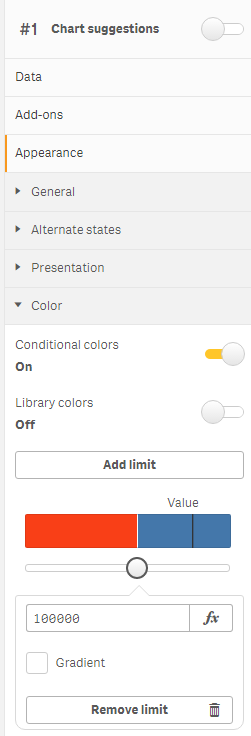
You can use the coloring part for the segments. Insert your formula, with maybe some changes, in the fx. See the image.

Jordy
Climber
abubakarsiddiq7
- Mark as New
- Bookmark
- Subscribe
- Mute
- Subscribe to RSS Feed
- Permalink
- Report Inappropriate Content
if i am using chr() function or any symbol conditional color option is disable so i am trying to implement the above if condition .
JordyWegman
- Mark as New
- Bookmark
- Subscribe
- Mute
- Subscribe to RSS Feed
- Permalink
- Report Inappropriate Content
Hi,
But if you switch of the library colors it should be possible to get the segments. If you both turn them on, you will get the message saying: 'Segment colors from a master measure are only applied if segment limits are based on fixed values.'
Jordy
Climber
