Unlock a world of possibilities! Login now and discover the exclusive benefits awaiting you.

- Qlik Community
- :
- Forums
- :
- Analytics & AI
- :
- Products & Topics
- :
- Visualization and Usability
- :
- qlik sens to postgres connection issue
- Subscribe to RSS Feed
- Mark Topic as New
- Mark Topic as Read
- Float this Topic for Current User
- Bookmark
- Subscribe
- Mute
- Printer Friendly Page

 vb00494773
- Mark as New
- Bookmark
- Subscribe
- Mute
- Subscribe to RSS Feed
- Permalink
- Report Inappropriate Content
qlik sens to postgres connection issue
Hi team,
could you please help me on the below issue.
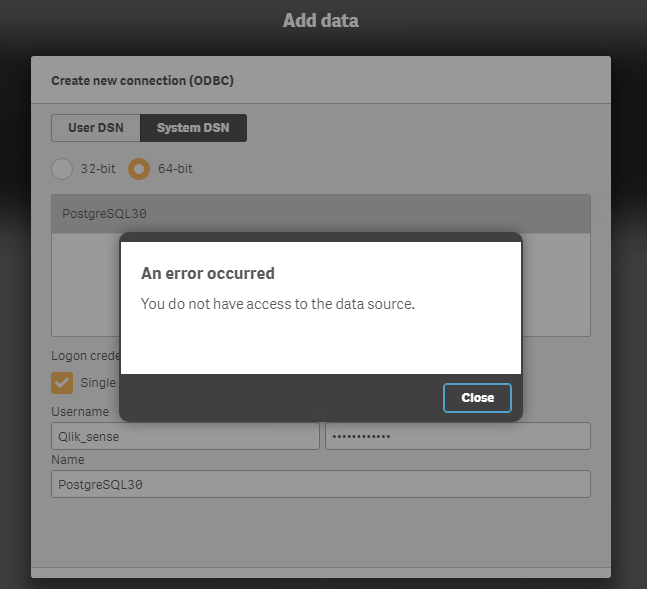
I have a problem for connecting(using HBU) to postgres sql . i am getting error like , "you don't have access to data source"
FYI, i have created a ODBC connection with correct credentials and using the same while connecting .
Please let me know solution ASAP.
Thanks,
Venkatesh
Accepted Solutions
vb00494773
- Mark as New
- Bookmark
- Subscribe
- Mute
- Subscribe to RSS Feed
- Permalink
- Report Inappropriate Content
Thanks for the reply,
i even explored an another way by add data option and select connect to my data option ,
There we can select postgresql option
then we can fill the required info.
it will work.
Thanks
 vlad_komarov
- Mark as New
- Bookmark
- Subscribe
- Mute
- Subscribe to RSS Feed
- Permalink
- Report Inappropriate Content
Venkatesh,
Couple things to verify:
1. Check if you can actually access your data using ODBC connector you have created (using other ODBC-enabled applications, for example).
2. Check if you have the latest and greatest Postgres ODBC driver with proper 64-bit support installed on your Qlik Server.
I've had the same case some time ago and resolving #2 was a key.
Regards,
Vlad


- Mark as New
- Bookmark
- Subscribe
- Mute
- Subscribe to RSS Feed
- Permalink
- Report Inappropriate Content
In fact, This is my first time connection to DB I am not getting any issue while connect to Postgres
Sample Script
LIB CONNECT TO 'PostgreSQL30';
LOAD "last_name",
"contact_id",
"first_name",
"country",
"Images";
SQL SELECT "last_name",
"contact_id",
"first_name",
"country",
"Images"
FROM "mydb"."public"."DDQ";
Process Done
1) Create New Connection
2) ODBC
3) Follow the image, Please
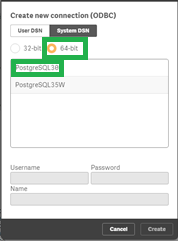
4) Then Use Username - postgres and Password - XXXXXX is up on you
Then simple Click Okay and then Try to pull data from DB.
You can follow below Link to download as per your need
vb00494773
- Mark as New
- Bookmark
- Subscribe
- Mute
- Subscribe to RSS Feed
- Permalink
- Report Inappropriate Content
Thanks for the reply,
i even explored an another way by add data option and select connect to my data option ,
There we can select postgresql option
then we can fill the required info.
it will work.
Thanks
- Mark as New
- Bookmark
- Subscribe
- Mute
- Subscribe to RSS Feed
- Permalink
- Report Inappropriate Content
Good, Some what you will get some information on my post

- Mark as New
- Bookmark
- Subscribe
- Mute
- Subscribe to RSS Feed
- Permalink
- Report Inappropriate Content