Unlock a world of possibilities! Login now and discover the exclusive benefits awaiting you.

- Qlik Community
- :
- Forums
- :
- Analytics & AI
- :
- Products & Topics
- :
- Visualization and Usability
- :
- Re: restrict options in filter pane?
- Subscribe to RSS Feed
- Mark Topic as New
- Mark Topic as Read
- Float this Topic for Current User
- Bookmark
- Subscribe
- Mute
- Printer Friendly Page

- Mark as New
- Bookmark
- Subscribe
- Mute
- Subscribe to RSS Feed
- Permalink
- Report Inappropriate Content
restrict options in filter pane?
Hi
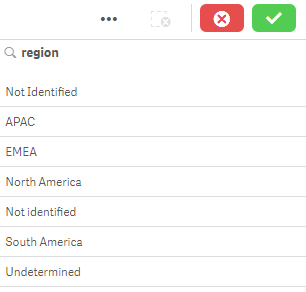
I want to add a filter pane to my page for region. For reasons I won't go into, some of our data doesn't generate the region properly and a small portion of the data has 'Not Identified' or something similar for this field.
I do not want this to be visible in the filter pane. How do I restrict the filter pane so I only see APAC, EMEA, North America, and South America?
Thanks

 felipedl
- Mark as New
- Bookmark
- Subscribe
- Mute
- Subscribe to RSS Feed
- Permalink
- Report Inappropriate Content
Hi Dustin,
Do something like this on your dimension:
=if(match(region,'APAC','EMEA','North America','South America'),region,null())
This way, the other fields wont show in the filter.
 NZFei
NZFei
- Mark as New
- Bookmark
- Subscribe
- Mute
- Subscribe to RSS Feed
- Permalink
- Report Inappropriate Content
Felip's solution should work but I will create another table with valid regions in the script.
The reason is that even you have define a title for a filter:
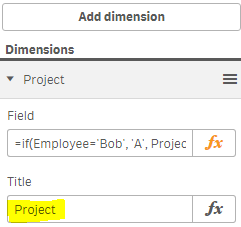
When users make some selections, the current selection on the top will not show the filter title but the if clause, which is messy:
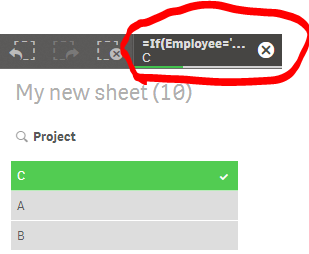
I will create a table in the script like this:
ValidRegion:
load * Inline [
region, Region
APAC, APAC
EMEA, EMEA
North America, North America
South America, South America
];
And use the Region as the filter in the front (the current field is region, which has the values you don't want to show).
Fei