Unlock a world of possibilities! Login now and discover the exclusive benefits awaiting you.

- Qlik Community
- :
- Forums
- :
- Analytics & AI
- :
- Products & Topics
- :
- Visualization and Usability
- :
- set analysis
- Subscribe to RSS Feed
- Mark Topic as New
- Mark Topic as Read
- Float this Topic for Current User
- Bookmark
- Subscribe
- Mute
- Printer Friendly Page

 Ismail_93
- Mark as New
- Bookmark
- Subscribe
- Mute
- Subscribe to RSS Feed
- Permalink
- Report Inappropriate Content
set analysis
Hello,
I have this issue "Use Date in SET Analysis, yet ignore a Date selection".
I calculat "number of employees KPI" like this :
Count({<
[Entry date]={"<=$(=MONTHEND('01/'&Mois&'/'&[Année]))"},
[Relaese date]={">=$(=MONTHEND('01/'&Mois&'/'&[Année]))"},
Mois=,
[Année]=,
[Comptabilisation effectifs]={'Y'}>}
Distinct salarie_matricule )
so when i select month number January and year 2020 i get my KPI.
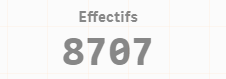
Right now i want to present "Board" in the same sheet where i want to show "number of employees" by all months of years and ignore a Date selection. For that i used :
Count({<
[Entry date]={"<=$(=MONTHEND({<[Date started période]=>}[Date started période]))"},
[Relaese date]={">=$(=MONTHEND({<[Date end période]=>}[Date end période]))"},
Mois=,
[Comptabilisation effectifs]={'Y'}>}
Distinct salarie_matricule)
I get as result for 2020 this board :
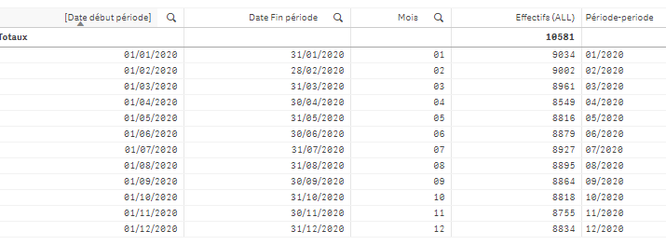
Can someone please tell me why i didn't get 8707 in the board as it is presented in the firs KPIs ?
Thank you
