Unlock a world of possibilities! Login now and discover the exclusive benefits awaiting you.

- Qlik Community
- :
- Forums
- :
- Analytics & AI
- :
- Products & Topics
- :
- Visualization and Usability
- :
- sum if function?
- Subscribe to RSS Feed
- Mark Topic as New
- Mark Topic as Read
- Float this Topic for Current User
- Bookmark
- Subscribe
- Mute
- Printer Friendly Page

 paaerts
- Mark as New
- Bookmark
- Subscribe
- Mute
- Subscribe to RSS Feed
- Permalink
- Report Inappropriate Content
sum if function?
Hi,
I need an expression that can do the following:
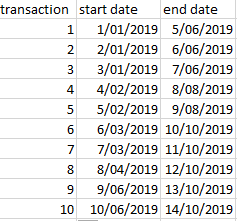
These dates present contracts which have a start and end date. I would like to compute a formula in Qlik Sense that can show all the contracts going on at a particular moment in time. So for example when looking at a specific date e.g. 7/03/2019, I would love to retrieve transaction number 4,5,6 and 7 because those are the contracts that did not end yet and are already 'ongoing'.
thanks in advance!
Accepted Solutions

 JordyWegman
- Mark as New
- Bookmark
- Subscribe
- Mute
- Subscribe to RSS Feed
- Permalink
- Report Inappropriate Content
Hi Paaerts,
Use the 'Variable Input' extension from the Qlik Dashboard bundel (Qlik Sense February). Create a variable like vTransactionsDate and put this in the variable input.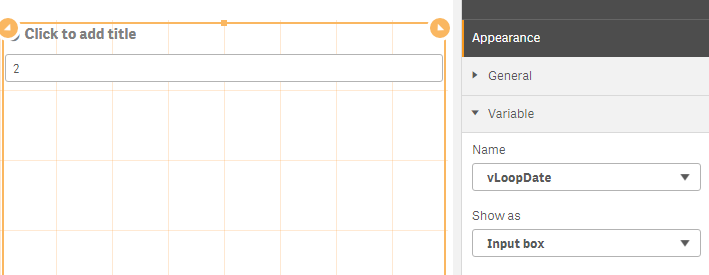
Create a table with a dimension with the formulas:
Transaction: If( [Start date] >= $(vTransactionsDate) and [end date] <= $(vTransactionsDate), transaction,null())

 Start date: If( [Start date] >= $(vTransactionsDate), [Start date],null())

End date: If( [end date] <= $(vTransactionsDate), [end date],null())
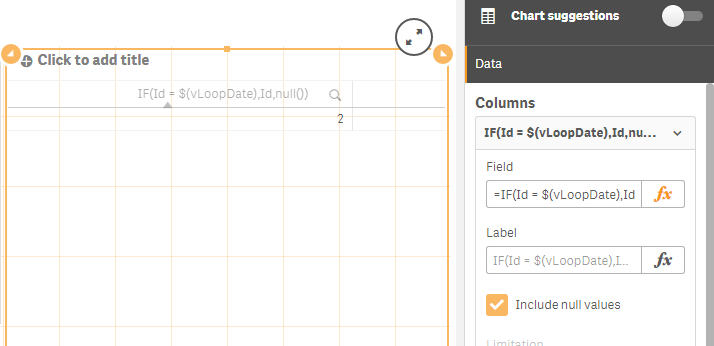
Make sure you have include null values on for all formulas!
Then you can enter a date in the variable input box and the right contracts will be shown.
Jordy
Climber
JordyWegman
- Mark as New
- Bookmark
- Subscribe
- Mute
- Subscribe to RSS Feed
- Permalink
- Report Inappropriate Content
Hi Paaerts,
Use the 'Variable Input' extension from the Qlik Dashboard bundel (Qlik Sense February). Create a variable like vTransactionsDate and put this in the variable input.
Create a table with a dimension with the formulas:
Transaction: If( [Start date] >= $(vTransactionsDate) and [end date] <= $(vTransactionsDate), transaction,null())

 Start date: If( [Start date] >= $(vTransactionsDate), [Start date],null())

End date: If( [end date] <= $(vTransactionsDate), [end date],null())
Make sure you have include null values on for all formulas!
Then you can enter a date in the variable input box and the right contracts will be shown.
Jordy
Climber
