Unlock a world of possibilities! Login now and discover the exclusive benefits awaiting you.

- Qlik Community
- :
- Forums
- :
- Analytics & AI
- :
- Products & Topics
- :
- Visualization and Usability
- :
- Re: how to create a for loop?
- Subscribe to RSS Feed
- Mark Topic as New
- Mark Topic as Read
- Float this Topic for Current User
- Bookmark
- Subscribe
- Mute
- Printer Friendly Page

 xyz1
xyz1
- Mark as New
- Bookmark
- Subscribe
- Mute
- Subscribe to RSS Feed
- Permalink
- Report Inappropriate Content
?
.
- Tags:
- scripitng
- « Previous Replies
-
- 1
- 2
- Next Replies »

 vinieme12
- Mark as New
- Bookmark
- Subscribe
- Mute
- Subscribe to RSS Feed
- Permalink
- Report Inappropriate Content
please post some sample data and expected out
If a post helps to resolve your issue, please accept it as a Solution.
xyz1
- Mark as New
- Bookmark
- Subscribe
- Mute
- Subscribe to RSS Feed
- Permalink
- Report Inappropriate Content
.
vinieme12
- Mark as New
- Bookmark
- Subscribe
- Mute
- Subscribe to RSS Feed
- Permalink
- Report Inappropriate Content
what sheet should I refer to? also what is your problem to be solved/ expected output
If a post helps to resolve your issue, please accept it as a Solution.

 Peter_Cammaert
- Mark as New
- Bookmark
- Subscribe
- Mute
- Subscribe to RSS Feed
- Permalink
- Report Inappropriate Content
Please move your discussion to a Qlik Sense forum. Thanks.
xyz1
- Mark as New
- Bookmark
- Subscribe
- Mute
- Subscribe to RSS Feed
- Permalink
- Report Inappropriate Content
.
Peter_Cammaert
- Mark as New
- Bookmark
- Subscribe
- Mute
- Subscribe to RSS Feed
- Permalink
- Report Inappropriate Content
Such things can be easily found with the help of the Search box. It's located in the black toolbar at the far right.
xyz1
- Mark as New
- Bookmark
- Subscribe
- Mute
- Subscribe to RSS Feed
- Permalink
- Report Inappropriate Content
.
vinieme12
- Mark as New
- Bookmark
- Subscribe
- Mute
- Subscribe to RSS Feed
- Permalink
- Report Inappropriate Content
First Load Employee details and then Crosstable Load ROLE and FTE values, Your data model will look like below
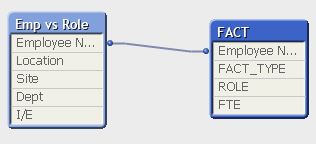
LOAD [Employee Name],
Location,
Site,
Dept,
[I/E]
FROM
(ooxml, embedded labels, table is [Emp vs Role]);
CrossTable(ROLE,FTE,2)
FACT:
LOAD [Employee Name],
'Individual' as FACT_TYPE,
[Business Relationship (BRM)],
[Architect / PM],
Analyst,
Admin,
[Support & SME],
[Project Integrator],
Specialist,
Technician,
[Manager / Team Leader] ,
Enable
FROM
(ooxml, embedded labels, table is [Emp vs Role]);
CrossTable(ROLE,FTE,2)
temp:
LOAD [Employee Name],
'TEAM' as FACT_TYPE,
[Alignment & Direction],
Performance,
[Sales, Marketing, and Logistics],
[Industrial, Quality, and Research],
[Finance, Purchasing, HR, & IT],
[Web Application Systems],
[Content Collaboration],
[Business Intelligence],
[B2B / EDI],
[Data Mart Management],
Testing,
[Innovation Center],
[Engineering and Architecture],
[Infrastructure and Operations],
OCM,
[Security and Risk],
[Client Services],
[Access Rights],
Symphony
FROM
(ooxml, embedded labels, table is [Emp vs Team]);
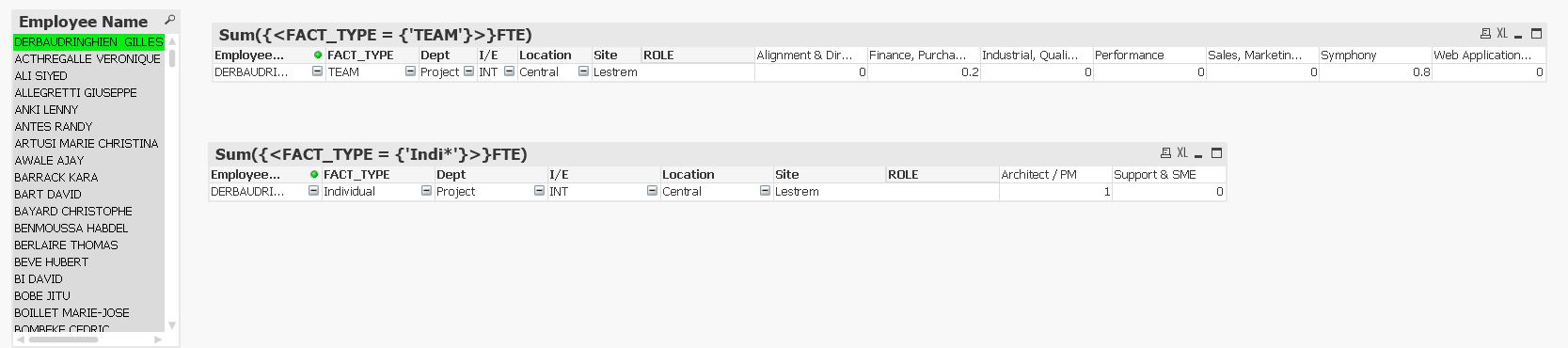
Chart Expression for TEAM TOTAL
=Sum({<FACT_TYPE = {'TEAM'}>}FTE)
Chart Expression for Employee TOTAL
=Sum({<FACT_TYPE = {'Indi*'}>}FTE)
If a post helps to resolve your issue, please accept it as a Solution.
xyz1
- Mark as New
- Bookmark
- Subscribe
- Mute
- Subscribe to RSS Feed
- Permalink
- Report Inappropriate Content
.

- « Previous Replies
-
- 1
- 2
- Next Replies »