Unlock a world of possibilities! Login now and discover the exclusive benefits awaiting you.

- Qlik Community
- :
- Forums
- :
- Analytics & AI
- :
- Products & Topics
- :
- App Development
- :
- Re: 90 Day rolling average
- Subscribe to RSS Feed
- Mark Topic as New
- Mark Topic as Read
- Float this Topic for Current User
- Bookmark
- Subscribe
- Mute
- Printer Friendly Page

 shearwatertroy
- Mark as New
- Bookmark
- Subscribe
- Mute
- Subscribe to RSS Feed
- Permalink
- Report Inappropriate Content
90 Day rolling average
Hey again guys,
I'm now working on a 90 day rolling average.
I've tried a variety of solutions listed on here, but maybe using the fields I am working with, I have messed up the syntax (I'm hoping it's something as simple as that).
I've tried using these equations:
Set Analysis for certain Point in Time
More specifically, the one I have been working with the most is:
Sum({<Year=, Quarter=, Month=, Week=, Date={‘>=$(=Date(Today()-9))<=$(=Today())’}>} Sales )
Here's what I have adapted
Sum( {<Date={‘>=$(=Date(Today()-89))<=$(=Today())’}>} [Line Amount] )
So I'm trying to total up the Line Amount field for the last 90 days. I get null values.
I have a couple other places to use this within an if statement as well.
Any help would be greatly appreciated.
Cheers,
Troy
Message was edited by: Troy Strachan July 8 2016
- « Previous Replies
-
- 1
- 2
- Next Replies »

 sunny_talwar
- Mark as New
- Bookmark
- Subscribe
- Mute
- Subscribe to RSS Feed
- Permalink
- Report Inappropriate Content
Have you made sure that your Date format matches that for the date format that comes out when you use Date(Today() - 89)?
Try this:
Sum({<Date={"$(='>=' & Date(Today()-89, 'DateFieldFormatHere') & '<=' & Date(Today(), 'DateFieldFormatHere))"}>} [Line Amount])
Read about dates in set analysis here:
shearwatertroy
- Mark as New
- Bookmark
- Subscribe
- Mute
- Subscribe to RSS Feed
- Permalink
- Report Inappropriate Content
Still getting a 0 value.
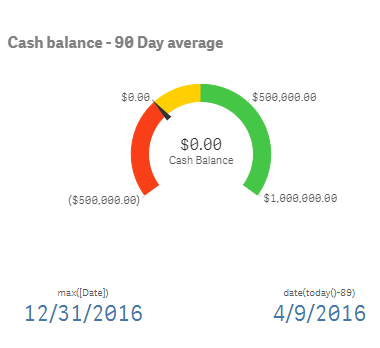
When I do Date(Today()-89) I'm getting 4/9/2016 which is the correct date format
sunny_talwar
- Mark as New
- Bookmark
- Subscribe
- Mute
- Subscribe to RSS Feed
- Permalink
- Report Inappropriate Content
Can you share a sample or a screenshot atleast?
shearwatertroy
- Mark as New
- Bookmark
- Subscribe
- Mute
- Subscribe to RSS Feed
- Permalink
- Report Inappropriate Content
What exactly do you want to see? the date format? the 0 value?
I can't share the app based on our corporate policy.
shearwatertroy
- Mark as New
- Bookmark
- Subscribe
- Mute
- Subscribe to RSS Feed
- Permalink
- Report Inappropriate Content
On the gauge this is the expression:
Sum({<Date={"$(='>=' & Date(Today()-89, '[Date]') & '<=' & Date(Today(), '[Date]))"}>} [Line Amount])
shearwatertroy
- Mark as New
- Bookmark
- Subscribe
- Mute
- Subscribe to RSS Feed
- Permalink
- Report Inappropriate Content
Hey Sunny, I have just attached a data sample in a qlik sense file. Can you take a look and let me know what I'm doing wrong?
sunny_talwar
- Mark as New
- Bookmark
- Subscribe
- Mute
- Subscribe to RSS Feed
- Permalink
- Report Inappropriate Content
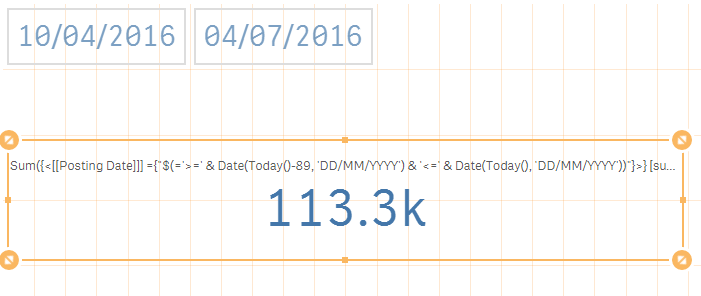
Check these changes in red
Sum({<[[Posting Date]]] ={"$(='>=' & Date(Today()-89, 'DD/MM/YYYY') & '<=' & Date(Today(), 'DD/MM/YYYY'))"}>} [sum(Actual)])
shearwatertroy
- Mark as New
- Bookmark
- Subscribe
- Mute
- Subscribe to RSS Feed
- Permalink
- Report Inappropriate Content
What is odd is that it works with the test data but doesn't work with my production data.
sunny_talwar
- Mark as New
- Bookmark
- Subscribe
- Mute
- Subscribe to RSS Feed
- Permalink
- Report Inappropriate Content
Might be because of [[Posting Date]]] you might just need one set of square brackets -> [Posting Date]

- « Previous Replies
-
- 1
- 2
- Next Replies »